


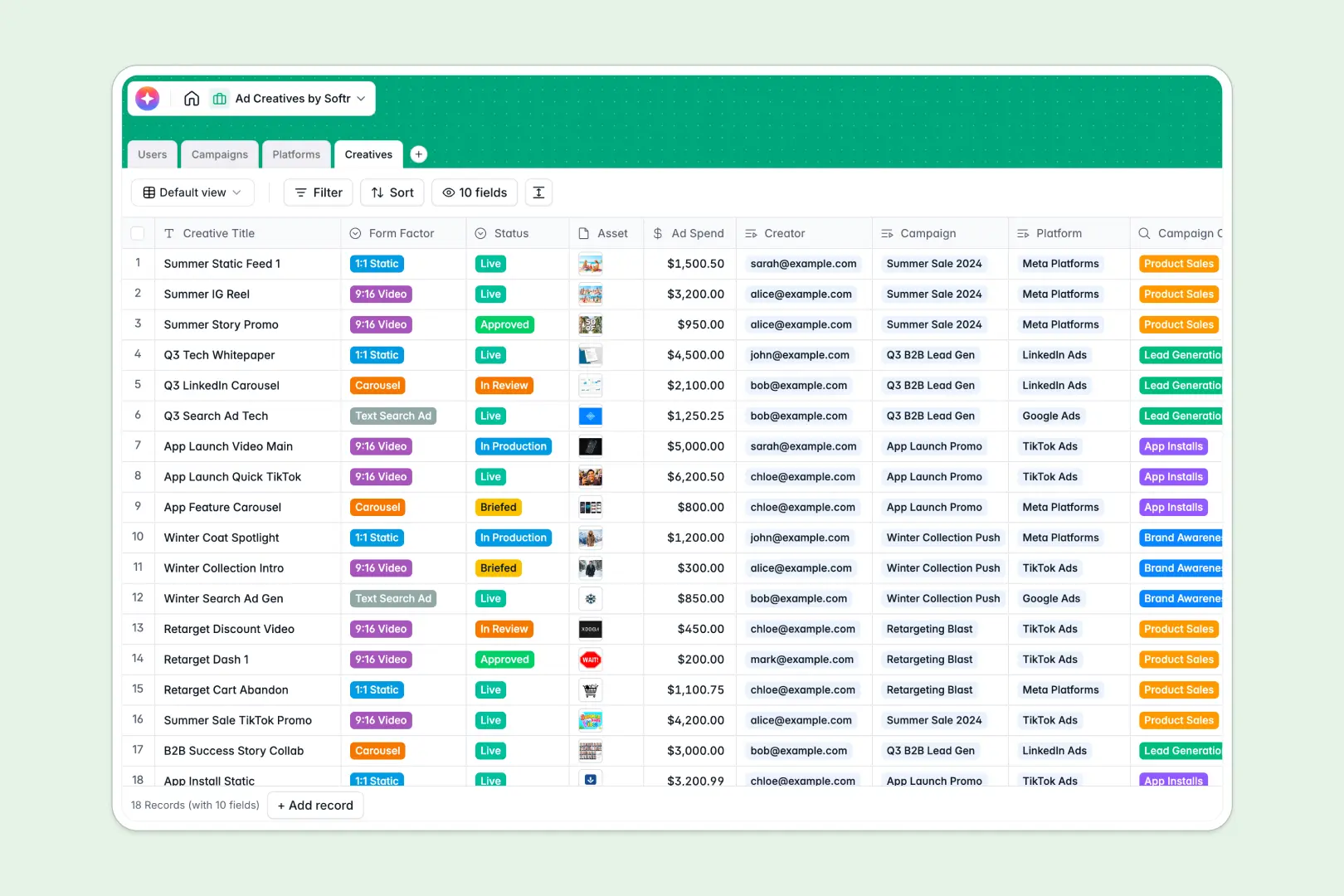
Your Ad Creatives database at a glance
The Ad Creatives Database helps you track everything from initial briefs to live campaign assets in a single workspace. It replaces scattered files with a clean structure for marketing teams to monitor production.
The template connects your Creatives directly to high-level Campaigns and target Platforms. You can assign tasks to specific Users and track spending or asset formats without losing the latest file attachments.
Built-in AI fields take the manual work out of asset production. They automatically summarize campaign briefs, research platform ad formats from the live web, and draft high-converting ad copy.
Why tracking ad creatives in Excel becomes messy
Managing ad production in spreadsheets usually leads to broken links, buried attachments, and outdated statuses. When multiple creators and managers are involved, version control on complex campaigns quickly falls apart.
What a structured database changes
A structured database enforces strict column types so status updates, budgets, and links stay perfectly aligned. You can connect individual creatives directly to their parent campaigns without writing fragile lookup formulas.
You can also upload heavy attachments directly to the record, keeping actual design files mapped correctly. This is exactly what Softr Databases are built to handle as your marketing team scales.
What you can do with this template
Track the exact production status of 1:1 statics, 9:16 videos, and text ads across every platform you target. Managers can effortlessly monitor ad spend and see who is assigned to each creative at a glance.
You can also leverage AI to automatically draft variations of ad copy based on the form factor. The system will even browse a platform's website to summarize key ad formats for your external creators.
-
Users
Manage marketing team members, their specific roles and task assignments
-
Campaigns
Manage marketing initiatives and generate AI executive summaries for goals
-
Platforms
Store network details with AI-powered insights on available ad formats
-
Creatives
Track asset production and draft high-converting copy using an AI writer
Who is this Ad Creatives database for
This template provides crucial structure for teams managing high-volume advertising assets.
- Campaign Managers: Monitor ad spend across platforms and track creative production statuses in real time.
- Content Creators: See exactly which form factors are required and upload assets directly to their specific briefs.
- Marketing Directors: Get automated, AI-generated executive summaries of high-level campaign objectives instantly.
How to take it further
Customizing this structure is incredibly easy since it runs entirely natively. You can quickly add new platforms, adjust form factor drop-downs, or add new status stages specifically for your approval process.
Bring in your historical campaign data effortlessly to get started instantly. You can perform a mass CSV import to populate your active creatives and assign user roles in bulk.
Once your asset tracking is organized, you might want to share it safely with external agencies or freelance teams. A clean, relational database makes creating these secure internal portals a breeze.
You can leverage robust users and permissions to ensure external creators only see and upload assets for their explicitly assigned campaigns. This transforms a basic tracker into a fully functioning production environment.
-
1
-
2
-
3
-
4
Frequently asked questions
-
What is an ad creatives database?
-
Why use a no-code database to build an ad tracking system?
-
How can AI help managing ad creatives content?
-
Can I build an app with this ad creatives database?
-
Is this Ad Creatives template free?
-
Why is managing ad creatives in Excel so difficult?
Start building today. It's free!
Build and launch your first app in under 30 minutes.