


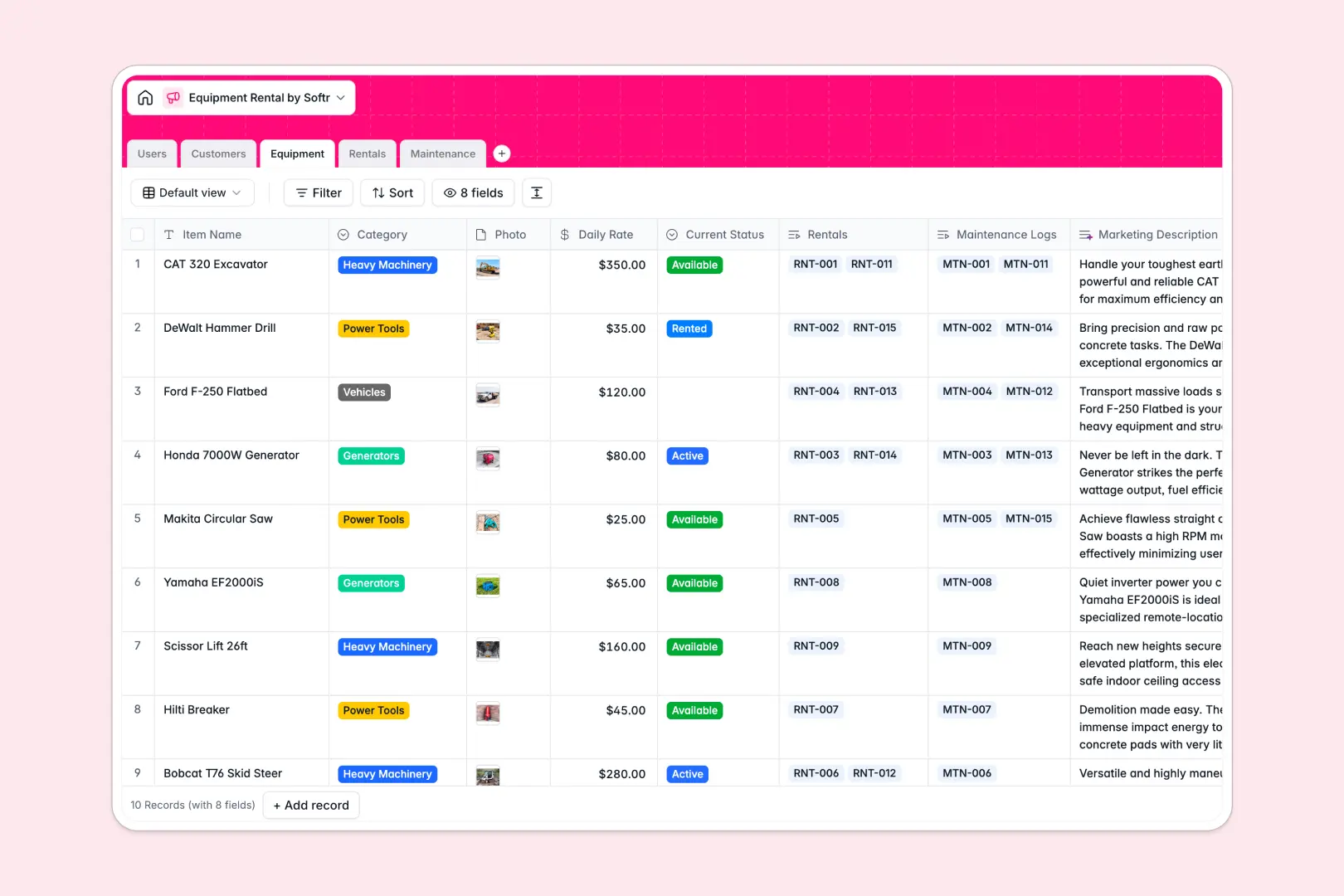
Your Equipment Rental database at a glance
This template gives you a centralized system to track machinery availability, manage bookings, and coordinate repairs without missing a return date.
Five dedicated tables organize Equipment, Customers, Rentals, Maintenance, and internal Users. Native relations automatically link each rental contract directly to the assigned equipment and customer profile, keeping your inventory status accurate in real time.
Built-in AI automatically drafts catalog marketing descriptions for tools, enriches company profiles from customer websites, and scores repair urgency.
When rental schedules, machinery specs, and repair logs outgrow loose sheets
Tracking high-value tools across separate tabs quickly leads to double-bookings, missed return deadlines, and unrecorded maintenance.
What a structured database changes
A structured database enforces strict data integrity across your entire fleet. Item daily rates, rental start dates, and equipment categories stay formatted correctly rather than degrading into plain text.
Instead of copy-pasting customer details into rental rows, real relational links connect each contract directly to the client and inventory record. This is exactly what Softr Databases are designed for.
When a piece of equipment goes out on a job, its rental history and active contracts update instantly across the entire system.
What you can do with this template
You can immediately monitor which items are available, rented, or in repair, preventing lost revenue from idle or missing gear.
Built-in Database AI agents analyze service issue descriptions to assign urgency levels automatically and research customer websites to enrich business profiles.
Rollup fields calculate total lifetime rentals per customer so your team always knows who your most valuable accounts are.
-
Users
Manage internal staff members, system permissions, and task assignments
-
Customers
Track client contacts, rental history, and AI-generated company summaries
-
Equipment
Catalog rental inventory with rates, availability, and AI descriptions
-
Rentals
Manage equipment rental contracts, timelines, costs, and customer links
-
Maintenance
Track equipment repairs, technician logs, and AI-assessed urgency levels
Who is this Equipment Rental database for
- Equipment Rental Businesses: Track inventory availability, manage contracts, and streamline fleet operations in one place.
- Construction & Contracting Firms: Monitor tool assignments across job sites, manage internal checkouts, and log repairs.
- Event Production Companies: Organize audio-visual equipment packages, track client hires, and prevent scheduling conflicts.
- Fleet & Maintenance Managers: Schedule routine service, assign technicians to tasks, and log historical maintenance costs.
How to take it further
Customize your inventory and workflows. You can easily adjust categories to include specialized gear, add custom deposit fields, or modify rental statuses to match your operational stages. Native Softr Databases allow you to add new columns, formulas, and views in seconds.
Import your existing inventory. Bring in your current equipment lists, customer contacts, and active contracts using a quick CSV upload. You can also connect external systems via API to sync real-time reservations automatically.
Build a full app around your data. When your team is ready, you can build an app on top of this database. Create a self-service customer booking portal or a dedicated technician dashboard with custom users and permissions to control who can view and edit records. Because Softr unites databases, interfaces, and workflows in one platform, your rental database becomes an interactive business application without writing code.
-
1
-
2
-
3
-
4
Frequently asked questions
-
What is an equipment rental database?
-
Why use a no-code database to build an equipment rental tool?
-
How can AI help managing data for equipment rental?
-
Can I build an app with this equipment rental database?
-
Is this Equipment Rental database free?
-
How do I import my existing equipment and customer lists into this template?
Start building today. It's free!
Build and launch your first app in under 30 minutes.