


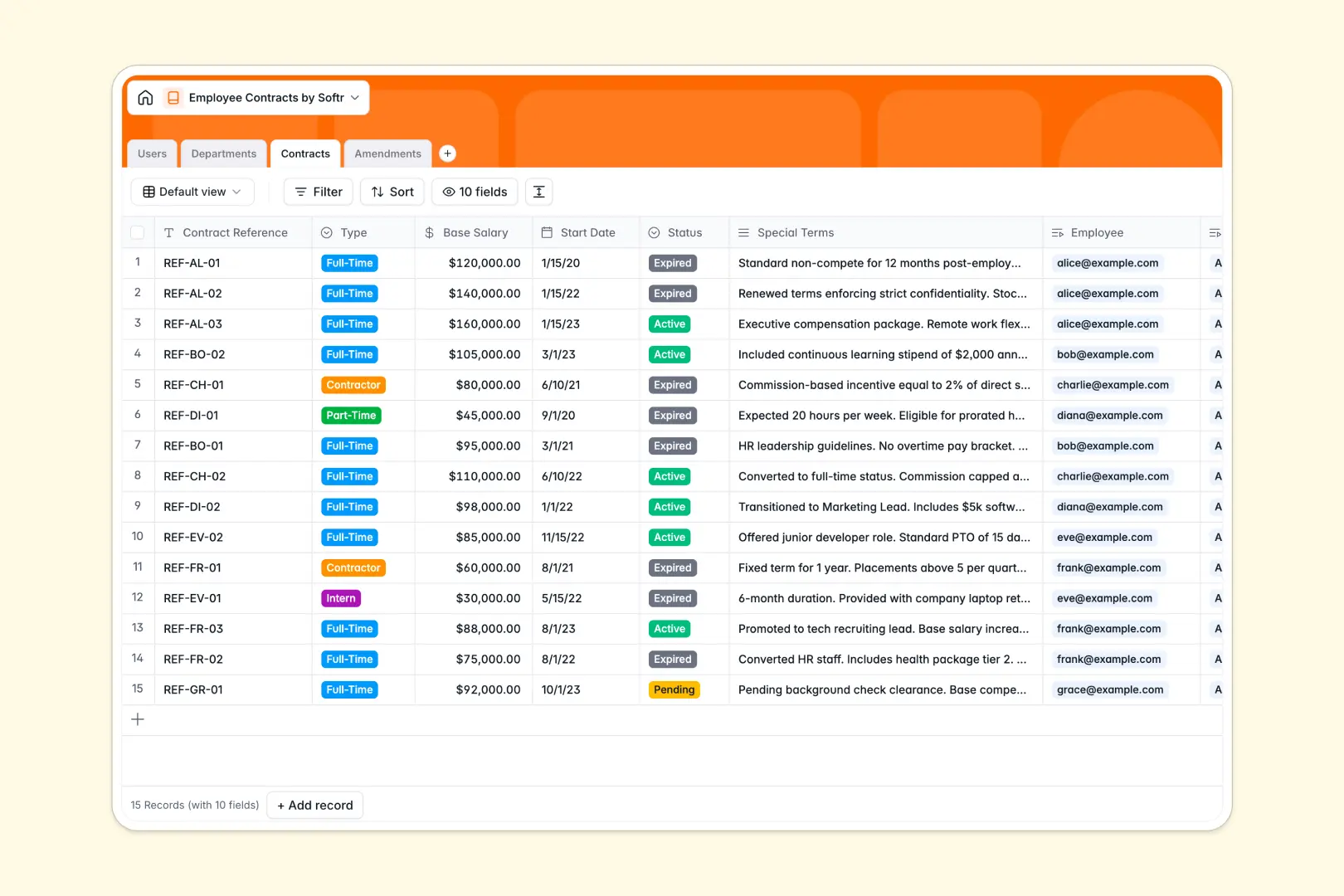
Your Employee Contracts database at a glance
This template gives HR teams and operations leads a clear system to track employment agreements, compensation details, and contract terms across the entire organisation.
Four connected tables link staff records in Users and Departments directly to agreements in Contracts and historical updates in Amendments, keeping full employment histories organized without duplicate data.
Built-in AI fields automatically summarize complex contract clauses and categorize amendment requests as soon as details are logged.
Why tracking agreements across static sheets fails
Employment terms, salary revisions, and contract extensions quickly turn into messy documentation when tracked across loose spreadsheets and disconnected email threads.
What a structured database changes
In a structured setup, every column strictly enforces its data type: salaries stay currency, start dates remain valid calendar values, and signed documents remain attached directly to the record.
Instead of copy-pasting employee names and risking broken lookup formulas, contracts link directly to individual employee profiles and their respective departments.
This clean architecture is exactly what Softr Databases are designed for, giving you reliable records that scale with your team.
What you can do with this template
Monitor contract statuses from pending to active or expired, and maintain a verifiable paper trail of every salary increase or role change with linked amendment logs.
Integrated Database AI agents analyze special contract terms to produce instant bulleted summaries and classify contract changes automatically.
Everything is pre-structured and ready to use immediately, allowing your team to organize agreements without starting from scratch.
-
Users
Manage employee profiles, role assignments, job titles, and departments
-
Departments
Structure company units with employee counts and AI-generated descriptions
-
Contracts
Track employment agreements, salaries, and terms with AI summaries
-
Amendments
Log contract modifications and categorize updates automatically with AI
Who is this Employee Contracts database for
This template is designed for teams managing employment agreements, compensation details, and team allocations:
- HR Managers: Centralize agreements, track renewal timelines, and log role adjustments with signed attachments.
- People Operations: Maintain accurate department headcounts and monitor active contract types across teams.
- Operations Leaders: Keep an accessible, structured audit log of company-wide salary amendments and terms.
- Department Heads: View direct report contract statuses and role details without accessing sensitive unrelated data.
How to take it further
Adapt this database to match your exact employment policies. You can add custom select options for contract types, insert probation end dates, or create custom tags for regional compliance.
Bring in your historical records quickly by uploading existing agreements and staff rosters via CSV, or connect an API to sync data directly from your payroll provider.
When your team is ready, you can generate an app with AI on top of this database in a single prompt. Build a secure internal HR portal with role-based users and permissions where employees view their own agreements while HR managers retain full editing access. Combining this structured database with Softr interfaces and automated workflows turns simple records into a comprehensive HR system.
-
1
-
2
-
3
-
4
Frequently asked questions
-
What is an employee contracts database?
-
Why use a no-code database to build an employee contract management system?
-
How can AI help managing data for employee contracts?
-
Can I build an app with an employee contracts database?
-
Is this Employee Contracts database free?
-
Can I import existing contract data into this template?
Start building today. It's free!
Build and launch your first app in under 30 minutes.