


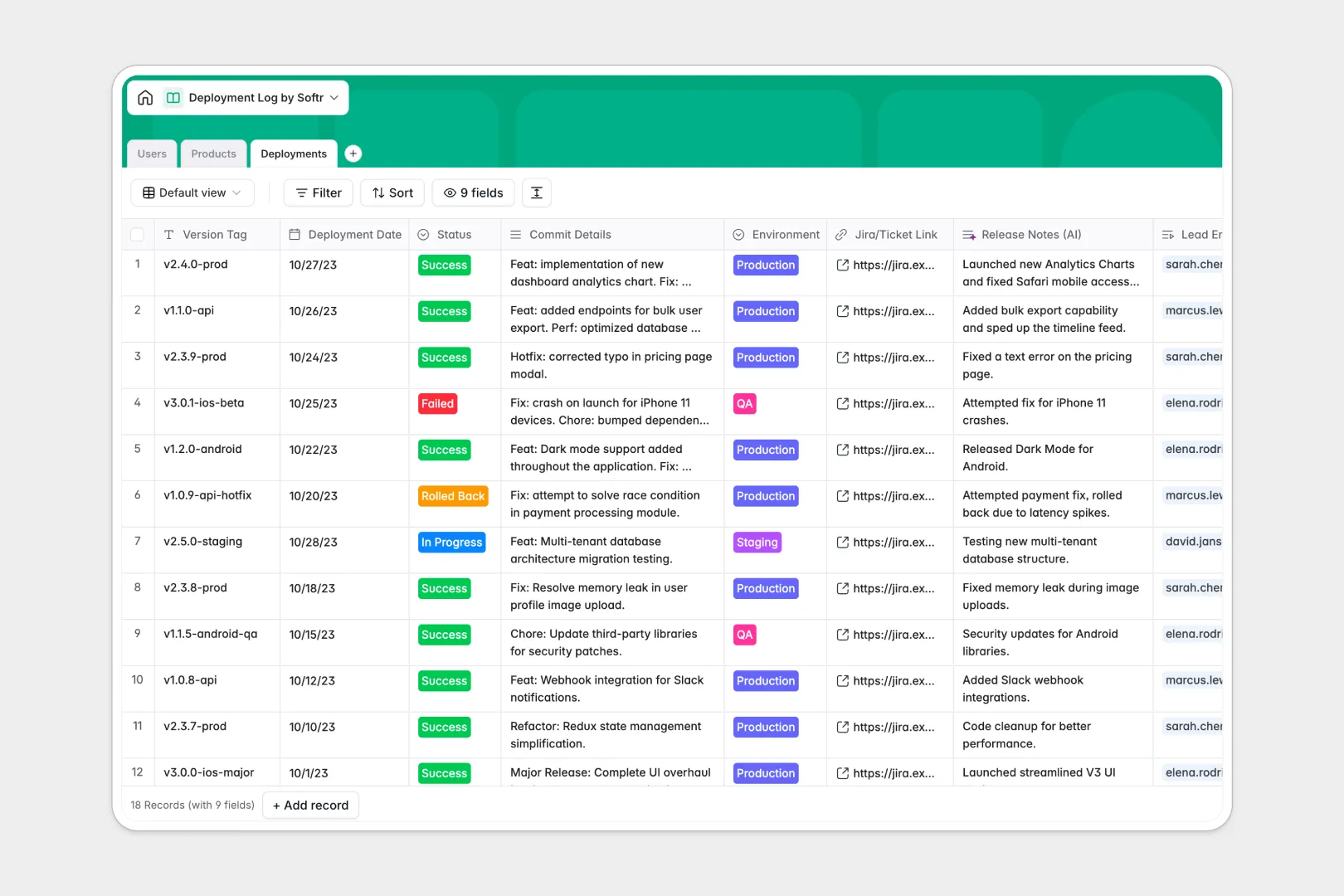
Your Deployment Log database at a glance
This deployment log database tracks every code push to production, keeping your engineering team perfectly aligned on active versions and targeted environments.
It seamlessly links your core microservices or products directly to deployment logs and user profiles. This simple structure means you can instantly see which engineer triggered a release, the exact Jira ticket attached, and whether the deployment is scheduled, rolling back, or actively succeeding.
Built-in AI fields automatically summarize complex technical commits into user-friendly release notes and actively research your repositories to map out your product's underlying tech stack.
Why tracking deployments in spreadsheets breaks down
Managing software releases across environments in a spreadsheet quickly becomes chaotic as rows multiply, formulas fail, and repository links get lost entirely.
What a structured database changes
A structured system ensures every new deployment has an unbreakable, clearly defined relationship to specific engineers and products. You never have to manually update a product's last deployment date—it calculates automatically as new releases are safely logged.
This is exactly what Softr Databases are designed for. Instead of fragile VLOOKUPs, you get native connections that tie your QA, staging, and production environments together reliably without any data mismatch.
What you can do with this template
You can actively track every version tag, map failed rollbacks directly to the responsible developer, and easily monitor your overall deployment frequency per application.
Because it includes true AI capabilities natively, the template acts as an operational assistant. It cleanly documents product stacks and writes non-technical release notes on its own, eliminating manual admin work for your developers.
-
Users
Manage team members managing deployments with roles and contact info
-
Products
Catalog digital products with AI-generated tech stack overviews
-
Deployments
Track release cycles with status logs and AI-summarized release notes
Who is this Deployment Log database for
This structured template provides immediate visibility and clear historical tracking for fast-moving technical teams.
- DevOps Engineers: Track ongoing and scheduled deployments across staging and production effortlessly.
- Product Managers: Instantly read AI-generated release summaries without having to decipher dense raw commit histories.
- Engineering Leads: Monitor team velocity and track the operational success rates per developer or specific microservice.
How to take it further
Customize your database
You can easily adjust the environment tracking tags, edit user roles, or add unique fields to capture specific CI/CD pipeline timings. Because this is a native no-code database, shaping the exact columns to match your team's workflow takes just minutes.
Import your existing data
Pull in your complete historical deployment logs via a simple CSV upload, or use our flexible API to automatically sync new automated pushes straight from GitHub into these tables.
Build a full app around it
When you are ready to share deployment updates with the wider company natively, you can design full functional interfaces entirely on top of this live data.
By configuring explicit users and permissions, you can allow senior developers to update and rollback deployment statuses while giving non-technical staff an accessible, read-only portal to check the latest release notes.
-
1
-
2
-
3
-
4
Frequently asked questions
-
What is a deployment log database?
-
Why use a no-code database to build a deployment log tool?
-
How can AI help managing data for deployment logs?
-
Can I build an app with this deployment log database?
-
Is this deployment log free?
Start building today. It's free!
Build and launch your first app in under 30 minutes.