


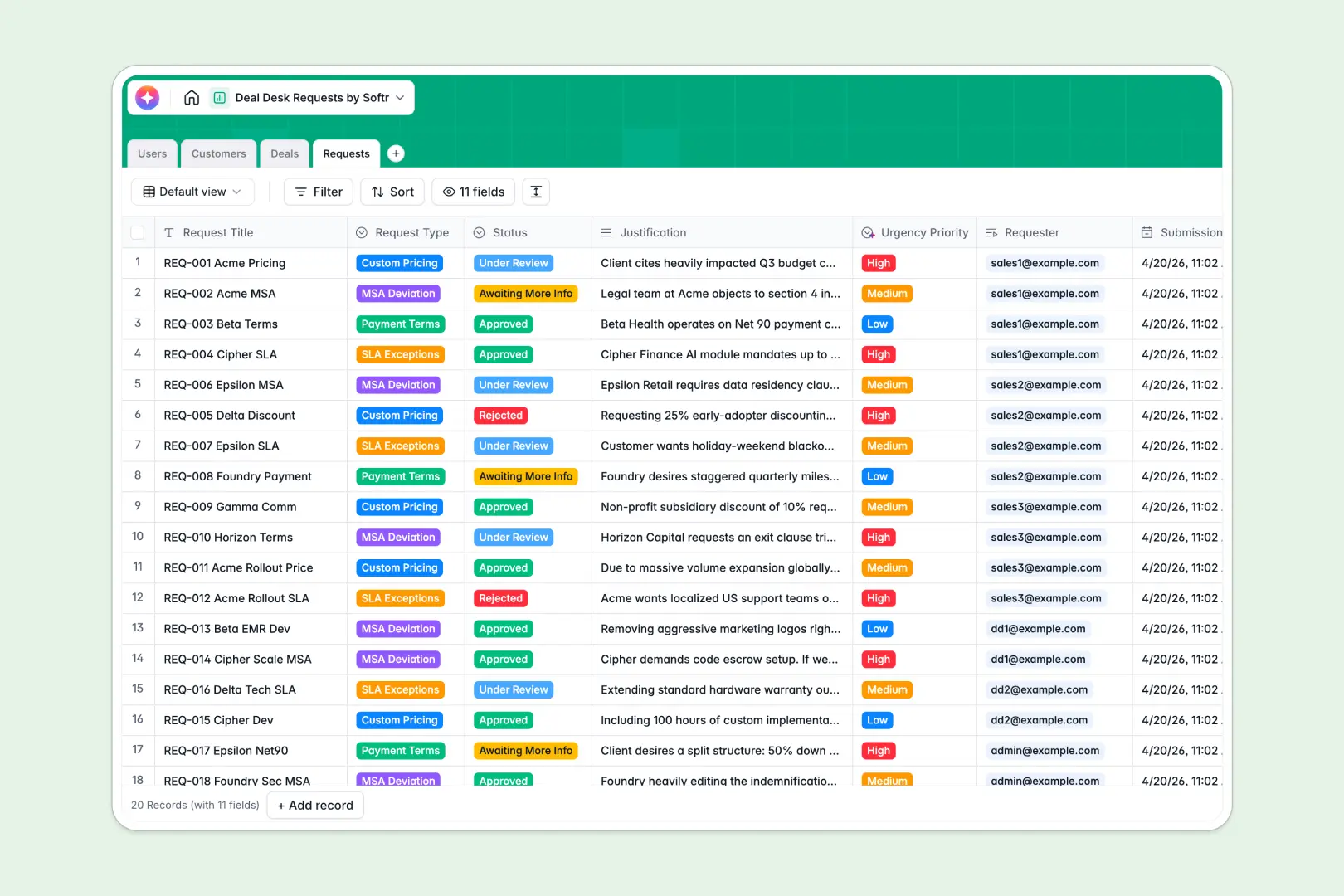
Your Deal Desk Requests database at a glance
Manage non-standard pricing, payment terms, and MSA deviations effortlessly so your sales team can maintain pipeline momentum. This template gives your Deal Desk team immediate clarity into every active request and its associated business impact.
This system natively connects incoming requests to specific customer profiles, deals, and internal users. When a sales rep submits an SLA exception or custom pricing request, it automatically links to their user record and the broader deal pipeline.
Built-in AI features automate the heavy lifting of request triage. AI agents instantly search the web to build customer executive profiles, evaluate justifications to assign urgency priorities, and summarize lengthy request contexts into crisp bullet points.
Why managing deal desk requests in spreadsheets breaks down
When reps track non-standard terms, custom pricing approvals, and SLA exceptions across rigid spreadsheets, critical context gets lost. Rows pile up, fragile VLOOKUPs break, and approvals stall because information isn't structured efficiently.
What a structured database changes
In a relational system, your data follows strict rules: deal amounts stay formatted as currency, approval statuses update clearly, and records cannot be accidentally deleted by another team member.
You can directly cross-reference an MSA deviation request with a customer's active pipeline without copying and pasting across tabs. This is exactly what Softr Databases are designed for—keeping complex, fast-moving sales workflows securely organized as your volume scales.
What you can do with this template
Standardize sales intake: Reps can log exactly what they need while ensuring all required justifications and associated deal links are present from day one.
Speed up executive decisions: The template groups every request by status and deal amount, giving your Deal Desk and Finance teams immediate visibility into high-value roadblocks.
Automate the busywork: Thanks to Database AI agents, every new request gets an automated, three-bullet executive summary and an AI-assigned urgency score so approvers can act instantly without reading paragraphs of context.
-
Users
Manage sales staff, deal desk members, and roles for system access
-
Customers
Store client profiles with web-sourced AI profiles and industry data
-
Deals
Track sales opportunities, pipeline stages, and expected deal revenue
-
Requests
Process pricing requests using AI to assess urgency and create summaries
Who is this Deal Desk Requests database for
This database is built for revenue organizations that need to centralize complex negotiations and scale non-standard sales workflows.
- Sales Operations: Standardize the intake process for non-standard pricing and effortlessly track pipeline impact.
- Deal Desk Teams: Gain immediate triage capabilities with automated AI summaries and clearly linked customer context.
- Account Executives: Submit requests quickly and monitor approval progress without continually chasing people down in Slack.
- Revenue Leaders: Monitor exactly where deals are getting stuck and analyze broader trends in MSA deviations.
How to take it further
1. Customize the database
Easily update the "Request Type" dropdowns to match your specific SLA or MSA clauses. Because this is a native database, adding a new column to track product lines or sales territories takes just one click.
2. Import your existing data
Upload a CSV of your ongoing deals or active customers to populate the structure instantly. You can easily connect via API to sync your open pipeline directly from your CRM.
3. Build a full app around it
When your organization scales, you can easily build an app directly on top of this data. A well-structured database is the perfect foundation for a secure, internal sales portal.
You can provide account executives with a custom interface where they only see their own active deals and submitted requests. Leveraging dynamic users and permissions, you can ensure Deal Desk admins see the entire queue while enterprise data remains totally secure.
-
1
-
2
-
3
-
4
Frequently asked questions
-
What is a deal desk requests database?
-
Why use a no-code database to build a deal desk system?
-
How can AI help managing data for deal desk requests?
-
Can I build an app with this deal desk requests database?
-
Is this Deal Desk Requests database free?
-
How is a deal desk requests database different from tracking approvals in spreadsheets?
Start building today. It's free!
Build and launch your first app in under 30 minutes.