


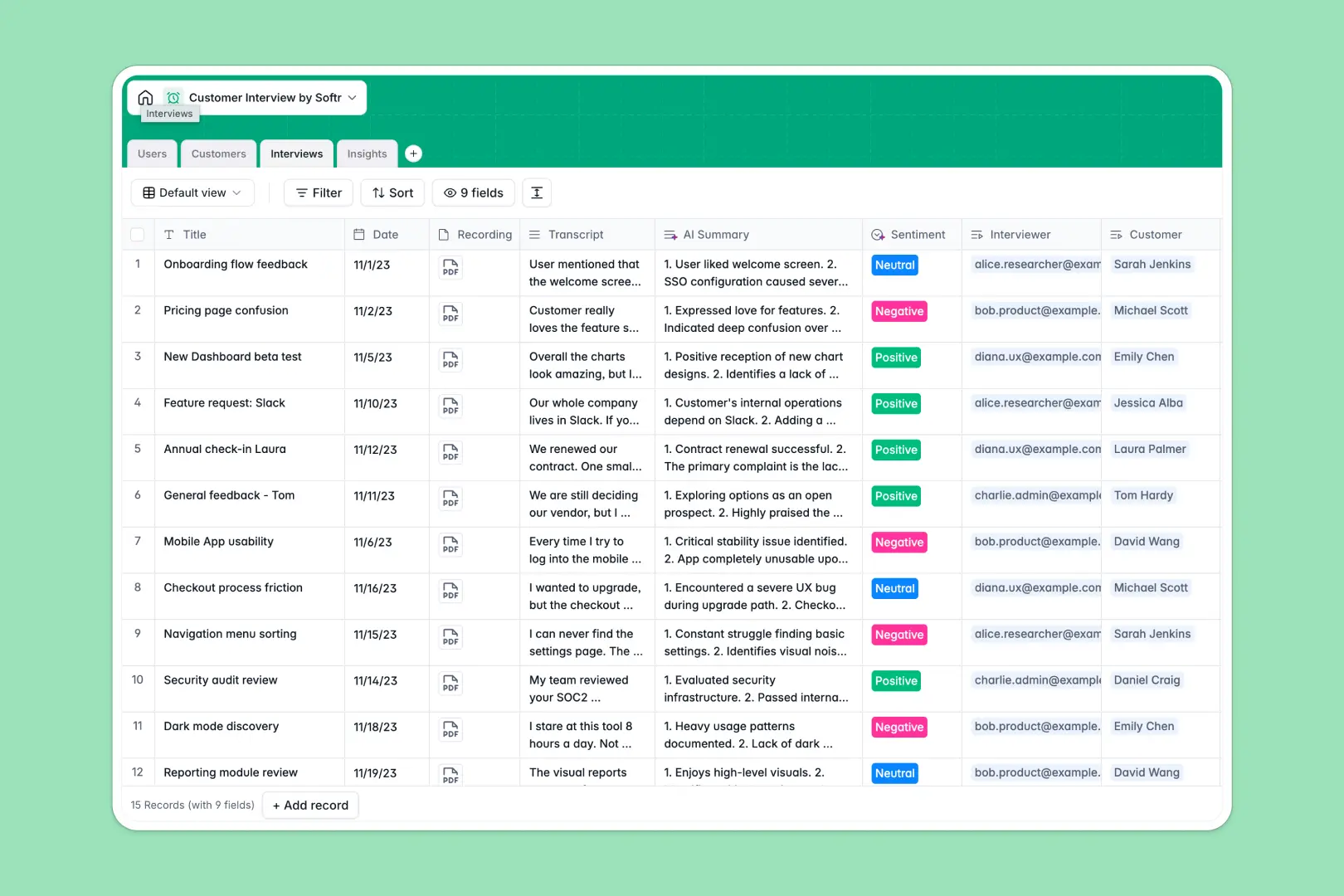
Your Customer Interview Database at a glance
This template gives your product and research teams a centralized place to track discovery calls and aggregate user feedback in one place. It eliminates scattered notes, ensuring every research insight is safely stored and instantly accessible.
The database connects four core tables: Users, Customers, Interviews, and Insights. By linking raw interview transcripts directly to specific feature requests or pain points, you always know exactly where a piece of feedback came from.
Built-in AI automatically fetches company descriptions from the live web and generates rapid 3-bullet summaries of your interview transcripts. It even analyzes the overall sentiment of the call, saving your team hours of manual review.
Why managing customer interviews in spreadsheets breaks down
When you rely on spreadsheets for user research, raw transcripts get trapped in massive, unreadable cells while crucial insights get lost across fragmented tabs.
What a structured database changes
A structured system keeps your research clean because data is categorized by strict format types. Dates, large audio attachments, and long-text transcripts each have dedicated, reliable columns.
Instead of fragile formulas trying to connect an interviewee to a specific feature request, native table connections link a single customer directly to multiple interviews and insights. This is exactly what Softr Databases are designed for.
What you can do with this template
You can instantly log discovery calls, upload video recordings, and track abstract themes like usability issues or feature requests in a single, scannable view.
Using native AI text capabilities, you can automate the most tedious parts of research. The template can auto-summarize transcripts and categorize call sentiment instantly without ever leaving the table.
-
Users
Manage internal team members with roles, contact info, and access levels
-
Customers
Register interviewees with AI-powered web-searched company descriptions
-
Interviews
Log calls with records and AI-generated summaries and sentiment analysis
-
Insights
Categorize themes and feedback extracted from user research sessions
Who is this Customer Interview Database for
This template is built for modern teams conducting continuous discovery and relying on user feedback to drive their decisions.
- Product Managers: Link qualitative feedback directly to roadmaps and feature requests.
- UX Researchers: Centralize unstructured transcripts, audio recordings, and aggregated themes in one streamlined workspace.
- Founders: Analyze early adopter sentiment quickly to validate hypotheses and pivot efficiently.
- Customer Success: Log customer pain points systematically so the product team can address them without delays.
How to take it further
You can easily customize this native database to match your exact user research methodology. Modify the insight status fields, adjust team roles from Viewer to Researcher, or add a column to track specific product lines.
Bring your existing research to life instantly by importing historical interview data via bulk CSV upload. You can also connect via API to auto-sync new transcripts directly from your favorite auto-transcription tools.
When your research scales, you can build a secure, interactive frontend portal for your entire company. An app connects directly to your database, turning raw tables into a friendly, navigable directory of insights.
You can enforce strict users and permissions to ensure external stakeholders only view approved insights, while researchers maintain full editing control over raw transcripts. A well-structured backend makes this kind of scalable app development completely effortless.
-
1
-
2
-
3
-
4
Frequently asked questions
-
What is a customer interview database?
-
Why use a no-code database to build a user research tool?
-
How can AI help managing data for customer interviews?
-
Can I build an app with a customer interview database?
-
Is this Customer Interview Database free?
-
How is a customer interview database different from spreadsheets?
Start building today. It's free!
Build and launch your first app in under 30 minutes.