


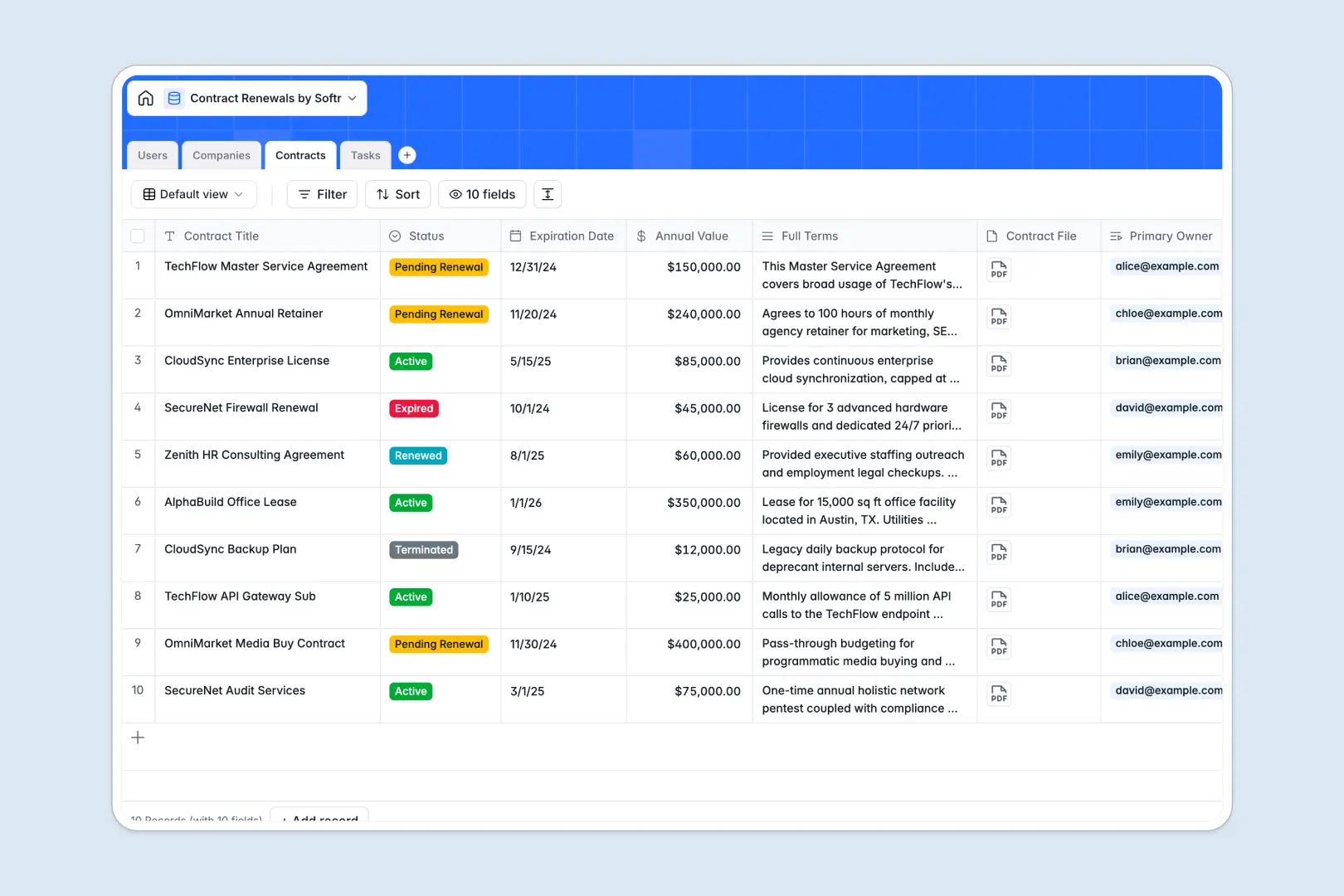
Your Contract Renewals database at a glance
This template centralizes your agreements, deadlines, and renewal milestones in one structured system. It eliminates missed dates and ensures your team stays ahead of expirations.
Contracts link directly to specific companies, internal owners, and renewal tasks. This relational setup keeps critical terms, annual values, and required actions connected across every vendor or client record.
Built-in AI automatically summarizes dense contract terms, drafts company profiles from URLs, and suggests next steps for open renewal tasks.
Why spreadsheets lose track of critical expirations
Tracking high-value agreements in static rows often leads to missed notice windows, overwritten dates, and lost files.
What a structured database changes
Unlike an unstructured table, a dedicated database enforces typed dates, currency fields, and direct attachments for original agreements.
Linking contracts directly to company profiles and renewal tasks means updates reflect everywhere without manual recalculations or broken formulas.
This reliability is exactly what Softr Databases are built for, keeping your renewal pipelines clear and operational.
What you can do with this template
Monitor contract statuses from active to pending renewal, track annual values, and attach executed agreements to the right account.
With native Database AI agents, you can instantly summarize complex terms into key bullet points and research company profiles in real time.
Assign renewal action items to specific team members with clear due dates so no renewal process stalls.
-
Users
Manage internal team members handling contract assignments and workflow tasks
-
Companies
Track client and vendor organizations with web-researched AI descriptions
-
Contracts
Store agreements, track renewal timelines, and generate AI terms summaries
-
Tasks
Manage renewal deadlines and generate AI suggestions for immediate actions
Who is this Contract Renewals database for
This database is designed for teams that need strict visibility over recurring agreements, notice periods, and commercial terms.
- Procurement Teams: Track vendor agreements, review terms proactively, and negotiate renewals well before deadlines.
- Account Managers: Monitor client contracts, manage upcoming renewals, and maintain healthy account relationships.
- Legal & Operations: Centralize executed documents, assign renewal tasks, and keep company profiles up to date.
- Finance Leads: Maintain visibility on upcoming renewals and annual contract values across the organization.
How to take it further
Customize this database by adding new contract categories, modifying status tags, or creating fields for auto-renewal clauses and notice periods. As a native Softr Database, you can adjust fields and relationships in seconds.
Import your existing agreements and vendor details in bulk using CSV uploads or connect external sources via API to sync renewal records automatically.
When you are ready, use Softr to build an app on top of this data. The AI Co-Builder can generate a dedicated vendor portal or internal renewal dashboard from a single prompt.
Configure granular users and permissions so account managers only see their assigned contracts while executives access organization-wide financial overviews.
-
1
-
2
-
3
-
4
Frequently asked questions
-
What is a contract renewals database?
-
Why use a no-code database to build a contract renewals system?
-
How can AI help managing data for contract renewals?
-
Can I build an app with this contract renewals database?
-
Is this Contract Renewals database free?
-
Can I attach original PDF agreements directly to records?
Start building today. It's free!
Build and launch your first app in under 30 minutes.