


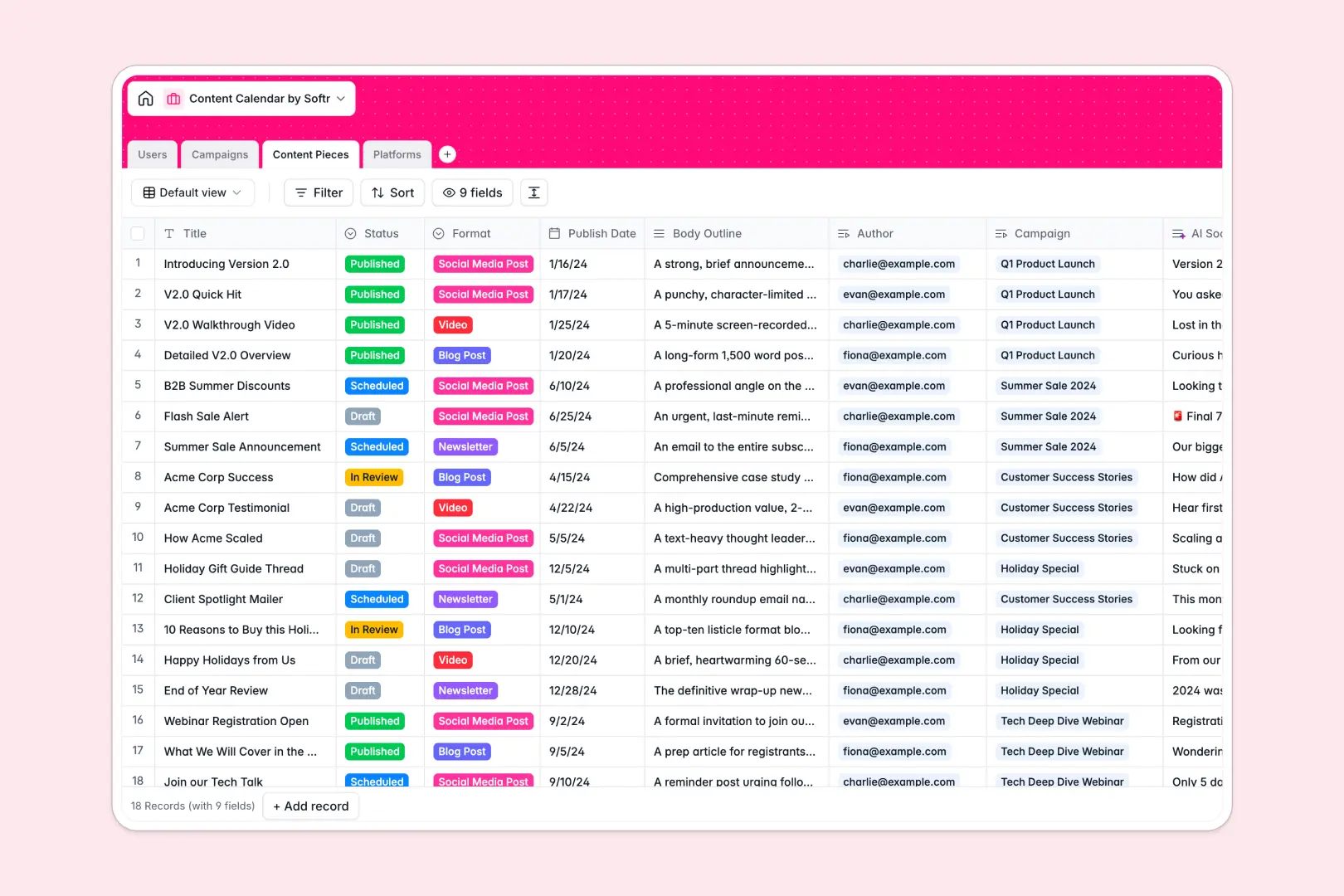
Your Content Calendar database at a glance
This database gives editorial teams a dedicated space to manage marketing campaigns, draft assignments, and multi-channel publication schedules. It centralizes your entire production pipeline so nothing slips through the cracks.
Everything is connected across dedicated tables for Campaigns, Content Pieces, Platforms, and Users. Linking an individual blog post or social update to its parent campaign and assigned author ensures deadlines, assets, and channel requirements remain perfectly aligned.
Built-in AI fields draft creative concept ideas for new campaigns and generate channel-tailored social snippets directly inside your records.
Why isolated sheets stall editorial production
Blank rows in a generic grid cannot maintain the multi-layered relationships that modern content operations require. When campaigns, writers, and distribution channels all live in flat rows, status updates get out of sync and tracking assets across platforms becomes manual guesswork.
What a structured database changes
Typed columns keep publish dates, draft statuses, and channel URLs consistent across every record. Native relations connect each content piece directly to its campaign manager and assigned writer, preventing duplicate entries and broken lookup formulas.
Rollup fields automatically calculate total content deliverables per campaign and count scheduled items per platform without complex calculations. This reliable foundation is exactly what Softr Databases are designed to provide.
What you can do with this template
Group content assets by distribution channel, track drafts through review stages, and manage author workloads from a single source of truth.
Embedded Database AI agents analyze outlines to generate social snippets and research target platforms, cutting administrative work before publication.
-
Users
Manage content team members, editorial roles, and linked assignments
-
Campaigns
Track marketing campaigns and generate creative content concepts using AI
-
Content Pieces
Schedule multi-format posts with AI-generated social summaries and copy
-
Platforms
Organize publishing channels with AI-generated web overviews and metrics
Who is this Content Calendar database for
- Content Marketing Managers: Keep multi-channel campaigns organized and balance editorial workloads across internal writers and freelancers.
- Social Media Teams: Track scheduled posts across distribution channels and generate promotional snippets automatically.
- Editorial Leads: Monitor draft review stages, enforce publication deadlines, and maintain consistent publishing schedules.
- Marketing Agencies: Manage multiple client content pipelines and deliverables with clear role assignments.
How to take it further
Customize field options in minutes to match your publishing rhythm, such as adding content formats like podcasts or updating workflow statuses with custom review stages.
Import your existing editorial schedules and contributor lists via CSV, or connect external tools via API to keep your asset pipeline synchronized automatically.
When your team is ready, build an app on top of this database to give writers, editors, and external contributors dedicated submission portals. Set granular permissions so freelancers view only their assigned drafts while editors manage campaign schedules, all powered by the same database.
-
1
-
2
-
3
-
4
Frequently asked questions
-
What is a content calendar database?
-
Why use a no-code database to build a content calendar tool?
-
How can AI help managing data for a content calendar?
-
Can I build an app with this content calendar database?
-
Is this Content Calendar database free?
-
How do I import existing editorial schedules into this template?
Start building today. It's free!
Build and launch your first app in under 30 minutes.