


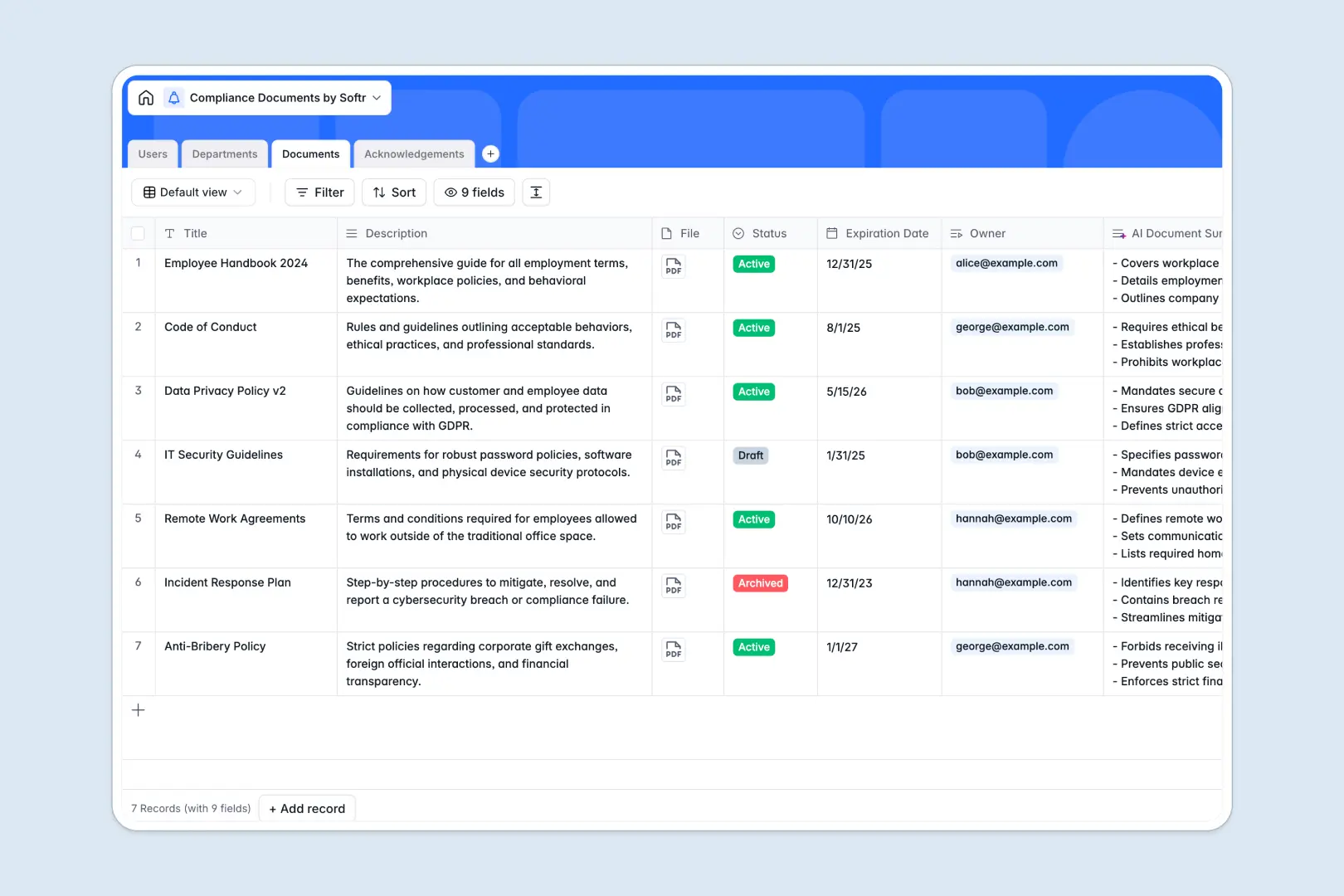
Your Compliance Documents database at a glance
Centralize every internal policy, regulatory guideline, and employee acknowledgement in one structured system. This template keeps your compliance records audit-ready without manual chasing.
Four connected tables link Documents directly to Users, Departments, and individual Acknowledgements. When an employee confirms a policy, their signature date and status link instantly to the relevant document.
An integrated AI summary field automatically digests lengthy policy descriptions into concise bullet points, making reviews fast for compliance officers.
What happens when policies live in static tables
Tracking company compliance across static sheets leads to missed expiration dates, fragmented audit trails, and unconfirmed acknowledgements. Without connected tables, linking a signature to a specific document version requires endless manual updates.
What a structured database changes
Typed columns ensure expiration dates remain accurate dates, policy files stay attached directly to records, and roles remain consistent across teams.
Native relations connect each sign-off directly to the exact employee and document record. This is exactly what Softr Databases are designed for, giving you a reliable system of record without broken lookups.
What you can do with this template
Assign policies to target departments in bulk and see real-time rollup counts of total team members who need to sign.
Use native Database AI agents to generate instant three-bullet summaries of policy descriptions as soon as new guidelines are added.
Filter active, draft, and archived documents effortlessly to maintain a clean regulatory archive that stands up to audits.
-
Users
Manage user accounts, roles, departmental assignments, and compliance status
-
Departments
Organize teams, monitor member counts, and distribute target policies
-
Documents
Store compliance policies with lifecycle tracking and AI-powered summaries
-
Acknowledgements
Audit employee policy sign-offs, signature dates, and pending verifications
Who is this Compliance Documents database for
This database helps organizations maintain airtight governance and visibility over their regulatory policies.
- Compliance Officers: Monitor policy lifecycles, track pending acknowledgements, and maintain audit-proof records.
- HR Managers: Streamline employee onboarding by assigning required compliance documents by department automatically.
- Department Leads: Verify team member sign-offs on critical workplace guidelines and safety protocols.
- Operations Teams: Keep operational SOPs, vendor terms, and regulatory documentation organized in one source of truth.
How to take it further
Customize your database by adding custom fields such as regulatory frameworks (like GDPR or SOC 2), revision numbers, or renewal reminders. You can adjust dropdown status choices and roles to match your company structure in seconds.
Import your existing compliance logs and team rosters using simple CSV uploads or connect via API to sync employee profiles directly from your HRIS.
When your team is ready, turn this data into a secure internal portal. You can build an app with Softr's AI Co-Builder to generate an employee compliance portal on top of this exact database, then configure users and permissions so employees only view and sign the documents assigned to their department.
-
1
-
2
-
3
-
4
Frequently asked questions
-
What is a compliance documents database?
-
Why use a no-code database to build a compliance management tool?
-
How can AI help managing data for compliance documents?
-
Can I build an app with this compliance documents database?
-
Is this Compliance Documents template free?
-
Can I customize the fields and roles in this template?
Start building today. It's free!
Build and launch your first app in under 30 minutes.