


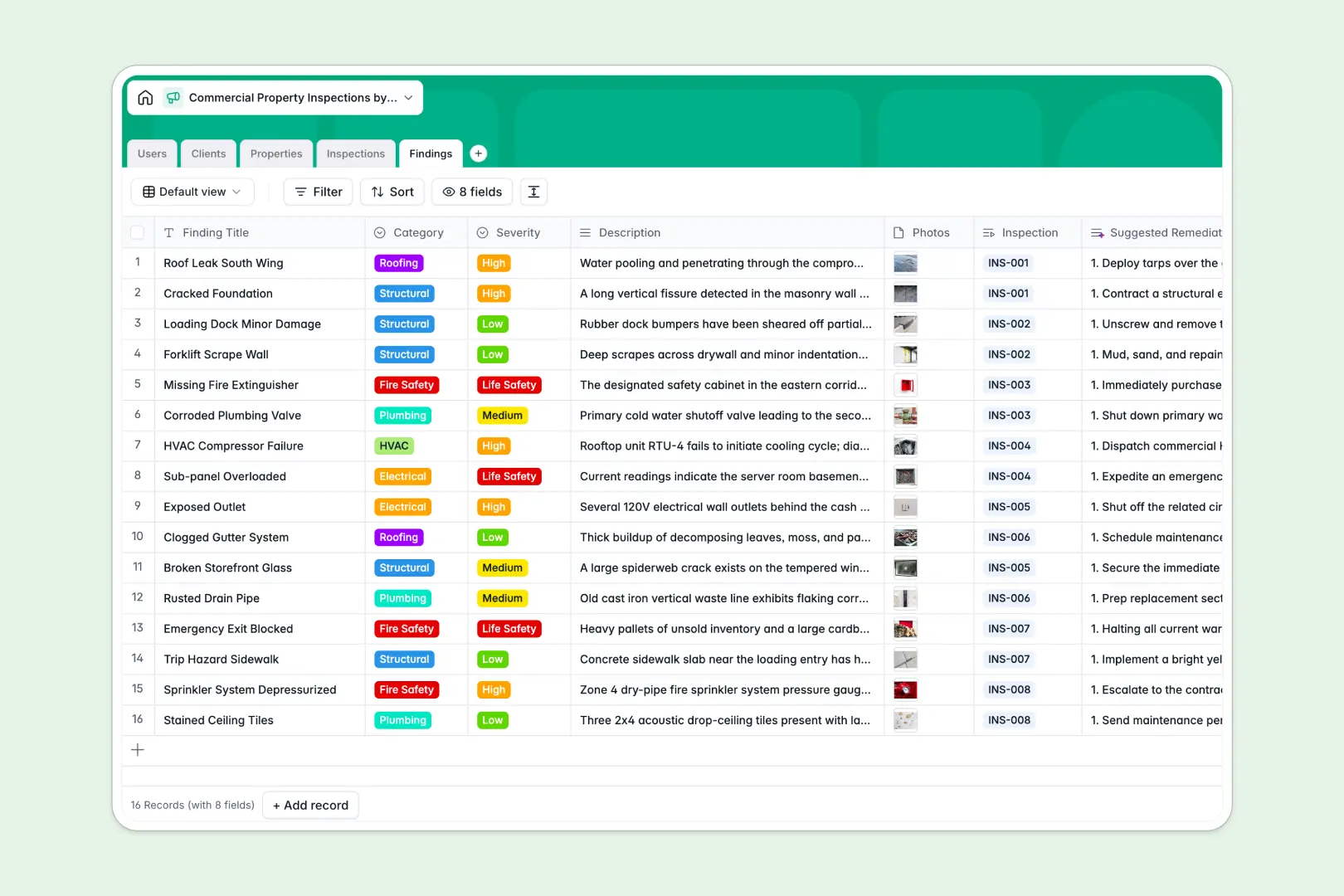
Your Commercial Property Inspections database at a glance
This template gives your team a centralized system to organize buildings, schedule site visits, and log deficiencies. It keeps every hazard and repair request tied exactly to the right property and client.
Built with connected tables, inspectors can link multiple findings to a single inspection event without copying data. Add photos directly to findings and track everything from scheduled to completed in one unified view.
Instead of writing manual reports, built-in AI fields automatically generate executive summaries and suggest remediation steps for each finding based on its severity.
Why managing commercial property inspections in spreadsheets breaks down
Tracking multi-family or industrial inspections in a spreadsheet quickly turns into chaos when trying to attach photos, link structural findings to specific floors, or generate client-ready reports.
What a structured database changes
A true relational structure means one inspection can contain unlimited findings, and one client can own multiple properties. You never have to duplicate rows just because a warehouse requires five different repair notes.
Data always stays clean because severity levels, statuses, and property types remain strictly constrained to specific text values. This is exactly what Softr Databases are designed for.
What you can do with this template
You can instantly log site visits, attach photos of safety hazards, and tie them back to the exact client and building address.
Because this template includes powerful Database AI agents, you can automatically web-search a building's public history or instantly auto-generate complete executive summaries from raw inspector notes.
-
Users
Manage internal staff roles, contact details, and assigned inspection reviews
-
Clients
Store property owners and management firms with contact info and holdings
-
Properties
Detail sites with AI-powered web search for historical building context
-
Inspections
Log site visits using AI to generate executive summaries from field data
-
Findings
Record hazards with AI-generated remediation steps based on severity
Who is this Commercial Property Inspections database for
This system is built for inspection agencies, property owners, and real estate operators who need structured, reliable field data.
- Commercial Inspectors: Log structural, HVAC, and fire safety findings directly from the field with attached photos.
- Property Management Firms: Keep a historical record of all building deficiencies and track remediation efforts.
- Operations Managers: Monitor inspection statuses in real time and automatically generate client-ready executive reports.
How to take it further
You can easily customize this database by updating the property categories or adding custom severity levels for hazards. Adjusting select field values or adding entirely new tracking columns takes just a few clicks.
Bring in your existing client list or property portfolio effortlessly using a quick CSV upload. You can also connect via API to sync your building database with external property management software.
When your operations grow, you can transform this raw database into a mobile-friendly inspector app or a secure client reporting portal using our interface builder. Connecting this data to a front-end allows you to build custom workflows without hiring a developer.
By setting up users and permissions, you can ensure landlords only see their own properties while inspectors get dedicated access to log their daily site visits securely.
-
1
-
2
-
3
-
4
Frequently asked questions
-
What is a commercial property inspections database?
-
Why use a no-code database to build a commercial property inspections tool?
-
How can AI help managing data for commercial property inspections?
-
Can I build an app with this commercial property inspections database?
-
Is this Commercial Property Inspections database free?
-
How does a database handle inspection findings better than a standard spreadsheet?
Start building today. It's free!
Build and launch your first app in under 30 minutes.