


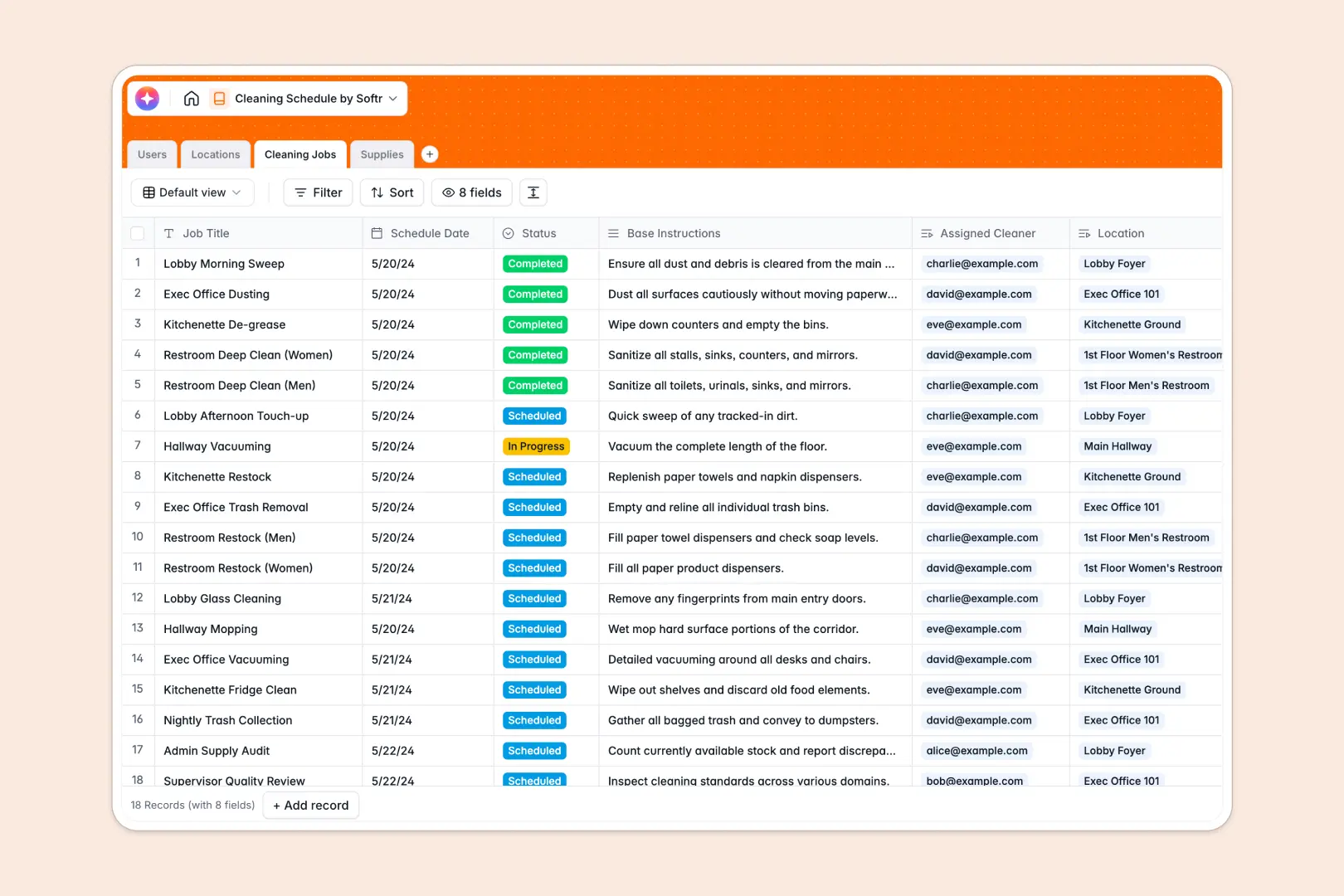
Your Cleaning Schedule Database at a glance
This template organizes your cleaning operations so you know exactly what needs to be cleaned, by whom, and when. It gives you a clear, centralized view of your entire facility's maintenance plan.
It connects four key tables—Users, Locations, Cleaning Jobs, and Supplies. By linking tasks directly to rooms and assigned staff, you eliminate confusion and missed work assignments.
For faster workflows, it includes built-in AI that automatically generates detailed step-by-step checklists for jobs and drafts restocking emails when supplies run low.
Why spreadsheets can't keep up with cleaning schedules
Tracking daily cleaning tasks across multiple floors and varying stock levels quickly turns standard spreadsheets into chaotic, error-prone lists.
What a structured database changes
A true system enforces rules where dates stay dates and inventory counts remain accurate as jobs are completed. You can instantly link a specific cleaner to a ground floor restroom without copying and pasting rows.
This is exactly what Softr Databases are designed for. They provide a reliable foundation that scales naturally as your facility management needs grow.
What you can do with this template
You can instantly assign daily jobs to your cleaners while tracking the exact supplies required for each specific location type. Status updates move tasks smoothly from 'Scheduled' to 'Completed.'
Thanks to Database AI agents, your inventory management is practically automated. The system writes your distributor restocking emails instantly when stock runs out and creates step-by-step room checklists on the fly.
-
Users
Manage cleaning staff, supervisors, and admins with roles and contact info
-
Locations
Organize physical zones and rooms requiring maintenance across facilities
-
Cleaning Jobs
Schedule tasks with AI-generated checklists for precise cleaning workflows
-
Supplies
Track inventory and use AI to draft restock emails for low stock items
Who is this Cleaning Schedule Database for
This system is built for operations teams that need to maintain high cleanliness standards without drowning in paperwork.
- Facility Managers: Ensure every zone is assigned and monitor daily completion rates without chasing staff.
- Cleaning Supervisors: Keep track of team availability and provide clear, automated checklists for every scheduled job.
- Inventory Administrators: Monitor chemical and tool stock levels accurately to avoid unexpected shortages.
How to take it further
You can easily modify the database to match your physical space. Add new location zones or update the cleaning supplies list to reflect your actual inventory.
Bring in your existing operation records effortlessly. Upload a CSV of your staff directory and current supply counts to start scheduling right away.
When your team is ready, you can use the interface builder to turn this database into a mobile-friendly staff portal. Cleaners can log in from their phones to check off daily tasks and report low supplies directly from the floors.
By utilizing proper users and permissions, you can ensure cleaners only see their assigned jobs while managers securely view the entire facility. A well-organized database makes building this custom portal completely seamless.
-
1
-
2
-
3
-
4
Frequently asked questions
-
What is a cleaning schedule database?
-
Why use a no-code database to build a cleaning schedule tool?
-
How can AI help managing data for cleaning schedules?
-
Can I build an app with this cleaning schedule database?
-
Is this cleaning schedule database free?
-
How does this template track cleaning supplies?
Start building today. It's free!
Build and launch your first app in under 30 minutes.