


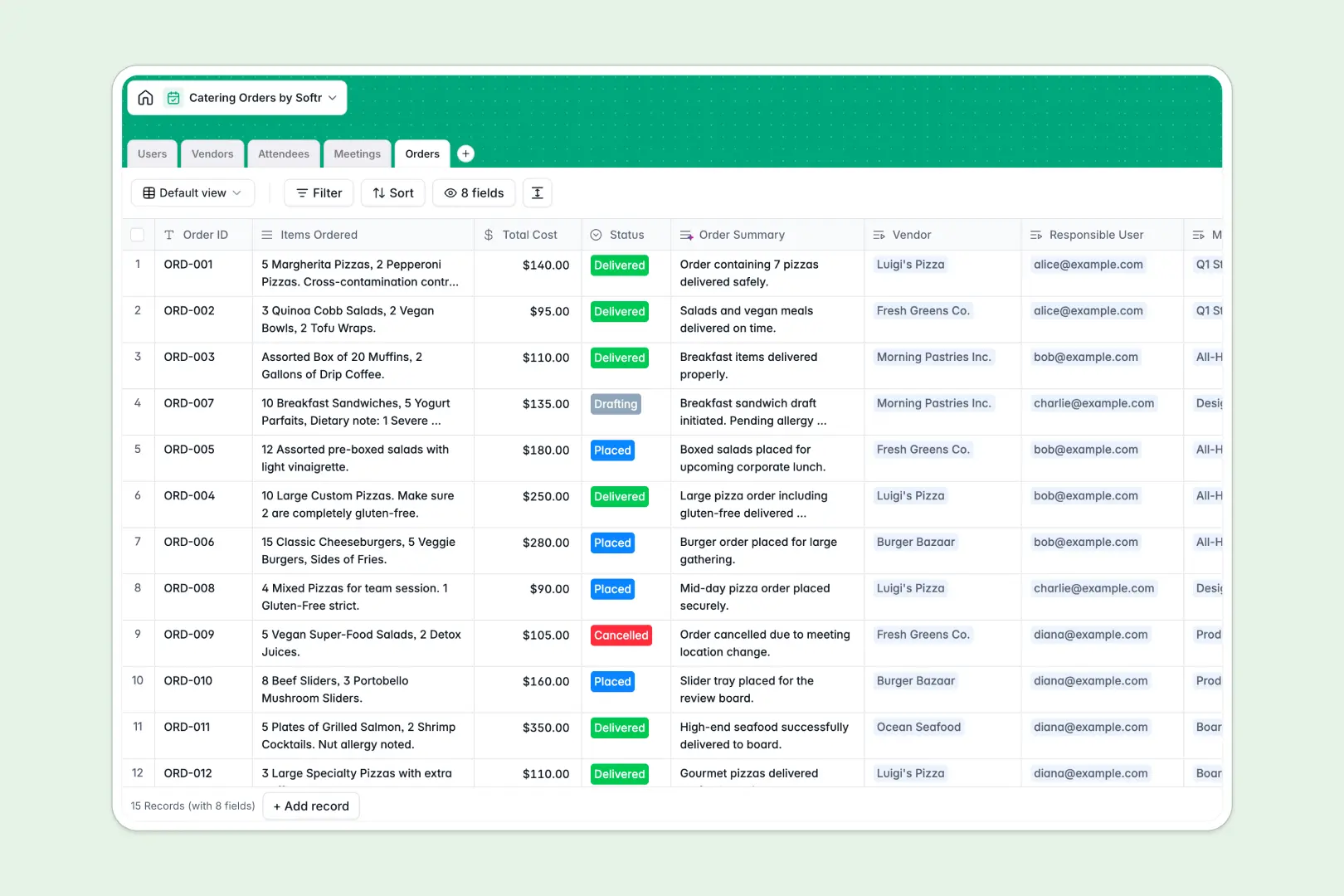
Your Catering Orders Database at a glance
This template centralizes everything needed to plan event food, from tracking vendors to managing specific attendee dietary needs. It gives your administrative team clear visibility into meeting costs and order statuses.
The database is built on connected tables, meaning every catering order natively links to a specific meeting, vendor, and responsible user. You can see exact attendee headcounts and link their dietary profiles safely to the event without duplicate data entry.
It also features native AI capabilities to eliminate manual data entry. The system automatically reads attendee notes to categorize dietary restrictions, writes vendor descriptions based on their live website, and summarizes order briefs instantly.
Why managing catering orders in spreadsheets breaks down
Organizing office meals gets incredibly messy when you try to track changing headcounts, vendor details, and severe allergies in simple rows and columns.
What a structured database changes
In a proper system, every piece of information has a reliable, enforced format. Budgets stay formatted as currency, dietary needs lock into standardized categories, and vendor invoice files attach cleanly to specific records.
Instead of building fragile formulas to match restaurants with meal types, you use native relationships to connect an order directly to a vendor. This is exactly what Softr Databases are designed for.
What you can do with this template
Connect attendees directly to scheduled meetings and instantly roll up precise headcounts so teams never over-order food. You can also track the real-time status of every delivery from the initial draft to the final dropped-off placement.
By leveraging built-in AI tools, this template categorizes complex dietary restrictions automatically based on raw text input. It even autonomously searches the web to enrich your vendor table with accurate company descriptions, saving you hours of manual research.
-
Users
Manage internal staff roles, contact details, and their order responsibilities
-
Vendors
Store restaurant details and use AI to generate descriptions via web search
-
Attendees
Track guest needs and use AI to automatically classify dietary restrictions
-
Meetings
Coordinate scheduled events by linking organizers, attendees, and catering
-
Orders
Track fulfillment and use AI to generate summaries of items and status
Who is this Catering Orders Database for
This complete system is designed for teams that coordinate internal events, client meetings, and daily office food logistics.
- Office Managers: Track weekly food budgets, manage preferred vendor lists, and monitor order deliveries seamlessly.
- Event Coordinators: Aggregate accurate dietary lists for large-scale meetings without missing any vital allergy information.
- Administrative Assistants: Request quotes, submit draft orders, and log meeting attendees in one standardized workflow.
How to take it further
Customizing this database takes only a few clicks. You can quickly add new catering categories, update order status dropdowns, or add numerical columns to track specific budget codes.
Importing your existing vendor lists or past order records natively is incredibly simple. Upload a CSV of your favorite local restaurants or use an API connection to sync incoming attendee schedules straight from your calendar tools.
When your team is ready, you can easily turn this database into an interactive internal portal. You can build dedicated screens where employees independently log in to submit their own catering requests or securely update their personal dietary profiles.
Because the underlying database is already perfectly structured, expanding it into an app requires zero heavy lifting. With robust users and permissions, you can ensure that general employees only see their targeted meal options while your administrators retain full financial oversight.
-
1
-
2
-
3
-
4
Frequently asked questions
-
What is a catering orders database?
-
Why use a no-code database to build a catering system?
-
How can AI help managing data for catering orders?
-
Can I build an app with this catering orders database?
-
Is this Catering Orders Database free?
-
How is a catering orders database different from spreadsheets?
Start building today. It's free!
Build and launch your first app in under 30 minutes.