


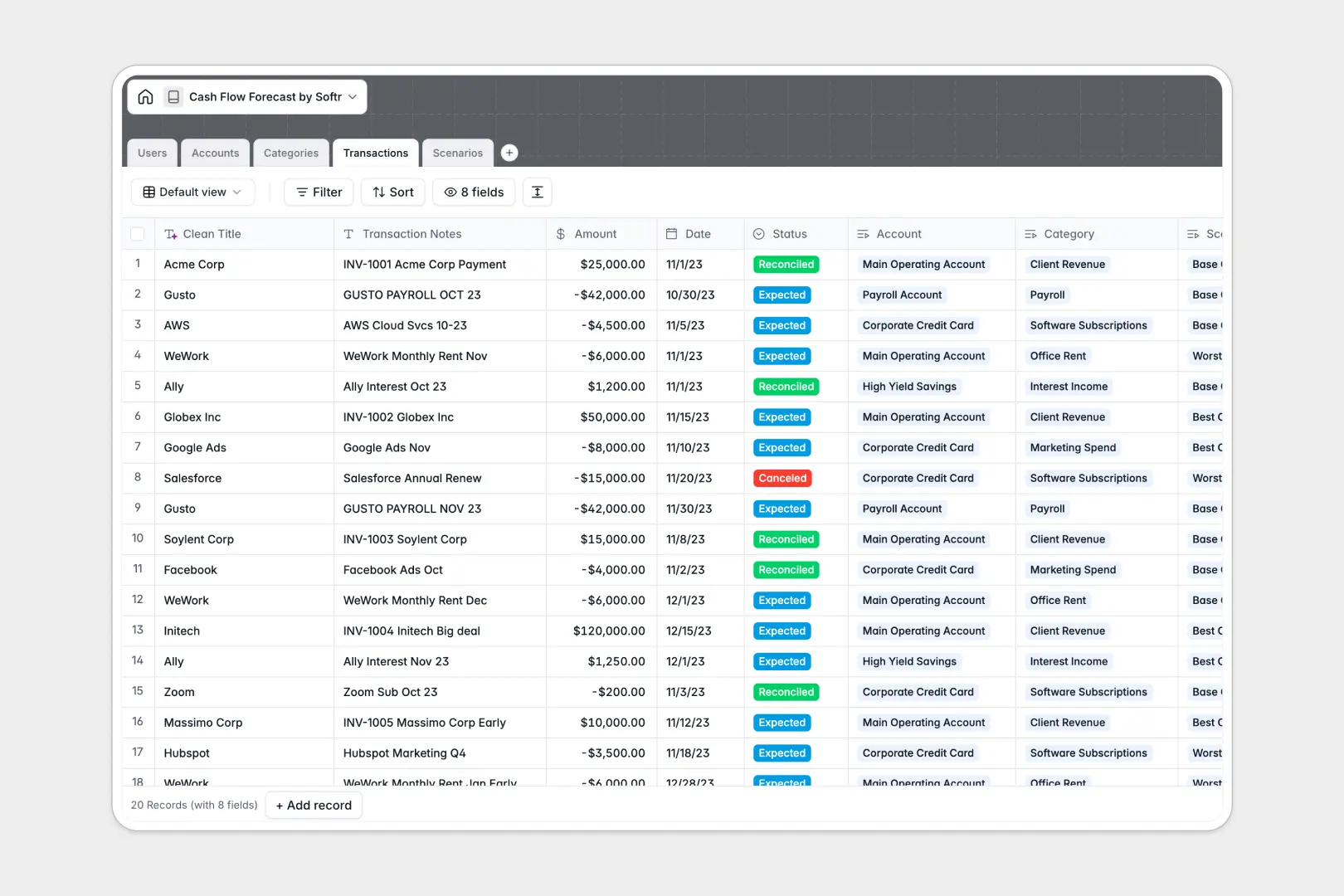
Your Cash Flow Forecast database at a glance
This template gives your finance team a structured system to project future liquidity, monitor bank balances, and test multiple financial scenarios. You can log expected inflows and outflows while keeping a reliable overview of your company's cash position.
Everything is connected across dedicated tables for Accounts, Transactions, Categories, and Scenarios. Linking every planned transaction directly to a specific account and forecast scenario gives you clean totals without manual copy-pasting.
Built-in AI fields clean messy transaction notes into readable vendor names and automatically generate executive summaries for each financial scenario.
When cash flow modeling outgrows disconnected grid rows
Financial forecasting requires dependable relationships between accounts, categories, and scenario plans. In a blank spreadsheet, a broken formula or mistyped category can silently distort your runway projections and hide impending cash deficits.
What a structured database changes
Instead of unstructured text cells, a dedicated database enforces strict field types for currency amounts, dates, and transaction statuses. Every transaction links directly to its parent account and scenario, ensuring rollup totals always stay accurate as you scale.
This structure eliminates the risk of accidental formula overwrites and gives your team a single source of truth for financial planning. This is exactly what Softr Databases are designed for.
What you can do with this template
Model base, best, and worst case scenarios side by side while tracking reconciled versus expected transactions across all your bank accounts. You can monitor runway clearly without reconciling broken lookups across multiple tabs.
With native Database AI agents, the database standardizes messy bank feed descriptions and writes automated briefs on your scenario notes instantly.
-
Users
Manage user accounts, roles, access permissions, and linked finances
-
Accounts
Track bank and cash accounts, current balances, and assigned owners
-
Categories
Classify cash flows and generate AI standard accounting definitions
-
Transactions
Log expected cash movements and use AI to extract clean vendor titles
-
Scenarios
Model cash forecast scenarios and generate AI executive summaries
Who is this Cash Flow Forecast database for
This template helps teams maintain clear visibility over cash positions and plan future runway with confidence:
- Finance Teams: Model multiple financial scenarios and track real-time liquidity across all corporate accounts.
- Founders & Operators: Monitor runway, evaluate burn rate, and test hiring plans against projected cash reserves.
- Fractional CFOs: Deliver clean, structured cash flow forecasts and executive summaries for multiple client accounts.
- Operations Managers: Track upcoming vendor disbursements and customer receivables against expected transaction dates.
How to take it further
1. Customize the database
Adapt the database to your exact financial structure in seconds. Add custom fields for payment methods, modify category directions for specialized revenue streams, or adjust the predefined forecast scenarios to match your planning quarters.
2. Import your existing data
Bring your historical cash logs and current account balances into the template immediately. Upload CSV files from your accounting software or connect external tools via API to keep transaction records synchronized automatically.
3. Build a full app around it
Turn your forecast database into a secure financial portal for your executive team. You can use an AI app generator to create an interface with interactive dashboards and scenario comparison views in one prompt.
Set up role-based users and permissions so financial analysts can submit projections while department leads and investors only access high-level executive summaries.
-
1
-
2
-
3
-
4
Frequently asked questions
-
What is a cash flow forecast database?
-
Why use a no-code database to build a cash flow forecasting tool?
-
How can AI help managing data for cash flow forecasting?
-
Can I build an app with cash flow forecast database?
-
Is this Cash Flow Forecast database free?
-
How is a cash flow forecast database different from a spreadsheet?
Start building today. It's free!
Build and launch your first app in under 30 minutes.