


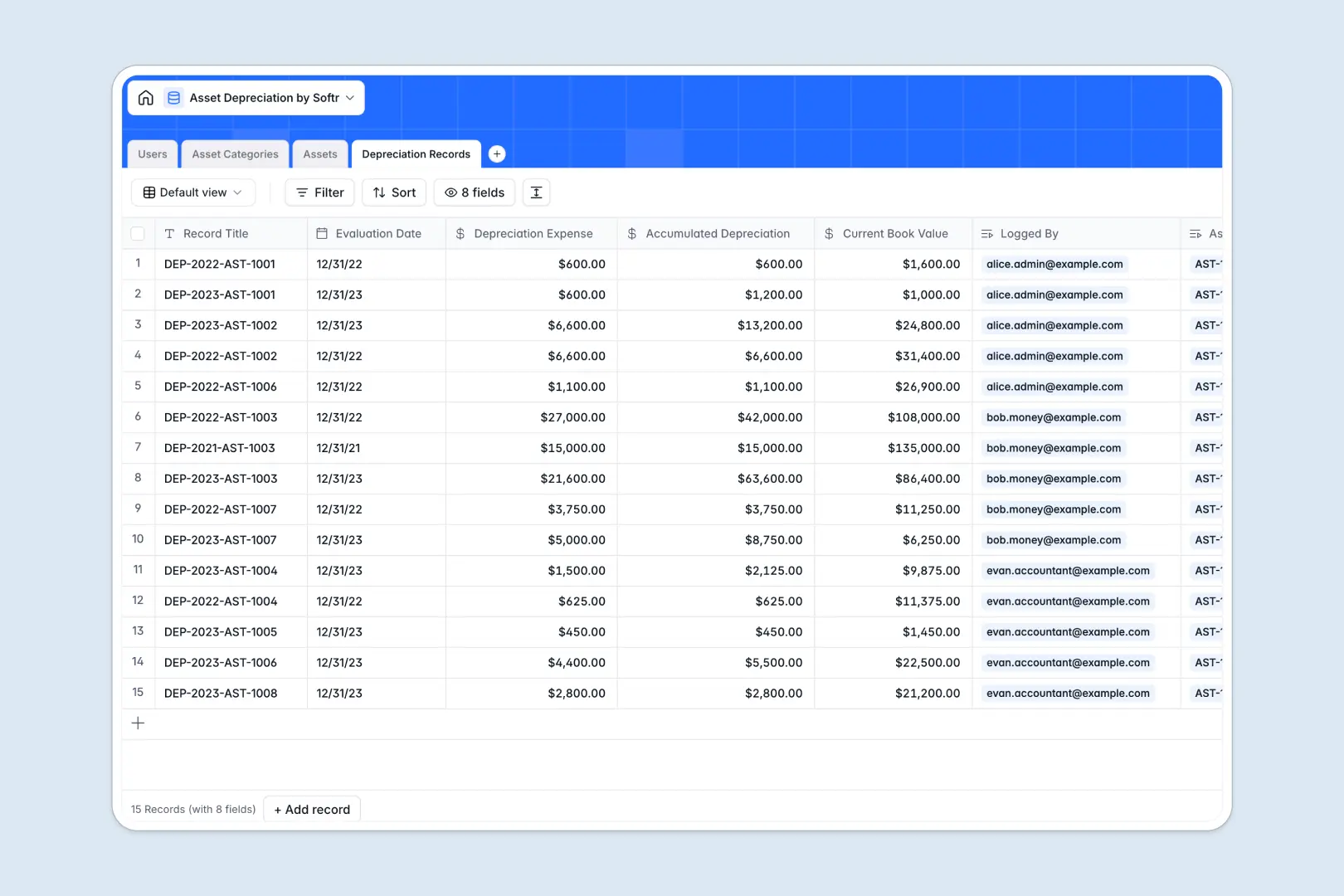
Your Asset Depreciation database at a glance
Track the lifecycle of your company's equipment, automatically log depreciation expenses, and maintain perfectly accurate book values in one central hub.
This system seamlessly connects your primary inventory to specific asset categories and depreciation methods. Every scheduled evaluation naturally ties back to the correct team member and piece of hardware without redundant data entry.
Built-in AI agents automatically search the web for technical asset specifications and generate instant narrative summaries for every depreciation record you log.
Why tracking asset depreciation in spreadsheets breaks down
Managing depreciation schedules in spreadsheets quickly turns into a math nightmare of broken formulas, disconnected purchase dates, and version control issues.
What a structured database changes
In a structured system, columns enforce strict data types like precise currency for salvage values and exact dates for purchases. You never have to worry about accidentally mixing text into a calculation field.
You can instantly link an asset to its specific depreciation method—like Straight-Line or Double Declining Balance—without drafting complex, fragile VLOOKUPs.
This is exactly what Softr Databases are designed for. They keep your financial records clean, structured, and scalable as your company's asset inventory grows.
What you can do with this template
Organize every asset by category, look up expected useful lifecycles automatically, and track accumulated depreciation against current book values perfectly.
Because we've integrated Database AI agents, you can even auto-generate detailed asset narratives and securely summarize complex record logs without manual typing. Your database essentially maintains its own documentation.
-
Users
Manage employee access and roles for asset and depreciation tracking
-
Asset Categories
Define depreciation rules with AI-generated summaries for each group
-
Assets
Track asset inventory using AI to research and summarize technical specs
-
Depreciation Records
Log value changes with AI-generated explanations of financial status
Who is this Asset Depreciation database for
This system is built for operations and finance teams that need to maintain strict visibility over company equipment and their lifecycle values.
- Accountants: Track precise book values and depreciation expenses across multiple rigorous calculation methods.
- Asset Administrators: Monitor equipment lifecycles, manage exact purchase dates, and oversee projected salvage values.
- Operations Managers: See exactly which employee is currently assigned to which piece of hardware across the organization.
How to take it further
Customize the database structure instantly by tweaking the predefined depreciation methods. You can easily adjust user roles to perfectly match your company's internal hierarchy.
When you are ready, upload your existing inventory lists via CSV or sync them through our API. This allows you to rapidly populate your new asset categories and historical depreciation records in minutes.
This structured foundation makes it incredibly simple to build an app on top of your financial data.
You can launch a secure internal portal where operations staff can track assigned hardware equipment effortlessly. With native users and permissions, you guarantee that only certified accountants can view or log sensitive financial evaluations.
-
1
-
2
-
3
-
4
Frequently asked questions
-
What is an asset depreciation database?
-
Why use a no-code database to build an asset depreciation tool?
-
How can AI help manage asset depreciation data?
-
Can I build an app with this asset depreciation database?
-
Is this asset depreciation database free?
-
How is a tracked database different from spreadsheets for depreciation?
Start building today. It's free!
Build and launch your first app in under 30 minutes.