


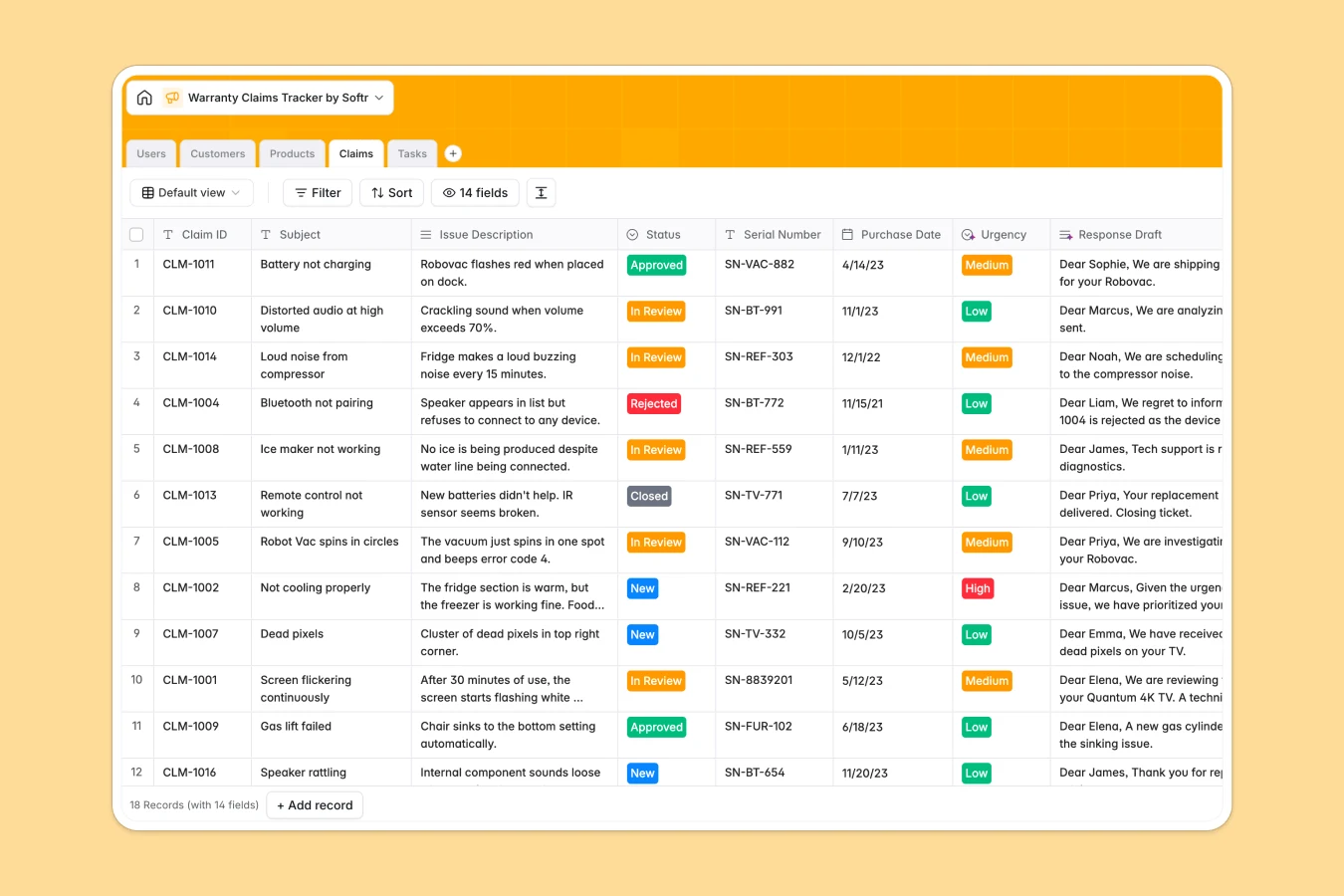
Your Warranty Claims Tracker database at a glance
Streamline your entire warranty and repair process from initial customer request to final resolution in one single place. This database connects claims, customers, products, and internal tasks to eliminate communication gaps.
Keep support agents, technicians, and administrators aligned while tracking serial numbers, proof of purchase, and real-time claim statuses. Built-in AI fields automatically analyze issue urgency and draft professional customer replies.
What to check before building your warranty claims tracker in Airtable
Airtable is a strong database tool, but managing customer claims with a team often exposes a major limitation: per-seat pricing. As soon as your support agents, technicians, and external partners need edit access, your monthly costs scale rapidly.
What changes with a database built for apps
Using Softr Databases gives you the robust relational connections of a database but with unlimited team collaborators. You can scale your records and keep your data clean with strict field validation without worrying about rising plan ceilings.
Instead of stitching third-party portal tools to Airtable, this template provides a natural foundation to instantly build client portals or team portals. Everything runs natively on the same platform, keeping your workflows unified and cost-effective.
Work faster with built-in AI assistance
No-code databases are even smarter when they analyze information for you. With integrated Database AI agents, this tracker auto-categorizes issue urgency from customer descriptions and drafts personalized resolution emails right inside your records.
This lets your support desk offload repetitive triage work and focus on solving customer hardware or product issues directly.
-
Users
Manage internal support agents, technicians, and administrators tracking claims
-
Customers
Store customer contacts, communication details, and their active claim history
-
Products
Catalog covered items with technical details generated via automated AI lookups
-
Claims
Centralize claims with AI analyzing severity and drafting customer emails
-
Tasks
Track action steps, due dates, and internal ownership to resolve issues
Who is this Warranty Claims Tracker database for
This database template is built for teams looking to streamline repair logistics and customer communication:
- Support Teams: Track and route claim statuses clearly without losing ticket details or serial numbers.
- Quality & Repair Technicians: Log diagnostic data and update task statuses easily.
- Operations Managers: Analyze product categories and SKU performance to spot recurring quality defects.
How to take it further
Customize the database fields
Tailor the warranty duration fields or modify status drop-down choices to match your specific return and refund policies. Adjust text fields and categories to capture the exact hardware details your team requires.
Import your legacy backlog
Quickly bring your previous claims history into the database using our secure CSV import wizard or custom API connections. Your team can run reports on older entries immediately.
Build a portal or app around your data
When your work expands, you can visually build an app with secure users and permissions. Your customers can submit claims via custom forms, while technicians only view tasks assigned to them.
You can generate an interface in seconds with our AI app generator, instantly turning your relational database tables into a fully functional product portal.
-
1
-
2
-
3
-
4
Frequently asked questions
-
What is a warranty claims tracker database?
-
Why use a no-code database to build a warranty claims system?
-
How can AI help managing data for warranty claims?
-
Can I build an app with my warranty claims database?
-
Is this warranty claims tracker database template free?
-
How is this template different from a warranty tracker in Airtable?
Start building today. It's free!
Build and launch your first app in under 30 minutes.