


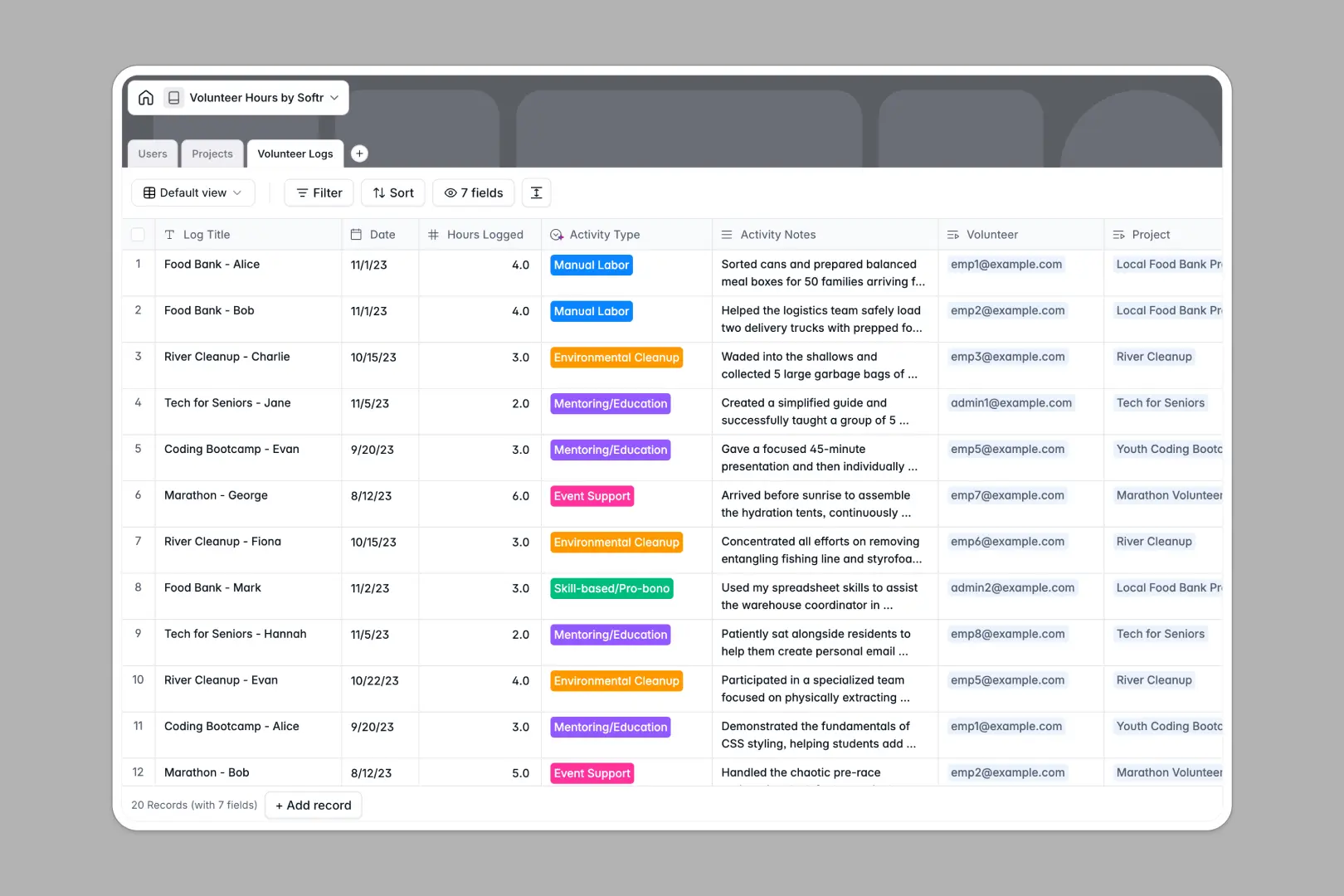
Your Volunteer Hours database at a glance
This template provides a central, structured hub for tracking community service across your entire organization. It eliminates messy record-keeping by connecting your team, projects, and actual time logs together in one clear view.
The system runs on three connected tables: Users, which directories your participating employees; Projects, which hosts available community service opportunities; and Volunteer Logs, where actual hours are submitted.
Built-in Database AI agents work directly inside your fields. They automatically categorize activities from notes and research organization details from live websites to save your team manual entry time.
What to check before building your volunteer hours base in Airtable
Many teams naturally turn to Airtable when keeping track of community service hours because they need real database relationships. But structured fields are only half the battle when setting up an organization-wide program.
What changes with a database built for apps
While Airtable is great for structuring data, your costs will skyrocket as soon as you want employees to log their hours themselves. Since Airtable charges per seat, every volunteer who needs write access translates to a higher monthly bill.
This is exactly what Softr Databases are designed to solve. You get unlimited collaborators on all plans so your whole organization can log, view, and search hours without unexpected pricing penalties.
What you can do with this template
With this database, you can log precise community service contributions without complex navigation. The linked relationship between tables ensures a volunteer log automatically updates both the individual user's total hours and the project's overall impact metric.
Additionally, integrated AI runs automatically. The system reads logged activity descriptions to instantly select the right classification, removing inconsistency from your impact reporting.
-
Users
Track details of participating employees, roles and total hours logged
-
Projects
Manage community service initiatives with AI-generated briefs and reviews
-
Volunteer Logs
Log individual volunteer hours with AI classification of service activities
Who is this Volunteer Hours database for
- HR & CSR Teams: Track company-wide corporate social responsibility goals and generate impact reports easily.
- Department Heads: Monitor team participation levels and support employee-led community initiatives.
- Program Coordinators: Keep track of active external nonprofit partners and their specific physical or skill-based requirements.
How to take it further
Customize the database
You can easily tailor this database to your organization's specific needs. Add fields to track shirt sizes for volunteer events, modify the activity type choices, or add custom notes to track manager approvals.
Import your existing data
Moving your current tracker is fast and simple. Drag and drop any spreadsheet or existing volunteer CSV directly into your new workspace to instantly populate your user directory and project records.
Build a full app around it
When your team is ready, you can easily turn this database into an employee portal. Use the AI app generator to describe the workflow you want, and Softr will generate a visual logging app on top of this exact database.
You can configure granular users and permissions so employees only edit their own logs. Administrators retain full access to manage active projects and export clean, structured reports for leadership.
-
1
-
2
-
3
-
4
Frequently asked questions
-
What is a volunteer hours database?
-
Why use a no-code database to build a volunteer tracker?
-
How can AI help managing data for volunteering program?
-
Can I build an app with this volunteer hours database?
-
Is this Volunteer Hours template free?
-
How is this different from a volunteer hours Airtable template?
Start building today. It's free!
Build and launch your first app in under 30 minutes.