


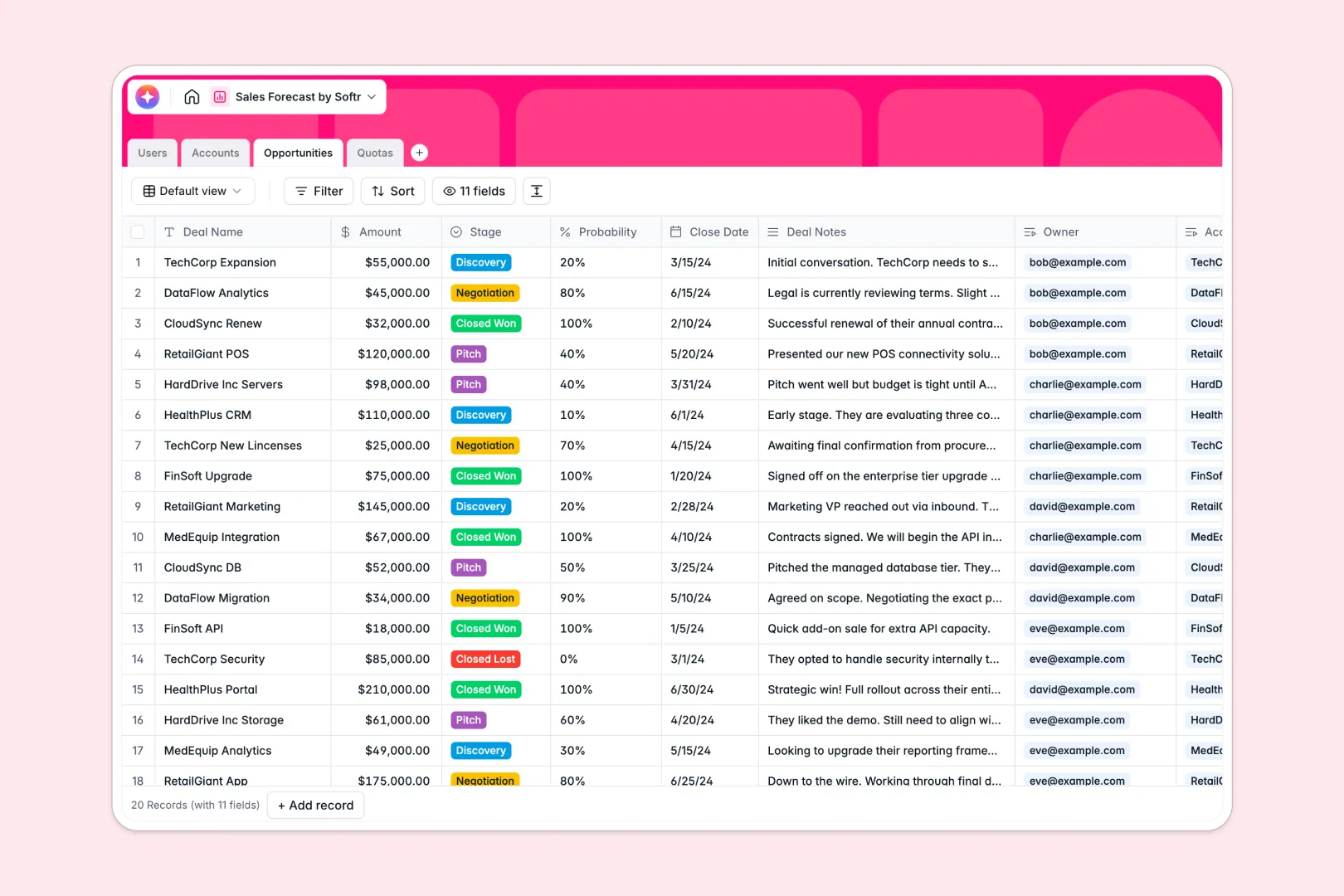
Your Sales Forecast database at a glance
This template gives you complete visibility over your deal pipeline, team quotas, and revenue estimations. It helps sales managers and reps stay aligned on quarterly targets without chasing manual status updates.
Everything is connected out of the box: Accounts connect to Opportunities, which roll up directly into Quotas assigned to your Users. Formulas automatically calculate expected revenue by multiplying the deal amount by its probability.
With built-in AI, your database automatically researches company descriptions from account websites and summarizes actionable next steps based on your sales notes.
What to check before building your sales forecast base in Airtable
Airtable is a great tool for structured thinking, but running your sales forecasting process there often introduces friction that teams only realize too late.
What changes with a database built for apps
In a scaling sales team, you need everyone updating their deals daily—but Airtable's per-seat pricing penalizes you for adding collaborators. Softr Databases include unlimited collaborators on all plans so your entire team can input data freely without ballooning your monthly software bill.
Additionally, managing sensitive data like individual quotas and commission figures is difficult when everyone has identical base access. Instead of stitching together external portals and form builders, Softr gives you native interface-building and granular user permissions in the same platform.
This means you can easily present this exact backend data as a secure, tailored application where reps only see their own accounts and managers view the entire department pipeline.
What you can do with this template
You can track ongoing deals through pipeline stages from Discovery to Closed Won, automatically calculating forecasted revenue for each opportunity. Your sales reps can log deal notes directly and let Database AI agents instantly generate clear, actionable next steps.
At the management level, you can review total pipeline health and track rep-specific progress against targets using automatic rollup functions on your quotas table.
-
Users
Manage sales representatives, managers, and system administrators
-
Accounts
Track client companies and use AI to auto-generate business profiles
-
Opportunities
Manage sales deals and use AI to output recommended next steps
-
Quotas
Monitor quarterly sales targets and accumulated forecast performance
Who is this Sales Forecast database for
- Sales Managers: Track team performance against quarterly quotas and get an accurate picture of expected revenue.
- Sales Representatives: Update deal stages, manage accounts, and generate AI-powered next steps for active opportunities.
- Operations Teams: Maintain a clean, structured repository of customer accounts, deal sizes, and historical win rates.
- Founders and Executives: Monitor overall runway and organizational sales velocity with automated calculations.
How to take it further
Customize the database
Modify deal stages, change industry categories, or adjust quota periods to match your company's fiscal calendar in seconds. Because this runs on Softr's native database, you can add fields, formulas, or custom relations intuitively visual-first.
Import your existing data
Skip the manual reconstruction by uploading your current sales excel sheet or pipeline tracking CSV instantly. If you are already tracking deals in another system, you can also use our API to keep your records in sync.
Build a full app around it
When your team is ready, don't let them work out of raw spreadsheets or backend tables. Use the AI app generator to turn this well-structured database into a fully functioning, secure internal sales portal.
Using customizable users and permissions, you can ensure that sales reps can only edit their own pipeline while managers get access to high-level team dashboards, keeping your CRM secure, scalable, and easy to use.
-
1
-
2
-
3
-
4
Frequently asked questions
-
What is a sales forecast database?
-
Why use a no-code database to build a sales forecast system?
-
How can AI help managing data for sales forecasting?
-
Can I build an app with this sales forecast database?
-
Is this sales forecast template free?
-
How is this template different from an Airtable template?
Start building today. It's free!
Build and launch your first app in under 30 minutes.