


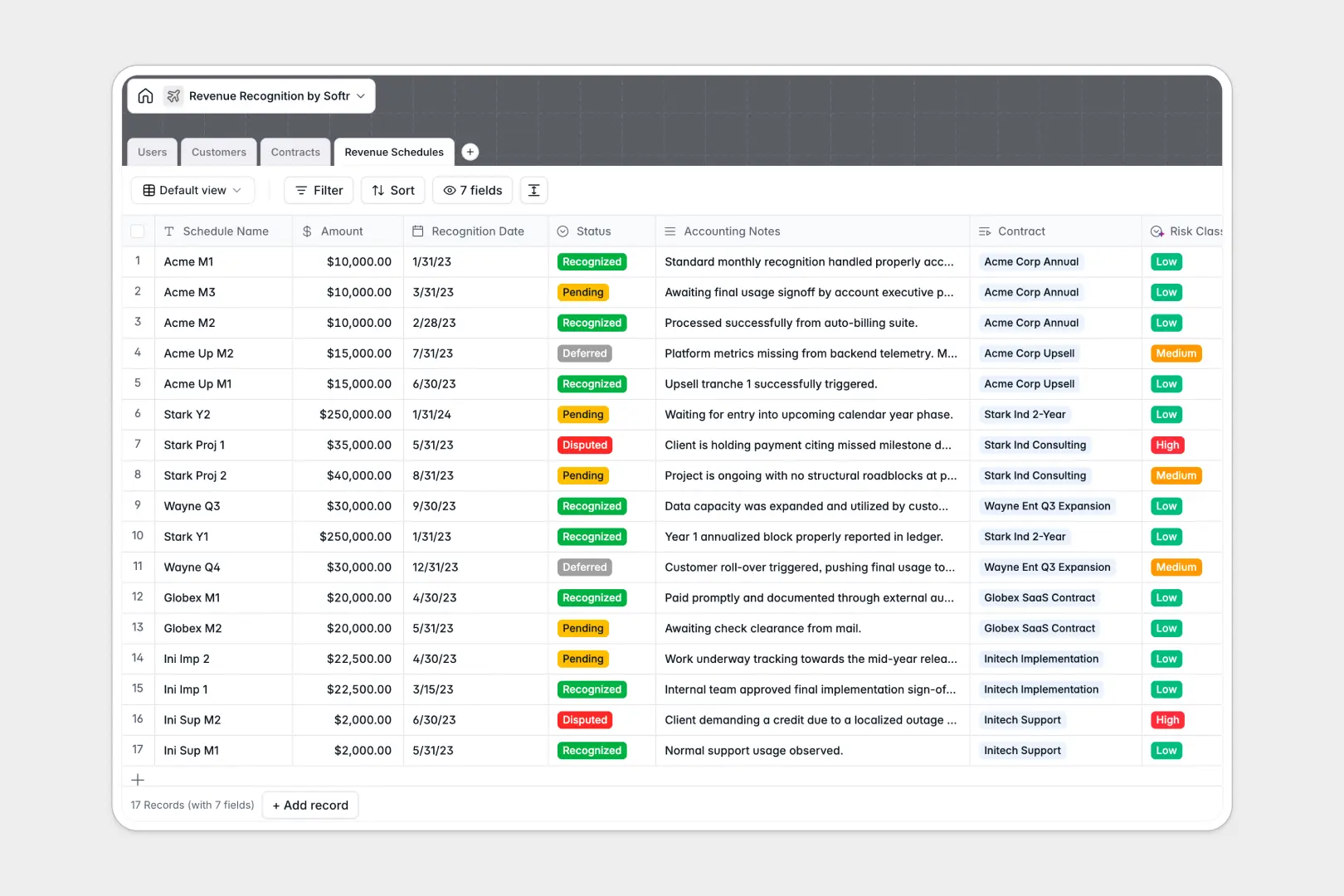
Your Revenue Recognition database at a glance
This template provides financial controllers and accounting teams with a structured system to trace every dollar from master agreements to monthly recognition schedules. You can eliminate the gaps between your sales pipeline and ASC 606 compliance by centralizing your contracts and schedules in one secure hub.
Your database connects four essential tables: Customers, Contracts, Revenue Schedules, and Users. This means every individual monthly payment tranche is natively linked to its parent contract and client profile, updating total recognized revenue automatically as statuses change.
Built-in intelligent fields automatically generate company summaries from live websites, analyze contract terms for key clauses, and classify risk levels based on your accounting notes.
What to check before building your revenue recognition base in Airtable
When managing complex compliance schedules, finding a tool with the right structural foundation makes all the difference.
What changes with a database built for apps
Airtable is a highly capable database, but licensing models that charge per collaborator can quickly punish scaling finance teams. If your sales reps, external auditors, and operations managers all need access to view or update contract details, the costs climb rapidly.
With Softr Databases, you get unlimited collaborators on all plans. This allows your entire team to view schedules, reconcile monthly figures, and update statuses without worrying about escalating seat costs.
Furthermore, Softr handles up to 200,000 records per database and supports a fast API (50 requests per second), letting you scale your transactional logs and accounting rules without hitting sudden record ceilings.
What you can do with this template
This template allows you to link contracts directly to billing schedules, eliminating the danger of double-counting or losing track of milestones. When a schedule's status shifts to "Recognized," your parent contract values adjust automatically via native rollups.
To make your compliance processes completely touchless, our Database AI agents run contextual evaluations directly inside your fields. They can parse complex contract terms to highlight critical termination clauses, and flag risk levels on disputed schedules automatically.
-
Users
Track team members with roles, contacts, and managed customer contracts
-
Customers
Manage client organizations with contract values and AI-generated company details
-
Contracts
Manage master agreements with timeline dates and AI-generated terms summaries
-
Revenue Schedules
Track deferred or recognized earnings with AI-powered risk classification
Who is this Revenue Recognition database for
- Finance Directors & Controllers: Keep the general ledger aligned with actual milestones and monitor compliance metrics centrally.
- Sales & Account Managers: Track contract start and end dates to proactively prepare for renewals or contract reviews.
- External Auditors: Securely review detailed audit trails and historical recognition schedules without manual data exports.
How to take it further
Customize the database
Define your own payment frequencies, modify recognition rules, or add custom tags to fit your specific accounting practices. Because it is a native Softr Database, you can add fields, adjust dropdown options, and configure custom formula fields instantly with a few clicks.
Import your existing data
You can bring your historic contracts and schedules in bulk using our fast CSV importer, or connect your existing billing systems directly via the API to sync transaction streams in real time.
Build a full app around it
When you are ready to secure your data and share customized views with different departments, you can easily build an app on top of this database. Generate the interface in minutes using Softr's AI app builder, which allows you to establish granular users and permissions so that sales reps only see their own accounts while controllers retain full administrative rights.
-
1
-
2
-
3
-
4
Frequently asked questions
-
What is a revenue recognition database?
-
Why use a no-code database to build a revenue recognition system?
-
How can AI help managing data for revenue recognition?
-
Can I build an app with this revenue recognition database?
-
Is this revenue recognition template free?
-
How is this template different from an Airtable template?
Start building today. It's free!
Build and launch your first app in under 30 minutes.