


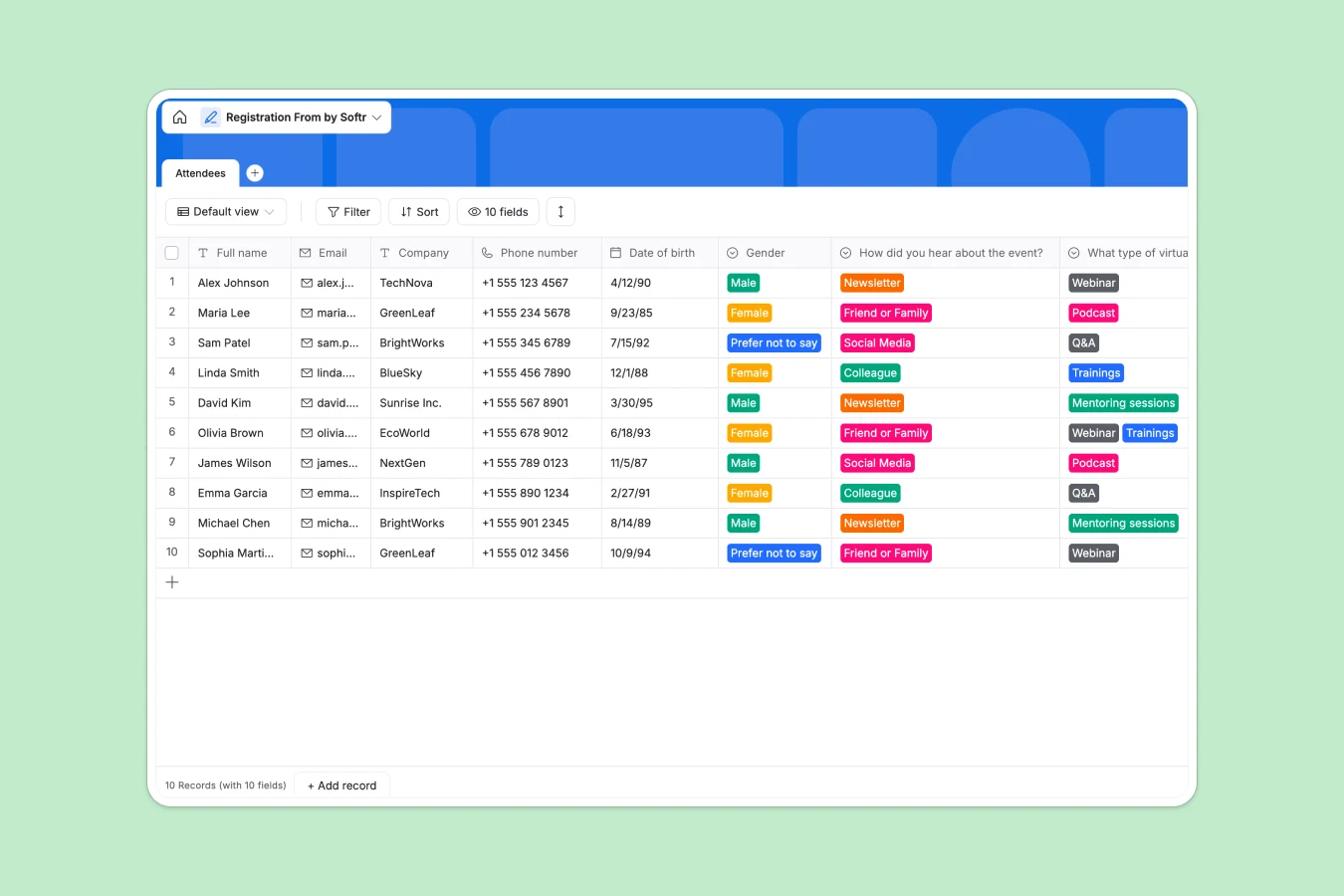
Your Registration database at a glance
This pre-structured Registration template helps you capture and organize attendee details for any event. It keeps vital participant data structured, clean, and immediately actionable for your organizing team.
Everything is stored in a clean Attendees table, tracking essential contact info alongside preferences like event interests and referral sources. This setup eliminates manual follow-ups and ensures you have all candidate data perfectly organized.
What to check before building your registration base in Airtable
When organizing event registrations, managing large volumes of attendee data can quickly uncover pricing and collaboration bottlenecks.
While Airtable provides a solid database structure, its per-seat pricing model can scale up costs quickly if you need multiple team members or external event coordinators to edit and manage guest lists.
What changes with a database built for apps
Instead of paying for every team member who needs edit access, using a Softr Databases template means you get unlimited collaborators. This lets your entire staff update attendee details, check guests in, or run registration desks without ballooning your budget.
Furthermore, you escape the rigid grid interface. Softr makes it incredibly simple to turn this database into a custom portal or internal check-in app as your event grows, keeping your back-end data secure and easy to access.
What you can do with this template
You can collect user details instantly via safe, structured record creation with pre-defined option lists for referral tracking and event interests.
If you want to automate administrative tasks, you can deploy Database AI agents to automatically categorize registration sources or clean up phone number formatting as new signups come in.
-
Attendees
Manage event participant registrations, contact details and event preferences
Who is this Registration database for
- Event Coordinators: Centralize attendee lists, communication channels, and consent agreements in a single place.
- Marketing Teams: Analyze how prospects heard about events to optimize social media and newsletter outreach campaigns.
- Community Managers: Track the exact types of webinars, podcasts, and training formats your community wants next.
How to take it further
Customize the database
Adjust fields or add custom values to the interest checklist depending on your event's specific focus. You can quickly add new single-select fields, rename columns, or toggle options inside your native database without breaking existing structures.
Import your existing data
If you already have a guest list in a CSV or an external spreadsheet, you can import it in a single click to instantly populate the Attendees table and keep your records unified.
Build a full app around it
When you are ready to expand, you can use Softr's AI app generator to turn this database into a secure attendee portal or a check-in app for event staff. You can configure granular users and permissions so that front-desk staff can check guests in, while planners retain access to high-level analytics. A well-structured database means your app works seamlessly out of the box.
-
1
-
2
-
3
-
4
Frequently asked questions
-
What is a registration database?
-
Why use a no-code database to build a registration system?
-
How can AI help managing data for registrations?
-
Can I build an app with this registration database?
-
Is this registration template free?
-
How is this template different from an Airtable template?
Start building today. It's free!
Build and launch your first app in under 30 minutes.