


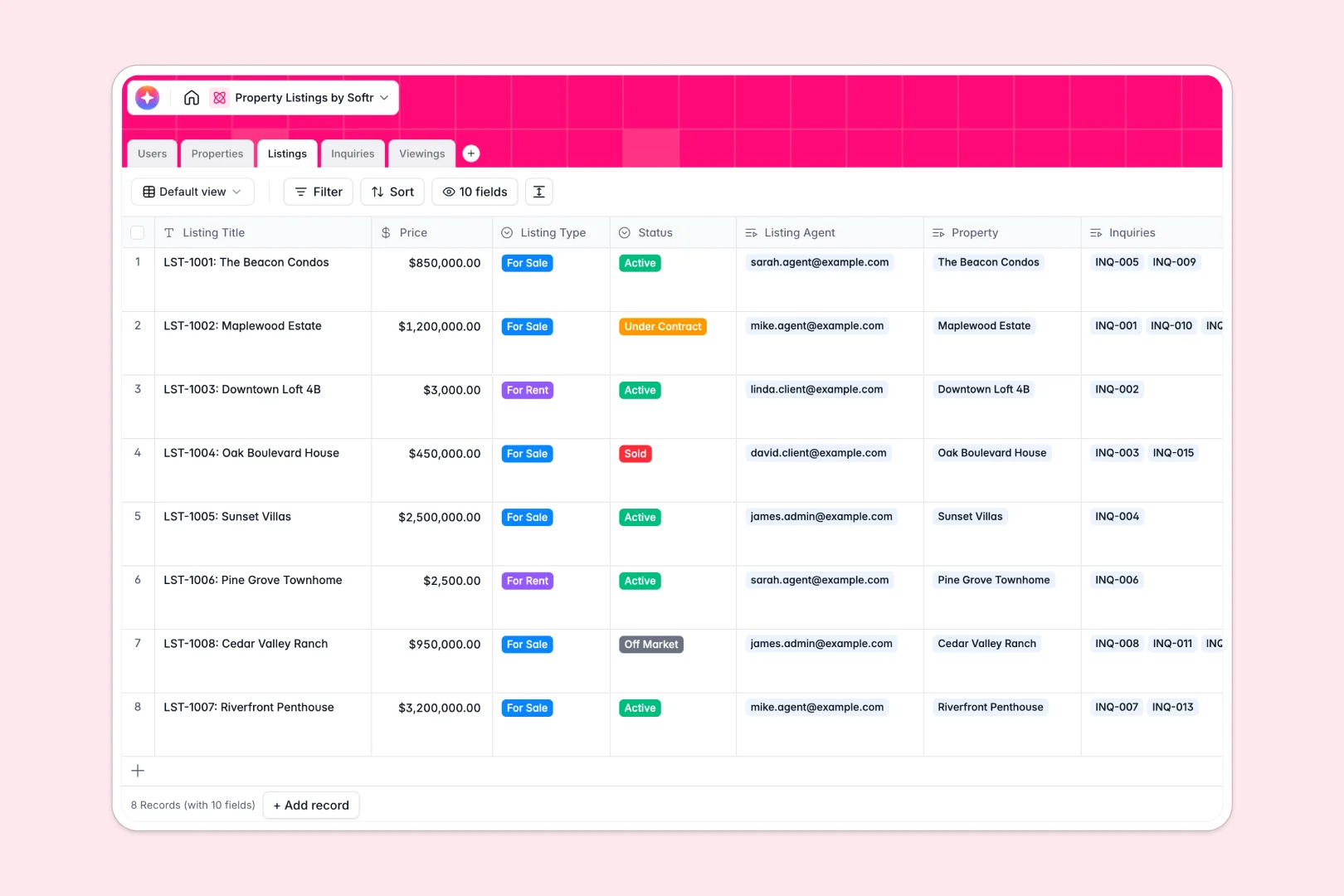
Your Property Listings database at a glance
Manage real estate listings and client relationships easily in one organized place. This database connects properties, agent assignments, live listings, and prospective client inquiries so your agency can close deals faster.
Every property asset links directly to active listings, viewings, and incoming messages. This relational logic means your client history, schedules, and property data are always in sync instead of scattered across emails and isolated documents.
Built-in intelligent tools handle the busywork for you. The database automatically researches neighborhood details, drafts engaging marketing copy, and scores the urgency of online inquiries as they arrive.
What to check before building your property listings base in Airtable
While organizing assets in a database is the right choice, planning how you scale, collaborate, and share that data with your team and clients is just as critical.
What changes with a database built for apps
Traditional databases can lead to unexpected per-seat charges once multiple agents, admins, and clients need write or edit access. In contrast, Softr Databases feature unlimited collaborators on all plans so your whole team can manage details together.
Instead of hitting records limits or custom scripting ceilings risk-free, you gain robust scalability to manage up to 200,000 records. Most importantly, you don't have to glue third-party portals or plugins together to let clients view properties. Your database is natively ready to power secure custom interfaces.
What you can do with this template
- Track listings and properties live: Tie viewing schedules, agent notes, and direct customer feedback directly to physical addresses.
- Automate content and workflows: Instantly draft property descriptions and summarize client viewing feedback using built-in Database AI agents working directly inside your tables.
- Accelerate response times: Categorize inbounding requests automatically so your sales agents can focus on high-priority buyers and hot listings first.
-
Users
Track agents, clients, and admins with roles, contact info, and activity
-
Properties
Manage real estate assets paired with AI-powered neighborhood overviews
-
Listings
Track active market inventory with prices and AI-generated marketing copy
-
Inquiries
Manage client leads and analyze message urgency using built-in AI
-
Viewings
Schedule property visits and generate AI summaries of client feedback
Who is this Property Listings database for
- Real Estate Agencies: Manage agents, inventory, and viewing calendars from a centralized source of truth.
- Independent Brokers: Structure client pipelines, track physical assets, and draft marketing material with zero engineering lift.
- Property Developers: Monitor active listings across development sites and assign lead agents to specific properties.
- Leasing Managers: Coordinate property maintenance viewings and track incoming applications effortlessly.
How to take it further
Customize the database
Adjust property types, update listing status tags, or add custom fields to track key values like homeowner details and security deposits. Because it is built as a native Softr Database, editing fields or changing relationship flows takes seconds.
Import your existing data
Bring your current listings over instantly by uploading a CSV. You can also connect other databases and tools via API to keep your listings accurate and updated across all channels in real time.
Build a full app around it
When your team is ready, convert this database into a complete agency workspace. Using the AI app generator, you can describe the system you want in a simple prompt to instantly build custom client portals or internal agent dashboards.
Control who sees what metadata by setting up granular users and permissions. This keeps internal agent reviews private while giving client-facing portals an exceptionally clean, professional layout.
-
1
-
2
-
3
-
4
Frequently asked questions
-
What is a property listings database?
-
Why use a no-code database to build a property listings system?
-
How can AI help managing data for property listings?
-
Can I build an app with this property listings database?
-
Is this property listings template free?
-
How does this property listings database differ from Airtable?
Start building today. It's free!
Build and launch your first app in under 30 minutes.