


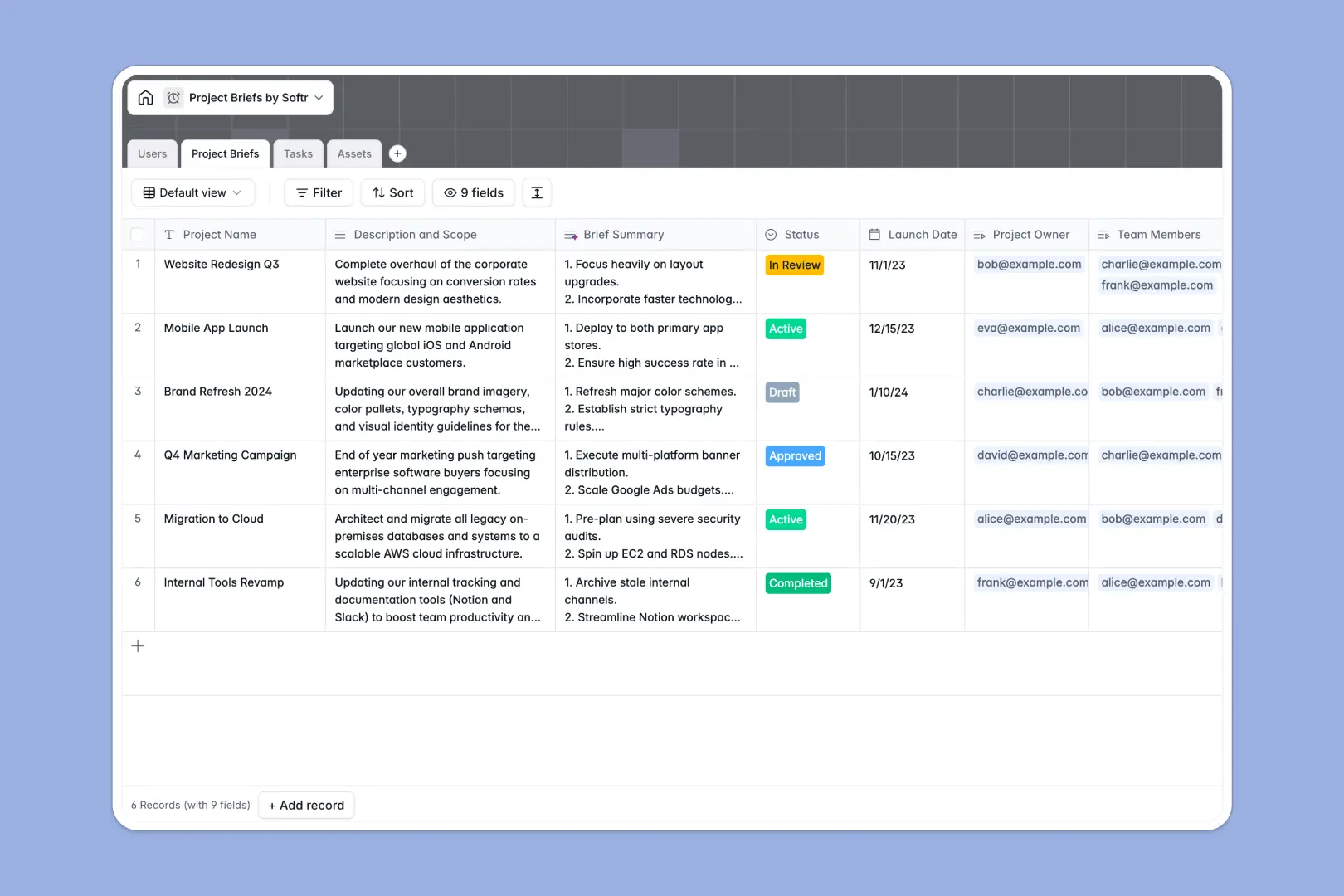
Your Project Briefs Database at a glance
This template centralizes your project launch plans, deliverables, and assets in one organized workspace. It connects your team directly to the tasks they own so that project alignment happens naturally.
Your database connects three main areas: Project Briefs, Tasks, and Assets. By linking records together, you can click on any project brief to see its complete scope, assigned team members, and real-time task statuses.
This setup also includes smart automation: integrated AI Summaries instantly condense long project descriptions, while AI-powered task priority fields automatically weigh urgency to keep your team focused on what matters.
Where project briefs outgrow Airtable
If you are searching for a project briefs Airtable approach, you already know that a structured database is the correct foundation for your workflow. However, before committing to a base, it is critical to look at where teams hit limitations.
What changes with a database built for apps
When your team expands, paying for every single database collaborator gets expensive quickly. Softr Databases are designed to provide the same strong relational structures without punishing team growth.
Softr Databases allow you to share your project briefs, tasks, and file assets with your entire organization because every plan includes unlimited collaborators. You get higher record rates, faster API requests, and built-in interface tools directly on top of your tables.
What you can do with this template
This template lets you coordinate projects from initial scope definition to final asset handoff. You can easily adjust status choices like "Draft" and "Approved" to match your team's approval pipeline.
You can also use Database AI agents directly inside your tables. They can summarize project briefs on demand or automatically rank tasks by priority as soon as your project managers enter them.
-
Users
Track system users, administrators, and team roles with assigned projects
-
Project Briefs
Manage scopes and launch dates, leveraging AI-powered brief summaries
-
Tasks
Organize deliverables with deadlines and AI-determined task priorities
-
Assets
Centralize design assets, reference materials, links, and documents
Who is this Project Briefs database for
- Project Managers: Keep track of timelines, launch dates, and project statuses in one clean list.
- Creative & Content Teams: Centralize project assets, templates, and reference URLs directly next to tasks.
- Product Managers: Outline scope, assign cross-functional team members, and view dependencies.
- Operations Leaders: Establish standard workflows for project intake and asset management without clutter.
How to take it further
First, configure your fields. You can rename statuses, customize document types, or alter select fields in your Assets table to match your organization's file-handling guidelines.
Next, upload your existing project files or sheets. You can use the built-in CSV importer to move your current project pipeline into your database in a few clicks.
When you are ready, use the AI app generator to turn this database into an internal project portal. Real team members can log in, view only their assigned briefs, update tasks, and upload assets based on the users and permissions you manage visually.
-
1
-
2
-
3
-
4
Frequently asked questions
-
What is a project briefs database?
-
Why use an Airtable alternative for managing project briefs?
-
How can AI help managing project briefs inside this database?
-
Can I build an app on top of this project briefs database?
-
Is this project briefs template free to use?
-
Can I import my existing spreadsheet data into this template?
Start building today. It's free!
Build and launch your first app in under 30 minutes.