


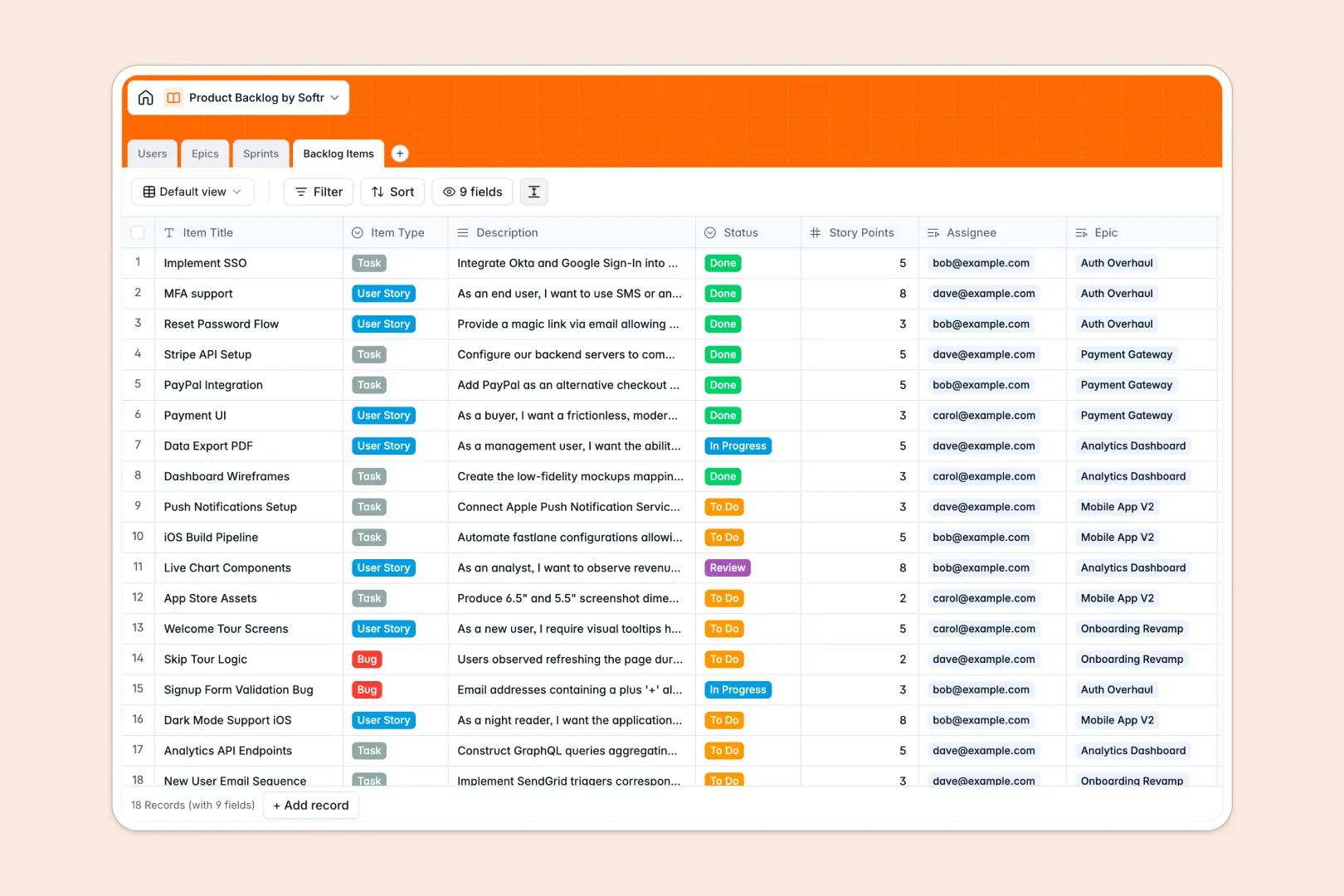
Your Product Backlog database at a glance
This template gives you a robust framework to centralize your product requirements. It lets you capture bugs, prioritize user stories, and track development velocity in real time.
Everything is connected out of the box. Your epics link directly to individual backlog items, which are seamlessly assigned to sprints and team members.
With two built-in AI fields, your database automatically generates testable acceptance criteria for backlog items and summarizes high-level epics to keep stakeholders informed.
What to check before building your product backlog base in Airtable
While Airtable is a powerful tool with relational capabilities, managing dynamic engineering backlogs there often runs into scalability and cost barriers that slow down shipping software.
What changes with a database built for apps
First, product teams grow fast. Sharing an Airtable backlog with external developers, testers, and designers quickly sparks high per-seat fees because everyone needs edit access to move tickets.
This is exactly why Softr Databases are structured differently. You get clean relational fields and rapid API speed, plus unlimited collaborators included on every single tier.
By keeping your schema native to the platform, you never have to stitch together external interface plugins or syncing tools just to give designers and developers simple, restricted access levels.
What you can do with this template
This backlog template lets you group small tasks inside broader Epics, schedule them into specific Sprints, and track total Story Points cleanly.
With integrated Database AI agents, you can prompt the database to translate raw feature write-ups into testable developer guidelines as updates happen.
-
Users
Track product team members with their roles and assigned tasks
-
Epics
Manage large blocks of work with AI summaries for quick insights
-
Sprints
Plan and monitor timeboxed sprints with schedules and focus goals
-
Backlog Items
Track tasks and bugs with AI-generated acceptance criteria
Who is this Product Backlog database for
- Product Managers: Streamline feature roadmaps, define clear epics, and manage team velocity easily.
- Development Leads: Align developer priorities with sprint timeline capacity and reduce planning friction.
- Designers & QA: Access clear acceptance criteria, track bug status, and claim tasks directly.
How to take it further
Customize the database
Add custom dropdown values for priorities, define unique item types (like spikes or hotfixes), or append formula fields to calculate business value versus development effort.
Import your existing data
Bring your list over from spreadsheets or other project management platforms instantly using CSV uploads or connect external tools via the API.
Build a full app around it
When you are ready to ship, use the AI app generator to generate client portals or developer hubs on top of this exact schema.
Applying users and permissions guarantees developers modify only their own tickets, while external executives only see high-level roadmaps without clutter.
-
1
-
2
-
3
-
4
Frequently asked questions
-
What is a product backlog database?
-
Why use a no-code database to build a product backlog system?
-
How can AI help managing data for your product backlog?
-
Can I build an app with this product backlog database?
-
Is this Product Backlog template free?
-
How is this template different from an Airtable template?
Start building today. It's free!
Build and launch your first app in under 30 minutes.