


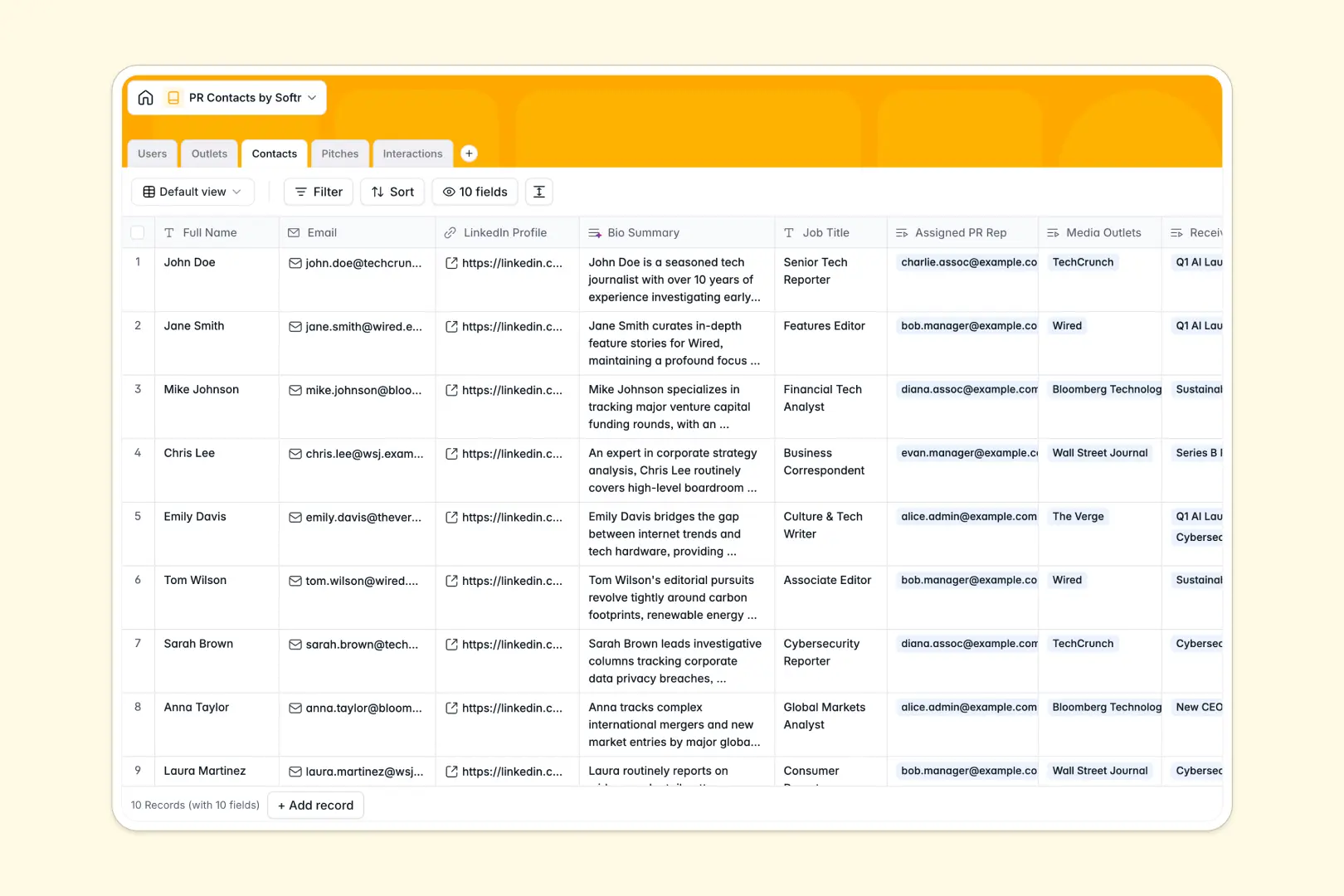
Your PR Contacts database at a glance
This template keeps media lists, outlets, campaigns, and communications perfectly organized in one central place. It helps PR teams move past spreadsheets to coordinate outreach with complete clarity.
Your database connects five tailored tables: Contacts, Outlets, Pitches, Interactions, and Users. Because these tables relate natively to one another, you can instantly see which outlets a contact works for, review their recent interactions, and track active pitches without copy-pasting.
With built-in AI capabilities, the database instantly researches professional backgrounds from LinkedIn profiles, generates targeted pitch email drafts, and analyzes interaction sentiment automatically.
What to check before building your PR contacts base in Airtable
If you are evaluating how to manage press relations, choosing a platform to host your relational data is a smart first step. While many teams default to Airtable for managing complex outreach networks, it often comes with roadblocks when you open it up to collaboration.
What changes with a database built for apps
Unlike platforms that charge per-seat fees that penalize you for adding collaborators, Softr Databases include unlimited collaborators on all plans so your entire team, agency, and clients can edit and view data freely.
Rather than dealing with restrictive record ceilings that hold back large-scale media lists, you can scale safely with higher limits and robust API performance. Most importantly, you do not have to stitch multiple external tools together to share lists; the database layer and interface components live together safely on one platform.
What you can do with this template
This template lets you immediately organize your press contacts and publications without structural setups. It eliminates manual background research by using Database AI agents that auto-fill details from web sources directly inside your records.
You can draft compelling pitch campaigns natively and track the history of every email, meeting, and call on a single timeline so no journalist gets pitched the same story twice.
-
Users
Track PR representatives and admins with roles and contact directories
-
Outlets
Manage media publications and channels with AI-generated web overviews
-
Contacts
Organize media leads using AI-generated LinkedIn professional summaries
-
Pitches
Draft PR campaigns and email subject options powered by AI generation
-
Interactions
Log communications with media contacts and analyze sentiments using AI
Who is this PR Contacts database for
- PR Agencies: Coordinate outreach across multiple team members and easily isolate contact records for specific campaigns.
- In-house Marketing Teams: Maintain active relationships with key media outlets, build clean lists, and track pitching history.
- Startup Founders: Keep track of early press lists, store target outlets, and draft clean pitches to secure media coverage.
- Communications Managers: Log all interactions with reporters and monitor automated sentiment tracking to optimize outreach.
How to take it further
Customize the database
Toggle select fields quickly, define custom categories for your media outlets, or add new columns to map specialized fields in a few clicks within your native database.
Import your existing data
Migrate existing media lists in a flash. Upload your media contacts via CSV import or use the Web API to run real-time integrations with external services.
Build a full app around it
When you are ready to collaborate securely, use the AI app generator to turn this database into an interactive PR portal. You can easily control access control rules to keep client details private while letting team leads edit relations. Your business database, workflows, and frontend will remain fully synced without a single line of code.
-
1
-
2
-
3
-
4
Frequently asked questions
-
What is a PR Contacts database?
-
Why use a no-code database to build a PR contacts system?
-
How can AI help managing data for PR contacts?
-
Can I build an app with this PR Contacts database?
-
Is this PR Contacts template free?
-
How is this template different from a PR contacts Airtable template?
Start building today. It's free!
Build and launch your first app in under 30 minutes.