


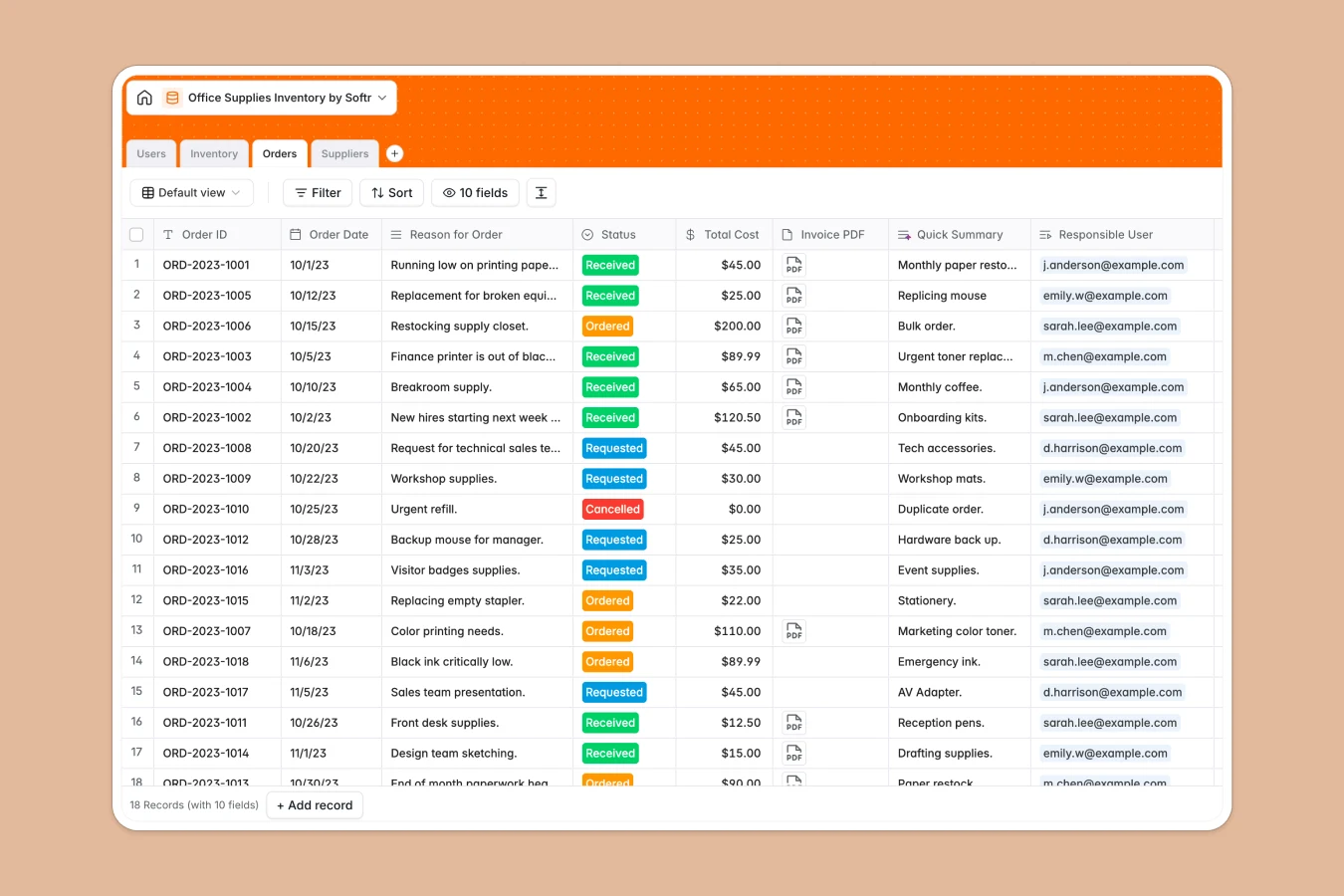
Your Office Supplies Inventory database at a glance
Keep track of all office essentials, monitor stock fluctuations, and fulfill team orders seamlessly in one unified hub.
This template connects your Inventory items to Suppliers and employee Orders, ensuring you never run out of critical supplies like toner, paper, or electronics.
What to check before building your office supplies inventory base in Airtable
Airtable is a powerful tool for designing relational schemas. However, managing office supply requests across a growing company often exposes collaboration and scale limitations.
What changes with a database built for apps
When multiple team members need to submit requests, view inventory, or approve orders, Airtable's per-seat pricing model becomes expensive very quickly.
Native Softr Databases allow you to share access with unlimited internal users without increasing your monthly bill.
This means you can easily store up to 200,000 inventory items and orders natively without hitting strict scale ceilings or paying for every employee who needs to request a new notebook.
What you can do with this template
Log new procurement requests instantly and monitor their progress from "Requested" to "Received" in the dynamic Orders table.
Automatically identify when paper or writing instruments fall below safe limits using the built-in Stock Status formula.
If you want to automate low-stock notifications, you can set up Database AI agents to draft replenishment emails straight to your vendors.
-
Users
Track authorized staff members managing orders and approval levels
-
Inventory
Monitor current stock levels, categories, and replenishment status
-
Orders
Manage replenishment requests, purchase workflow status, and costs
-
Suppliers
Maintain contact directories and system product lists for active vendors
Who is this Office Supplies Inventory database for
This flexible database handles workplace logistics for teams of any scale.
- Office Managers: Keep stock counts accurate, set reorder thresholds, and quickly access vendor contact details.
- Department Heads: Submit product requests for their teams and track approval statuses in real time.
- Procurement Leads: View historical orders, monitor total expenditures, and optimize relationships with key suppliers.
How to take it further
Customize the database
Easily adapt this layout to fit your exact workspace requirements. You can add custom categories, adjust reorder thresholds, or rename fields instantly within your Softr workspace.
Import your existing data
Bring in your existing inventory records in just a few clicks. Upload a CSV file or sync your current data using the database API to populate your tables.
Build a full app around it
Once your data is structured, you can easily build an app on top of it. Use Softr's AI Co-Builder to generate custom views, admin portals, and ordering workflows from a single text prompt.
Define exactly who sees what by setting up granular users and permissions. This allows staff to make requests while restricting approval actions only to authorized managers.
-
1
-
2
-
3
-
4
Frequently asked questions
-
What is an office supplies inventory database?
-
Why use a no-code database to build an office supplies inventory system?
-
How can AI help managing data for office supplies?
-
Can I build an app with this office supplies inventory database?
-
Is this Office Supplies Inventory template free?
-
How is this template different from an Airtable template?
Start building today. It's free!
Build and launch your first app in under 30 minutes.