


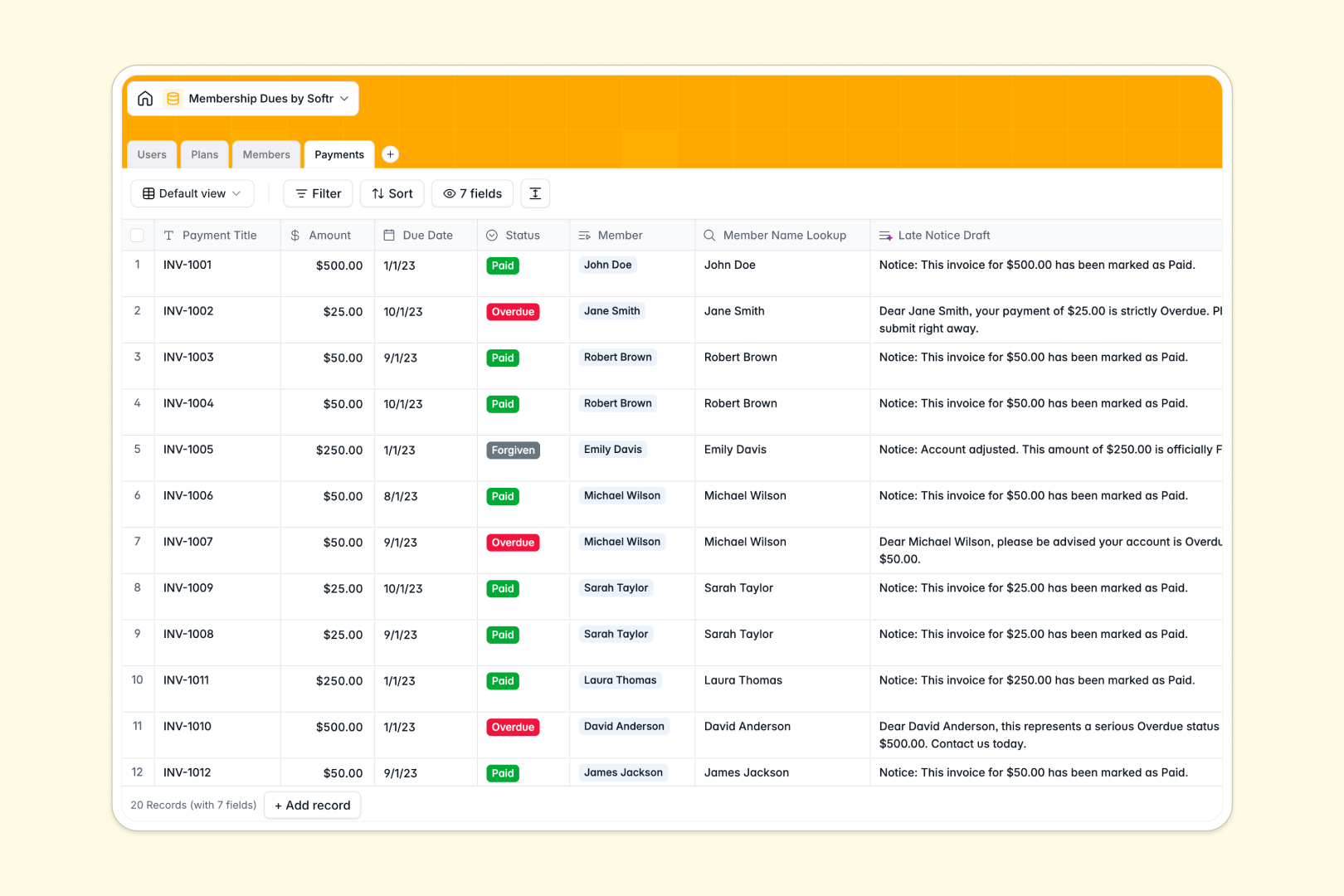
Your Membership Dues database at a glance
Manage your community's active plans and payment collections in a single, well-structured hub. This database connects your internal administrators directly to billing tiers, enrolled members, and live payment histories.
Every record relates to where it belongs: each member is linked to their designated subscription tier, their assigned account manager, and their active billing ledger. With built-in AI fields, you can instantly turn raw payment records into draft notices or member summaries without manual copy-pasting.
Where membership dues tracking outgrows Airtable
When managing community collections, coordinating with your internal team and external members requires more than just shared sheets. While Airtable offers strong relational tables, its per-seat pricing model makes it expensive to scale once you give more staff or managers editing access.
What changes with a database built for apps
This is exactly what Softr Databases are designed for. Instead of paying for every team seat, you get collaborative tables that scale without ballooning costs.
In addition to generous record counts and API limits, your tables rest of an app building pipeline. You can manage internal administrators, membership plans, and current ledgers natively on a foundation that fits your scaling operational needs.
What you can do with this template
- Track payments and plan performance: Visually audit which membership tiers are yielding the highest engagement and see exact rolls of enrolled members automatically summed up.
- Automate late payment reminders: Generate auto-drafted emails with Database AI agents whenever a record changes to "past due" status, eliminating manual monitoring.
- Keep operations secure: Keep member contact info, manager assignments, and billing histories joined under one coherent structure.
-
Users
Manage internal administrators and staff managing the memberships
-
Plans
Define membership tiers, prices, and use AI to pitch the benefits
-
Members
Track client files, active statuses, and use AI for user summaries
-
Payments
Monitor dues, record invoices, and use AI to draft late notices
Who is this Membership Dues database for
- Associations and Clubs: Easily keep member profiles associated with billing schedules and record payments systematically.
- Subscription Services: Manage custom billing curves, track plan tiers, and assign dedicated relationship managers to premium users.
- Internal Finance Teams: Track outstanding balances, draft notices, and maintain a historical archive of completed invoices.
How to take it further
Customize the database
Add your own unique pricing frameworks, adjust the billing cycles, or append custom select tags for membership statuses in a couple of clicks directly from the Softr workspace.
Import your existing data
Bring in data from external registries by importing your CSV files or setting up an API connection. Your existing records instantly map to your relationships and lookups.
Build a full app around it
When you are ready, use our AI app generator to turn this template into a secure, browser-based administrative portal. You can invite your internal team, build secure dashboards, and set granular users and permissions to control who sees financial balances. Generating your interface on top of a organized database makes custom software development lightning fast.
-
1
-
2
-
3
-
4
Frequently asked questions
-
What is a membership dues database?
-
Why use a no-code database to build a membership dues system?
-
How can AI help managing data for membership dues?
-
Can I build an app with a membership dues template?
-
Is this membership dues template free?
-
How is this different from an Airtable template?
Start building today. It's free!
Build and launch your first app in under 30 minutes.