


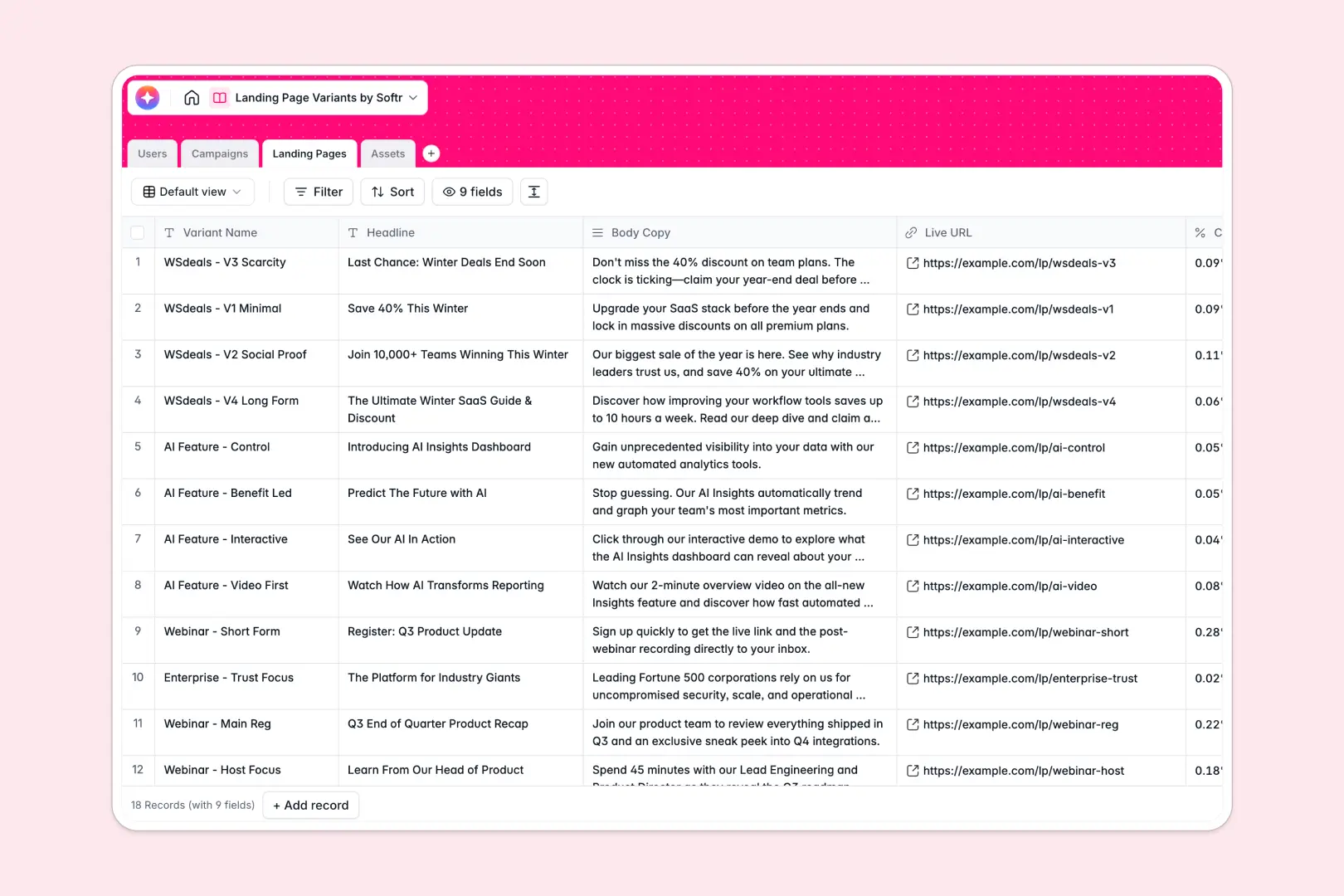
Your Landing Page Variants database at a glance
This template gives marketing teams, designers, and copywriters a single source of truth for managing creative experiments and conversion paths.
Keep your entire workflow organized by linking marketing initiatives in Campaigns directly to individual live URLs and design files in Landing Pages and Assets.
Because this template is built on a relational database, you can automatically run the Database AI agents included in the tables to summarize creative campaign briefs, generate SEO descriptions, and create image alt text instantly.
What to check before building your landing page variants base in Airtable
Airtable is a strong database with great relational capabilities, but building your variant tracking system there can introduce cost and access barriers as your operations expand.
If you want your entire marketing team, freelance copywriters, and external design agencies collaborating on landing page variants, Airtable's per-seat pricing makes sharing edit access prohibitively expensive.
This is exactly why Softr Databases are designed to provide the same relational structure—with linked records, rollups, and typed fields—but without the collaborator tax. You get a robust relational foundation for your marketing campaigns with unlimited collaborators on all plans.
What changes with a database built for apps
When you manage campaigns and landing pages on a platform optimized for building interfaces, your database is just the starting point.
Instead of exposing raw tables to external copywriters or clients, you can instantly turn your database into a custom portal. Clients can log in to view conversions, while designers only see their assigned assets, all controlled by native user permissions.
Additionally, you can run automated workflows directly inside your fields. The native Database AI agents in this template can automatically write alt text for newly uploaded images and draft meta descriptions for new variants to speed up launch times.
What you can do with this template
- Track conversions by variant: Link specific headers, body copy, and conversion rates to the parent campaign to see which messaging wins the test.
- Keep creative assets organized: Connect hero images and design files directly to the variants they're used in, eliminating messy asset folders.
- Automate copy generation: Let built-in AI fields draft SEO descriptions from your headline and body copy, reducing repetitive tasks.
-
Users
Track team members involved in landing page creation and campaign roles
-
Campaigns
Manage marketing initiatives and generate AI-powered summaries of briefs
-
Landing Pages
Test design variants with AI-generated SEO descriptions and performance metrics
-
Assets
Store media items and generate screen-reader-friendly alt text using AI
Who is this Landing Page Variants database for
- Growth Marketers: Track conversion rates across active experiments and keep variants organized by parent campaign.
- Copywriters & Designers: Access campaign briefs, upload assets, and collaborate on page content directly.
- Agency Teams: Present landing page variations and performance metrics to clients in a structured, professional format.
How to take it further
Customize the database
Your marketing team's workflow is unique. You can easily modify the structure of this database by adding new fields, changing status options, or tracking metrics like bounce rates and bounce sessions with numeric and percentage columns.
Import your existing data
If you have campaigns, past conversion data, or asset lists stored in spreadsheets, you can bulk-import them using a CSV file. You can also connect other marketing tools via API to sync live performance data directly into your variants table.
Build a full app around it
When you are ready, you can easily build an app on top of this database. Use Softr's AI app generator to turn these tables into a client portal or internal marketing hub.
With custom users and permissions, marketers, copywriters, and external partners only see and edit the tasks and campaigns assigned to them, keeping your data secure while eliminating clutter.
-
1
-
2
-
3
-
4
Frequently asked questions
-
What is a landing page variants database?
-
Why use a no-code database to build a landing page variant tracker?
-
How can AI help managing data for landing page variants?
-
Can I build an app with this landing page variants database?
-
Is this Landing Page Variants template free?
-
How is this template different from an Airtable template?
Start building today. It's free!
Build and launch your first app in under 30 minutes.