


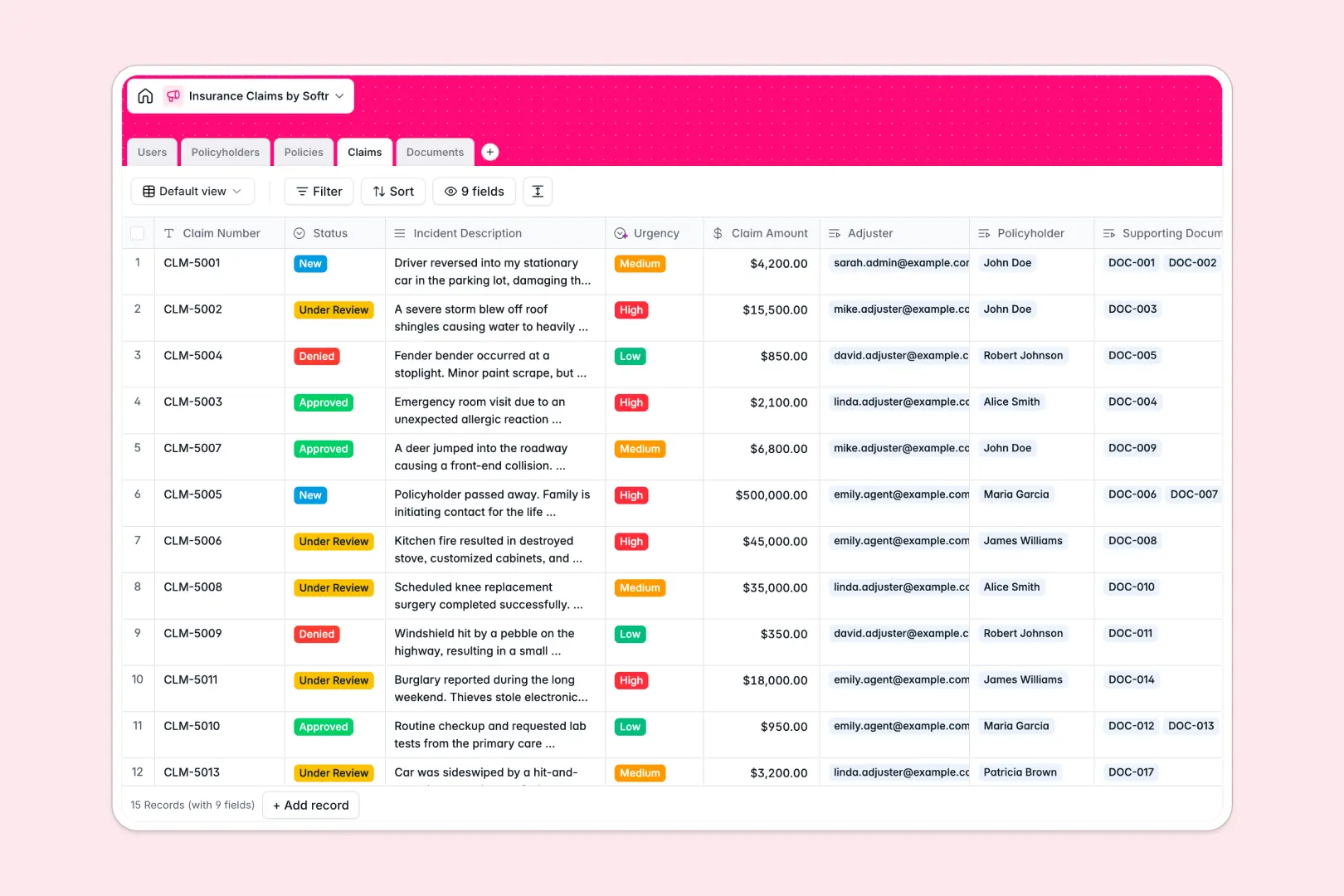
Your Insurance Claims database at a glance
Organize policyholders, insurance policies, and claims in a structured system that connects every record where it belongs. This template helps internal teams, agents, and custom adjusters process incoming claims without manual bottlenecking.
Five dedicated tables keep your data clean: Users (agents/adjusters), Policyholders, Policies, Claims, and Documents. Every filed claim links directly to its underlying policy and the adjuster assigned to it, making it easy to track historical payouts.
Built-in AI features streamline your review process automatically. A dedicated AI Agent reads incident descriptions to determine claim urgency, while another generates automated summaries of uploaded supporting documents.
What to check before building your insurance claims base in Airtable
When managing sensitive insurance records, choose a system built for operational scale and team collaboration.
What changes with a database built for apps
While Airtable provides relational foundations, managing a claim process soon forces you to choose between costly license fees or restricted access. Airtable charges per collaborator, meaning a system shared with multiple adjusters and policyholders becomes pricey fast.
With Softr Databases, you get unlimited collaborators on all plans. You can easily scale your team of adjusters and agents without fear of per-seat financial penalties.
Furthermore, Softr integrates your database, custom interfaces, workflows, and granular permissions into one system. You do not have to purchase and stitch together external subscription tools just to let policyholders securely check their claim status.
What you can do with this template
Get started immediately with pre-configured tables that map the relationships between policies, claims, and documents natively. You can adapt status options, add custom fields, or bulk-import policyholder details in minutes.
With our integrated Database AI agents, you can also automate standard administrative work. The database automatically analyzes incident reports to set claim priority ratings and summarizes evidence documents as adjusters upload them.
-
Users
Manage claims adjusters, administrators, and agents with assigned roles
-
Policyholders
Centralize customer contact information, policy links, and claim history
-
Policies
Track active insurance contracts, coverage limits, types, and terms
-
Claims
Process insurance claims using AI assistance to assess incident urgency
-
Documents
Store supporting files and evidence with automated AI summaries of notes
Who is this Insurance Claims database for
- Independent Insurance Agencies: Centralize policyholder details and claim tracking in one clean space.
- Claims Adjusting Teams: Assign tasks, review evidence reports, and update statuses through a shared queue.
- Operations Managers: Monitor total claims count and coverage limits across active policy contracts.
How to take it further
1. Customize the database
Tailor the database to your custom insurance vertical. You can add new coverage limits, rename coverage types (such as Marine or Liability), and modify the select field choices to match your team's exact workflow stages.
2. Import your existing data
Avoid manual data entry by uploading your current policyholder directories or legacy claim histories through a CSV import. You can also utilize our API to sync live records directly from your external tools.
3. Build a full app around it
When your team is ready to scale, easily build an app on top of this database. Our AI Co-builder lets you describe what you need in plain text to instantly generate a secure portal.
Specify custom user roles to configure users and permissions perfectly. This ensures adjusters only edit assigned claims, while policyholders can securely submit new incident reports and documents through a personalized portal.
-
1
-
2
-
3
-
4
Frequently asked questions
-
What is an insurance claims database?
-
Why use a no-code database to build an insurance claims system?
-
How can AI help managing data for insurance claims?
-
Can I build an app with an insurance claims database?
-
Is this Insurance Claims template free?
-
How is this template different from an Airtable template?
Start building today. It's free!
Build and launch your first app in under 30 minutes.