


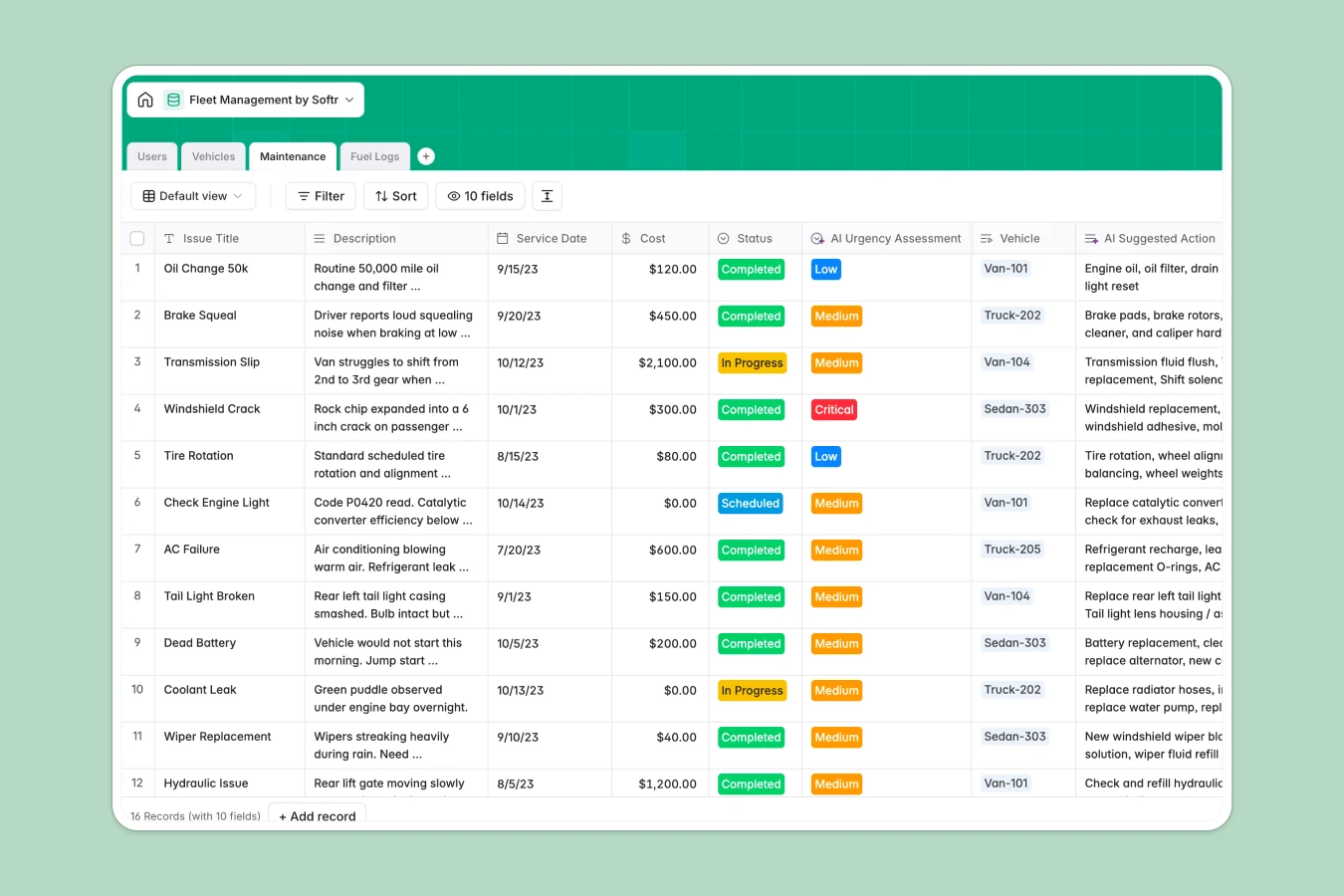
Your Fleet Management database at a glance
This template organizes your entire fleet operation, mapping out vehicles, drivers, fuel logs, and maintenance events in a single, connected space. By centralizing operations, you protect driver safety and prevent costly, unscheduled vehicle downtime.
Keep track of active, in-shop, or decommissioned assets while linking drivers to their assigned vehicles. Native relational connections tie fuel receipts and repair invoices back to specific trucks or vans instantly, giving you a real-time view of operating costs.
Built-in AI fields help you automate tedious research and speed up triaging. The database can automatically search the web for manufacturer specs and assess the urgency of a driver's reported issue based on their description.
What to check before building your fleet management base in Airtable
While using an Airtable base to coordinate commercial vehicles seems logical because of its database structure, scaling up operations often hits immediate pricing and collaboration limits.
What changes with a database built for apps
As your business grows, sharing data shouldn't get more expensive. Traditional databases charge you for every single coordinator, driver, or mechanic who needs to check in or update status fields.
With Softr Databases, your flat subscription covers unlimited team members and external vendors, so everyone can log data freely. It supports up to 200,000 records per database and features a fast API capable of 50 requests per second, preventing latency during busy field hours.
Instead of stitching separate tools together for user log-ins, client portals, and external driver forms, Softr gives you both the structured data layer and the app builder natively in one place.
What you can do with this template
This ready-to-use template helps you keep trucks on the road by managing vehicles and fuel logs sequentially. You can immediately log odometer readings, verify driver license numbers, and calculate total maintenance costs automatically via rollup formulas.
It features native Database AI agents designed to automate operations. For instance, when a driver reports a mechanical issue, an integrated AI agent classifies the urgency into Low, Medium, or Critical and suggests potential fixes or required parts.
-
Users
Track fleet managers, drivers, and mechanics with roles and assignments
-
Vehicles
Centralize vehicle assets and lookup engine specs via AI-powered web search
-
Maintenance
Log repairs and leverage AI to evaluate issue urgency and suggest actions
-
Fuel Logs
Track fuel consumption details, driver submissions, and purchase costs
Who is this Fleet Management database for
- Fleet Operations Managers: Track vehicle status, total maintenance costs, and odometer readings in real time.
- Logistics & Dispatch Teams: Keep a secure record of active drivers, their license details, and assigned vehicles.
- Maintenance Mechanics: View reported issues immediately, get AI-suggested actions, and log repaired vehicle status.
- Finance Teams: Keep tabs on fuel consumption, review receipts, and track overall fleet expenses logically.
How to take it further
Customize the database
Adjusting this database to match your exact operations is incredibly fast. You can rename status select options, add custom fields for tracking registration dates, or create new views to filter vehicles by location.
Import your existing data
If you have your fleet list stored anywhere else, you can import it in moments. Use CSV imports to upload vehicle histories, driver profiles, and maintenance logs, or use the API to sync telemetry data in real time.
Build a full app around it
When your team is ready to scale up, you can translate this structure into a secure AI app generator experience. Describe the operations mobile app or partner portal you need in a single prompt and watch the co-builder create the interfaces, logic, and workflows directly on top of your database.
Using native users and permissions ensures drivers only see their assigned vehicle and fuel logs, while managers get full access to budget overviews and system settings.
-
1
-
2
-
3
-
4
Frequently asked questions
-
What is a fleet management database?
-
Why use a no-code database to build a fleet management system?
-
How can AI help managing data for fleet operations?
-
Can I build an app with this fleet management database?
-
Is this fleet management template free?
-
How is this template different from an Airtable template?
Start building today. It's free!
Build and launch your first app in under 30 minutes.