


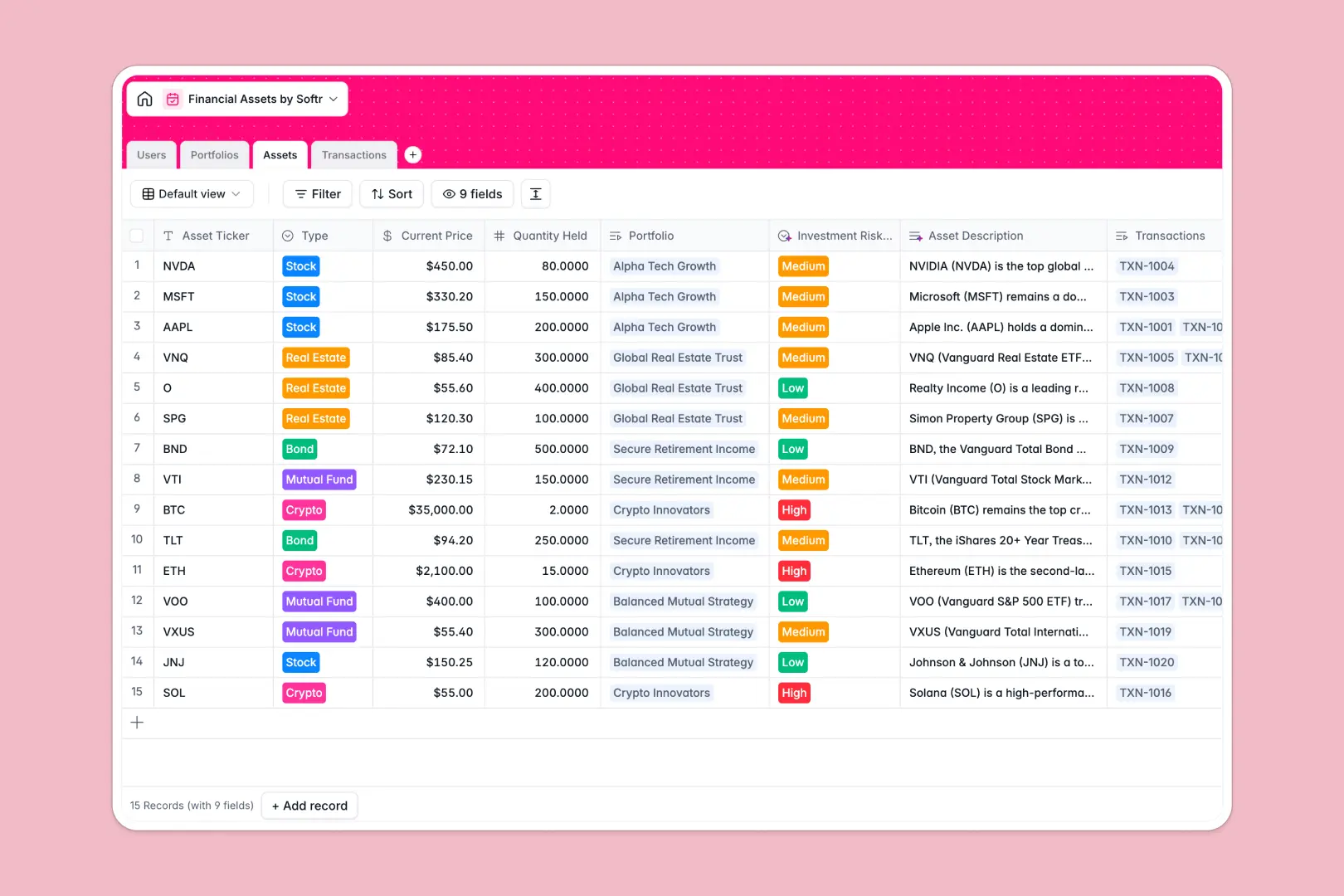
Your Financial Assets database at a glance
This template gives you a structured way to track investments, portfolios, transactions, and users in one secure place. Instead of scattered data, you can see how individual assets roll up into overall portfolio valuations and track performance over time.
Everything is connected logically. The Users table identifies portfolio managers and clients, who are linked directly to Portfolios. Individual Assets track quantities and live prices, while a Transactions table logs every buy, sell, or dividend event.
With native AI fields, the database automatically summarizes portfolio strategies, writes concise asset overviews, and classifies investment risk levels on the fly as your data changes.
What to check before building your financial assets base in Airtable
While Airtable is a highly capable database, building and sharing a tailored client portal or internal investment management tool on top of it often comes with unwanted compromises in terms of costs and security.
What changes with a database built for apps
First, Airtable's per-seat pricing can quickly penalize you for collaborating. If you need to give multiple clients or external portfolio managers edit access to their specific data, your subscription costs grow with each invite. With Softr Databases, you have unlimited collaborators on all plans, letting you share data generously without scale penalties.
Second, managing access control inside a raw database is difficult. If you want a client to see only their own portfolio, or a manager to edit only their assigned assets, you have to stitch extra third-party tools and forms together.
Starting with this template means you’re using a database designed to easily connect to a custom interface. You can set permissions, build secure client portals, and establish streamlined workflows directly on top of your financial data in the same unified system.
What you can do with this template
- Track valuations instantly: Roll up asset current prices and quantities into total portfolio values automatically without complex script programming.
- Automate market analysis: Tap into database AI agents to crawl the live web, write market outlooks based on stock tickers, and classify asset risk profiles dynamically.
- Keep transactional history clean: Link all buy, sell, and transfer history securely to their parent assets, calculation formulas, and receipt attachments for painless auditing.
-
Users
Track portfolio managers, admins, and clients with their contact info
-
Portfolios
Manage financial portfolios with AI-generated strategy summaries
-
Assets
Track individual investments with AI-generated risk evaluations and research
-
Transactions
Log buy, sell, and dividend allocation events with transaction receipts
Who is this Financial Assets database for
- Boutique Wealth Managers: Keep a master directory of client portfolios and track performance in real time.
- Investment Co-operatives: Organize asset allocations, execute trades with clean documentation, and keep team members aligned.
- Private Investors & Family Offices: House diverse financial holdings, track risk metrics, and maintain a historical ledger of transactions.
- Financial Advisors: Oversee individual client portfolios, map managers to clients, and log secure receipts dynamically.
How to take it further
Customize your investment schema
Modify the default fields to match your exact investment methodology. Change classifications in the asset type dropdown, add target yield formula fields, or adjust the AI's risk calculation rules to match your firm's specific thresholds.
Run automated data imports
Upload historical transaction logs in bulk using a simple CSV import, or use our developer-friendly API to feed live pricing and external transaction flows into your tables automatically.
Build a full app around your assets
Once your data is organized, you can easily generate an app with AI on top of this exact database. Using Softr's AI Co-Builder, simply describe what you need—like a secure client portal or an internal manager workspace—and the system will quickly spin up custom layout interfaces.
You can set detailed users and permissions so clients only see their own portfolio summary while managers can add new transactions. Everything runs on the exact same database structure with zero engineering overhead.
-
1
-
2
-
3
-
4
Frequently asked questions
-
What is a financial assets database?
-
Why use a no-code database to build a portfolio management system?
-
How can AI help managing financial asset data?
-
Can I build a secure client portal with this financial assets database?
-
Is this financial assets template free?
-
How is this database different from an Airtable template?
Start building today. It's free!
Build and launch your first app in under 30 minutes.