


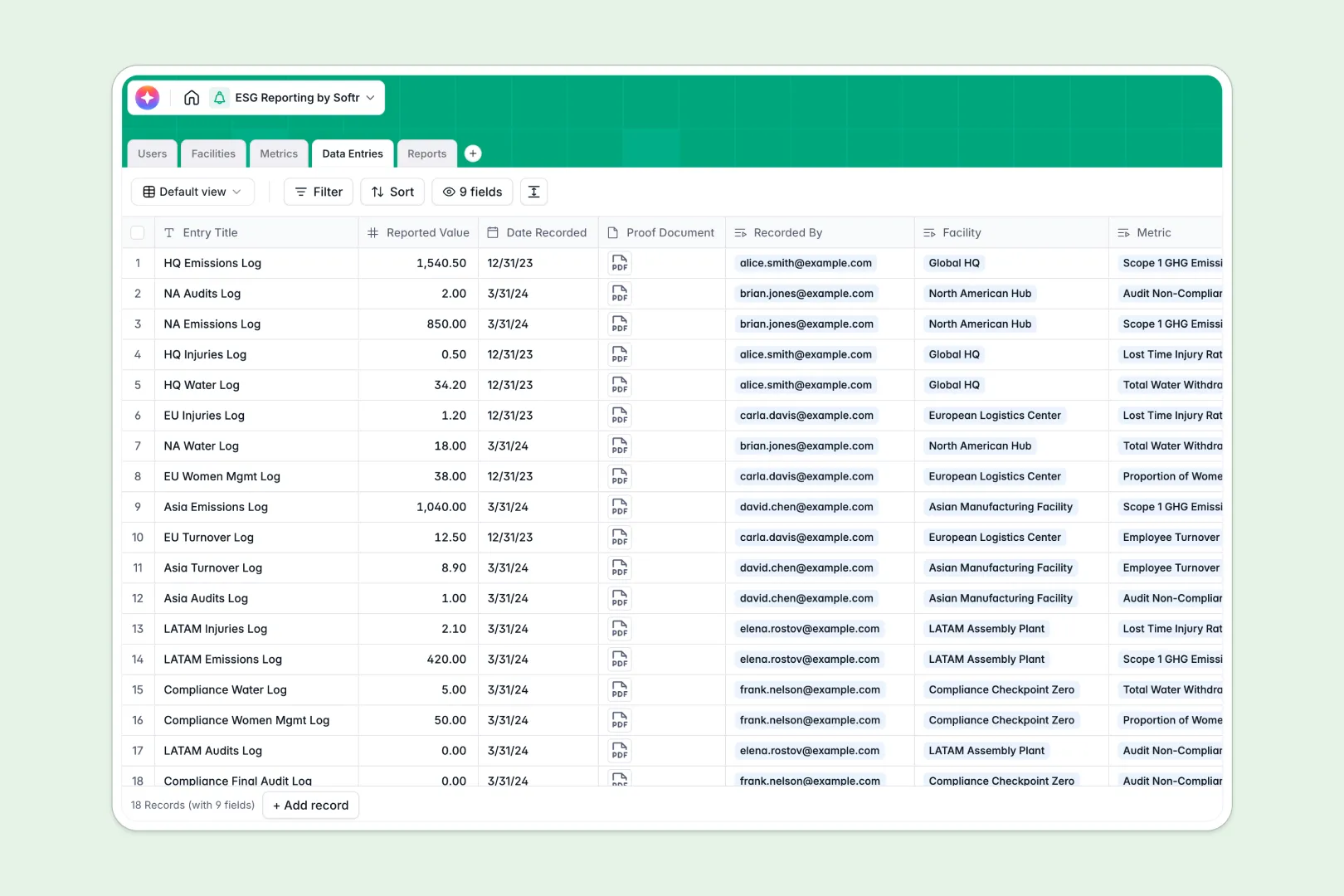
Your ESG Reporting database at a glance
Track your organization's environmental, social, and governance impact in one secure place. This template links facilities, sustainability metrics, and monthly data entries into a single, cohesive framework.
Everything connects naturally. When data entries are logged for a facility, the system automatically runs rollups and updates audit logs, giving compliance officers real-time visibility into performance indicators.
This database also includes built-in AI capabilities. It automatically categorizes new sustainability metrics and drafts executive summaries for your annual reports using the latest entry data.
What to check before building your ESG reporting base in Airtable
Gathering environmental data from facility managers across multiple sites requires sharing your workspace, which is where traditional tools can become incredibly expensive.
If you build your sustainability tracker in Airtable, you will face steep per-seat fees because every manager who needs to input utility bills or proof documents requires paid access. Additionally, as you scale from local facilities to global operations, you risk hitting record limits that stall your auditing process.
What a database built for apps changes
Instead of paying for every user who uploads an energy invoice, you need a system that supports your entire team without punishing your growth.
This is exactly what Softr Databases are designed for. You get the same relational power you expect—linked tables for facilities, metrics, and logs—but with unlimited collaborators on all pricing plans.
This design allows you to build a secure contributor network where team members submit data through tailored interfaces without accessing the underlying database directly.
What you can do with this template
This template allows you to centralize multi-facility logging immediately. You can assign specific contributors to facilities, log real-time values, and upload proof documents like utility bills directly to records.
To automate manual intelligence, you can leverage Database AI agents to auto-fill metric definitions or generate draft executive summaries for stakeholders as soon as a report year concludes.
-
Users
Track system users including administrators, managers, and external auditors
-
Facilities
Manage specific locations and physical business units tracking ESG metrics
-
Metrics
Standardize ESG indicators using AI to auto-classify categories and definitions
-
Data Entries
Log individual metric values recorded at facilities and track proof documents
-
Reports
Generate compliance reports featuring AI-powered executive summaries
Who is this ESG Reporting database for
- Sustainability Officers: Streamline the entire collection of ESG indicators and prepare for third-party audits with verifiable records.
- Facility Managers: Easily input local energy use, waste logs, and social metrics without dealing with complex database structures.
- EHS Teams: Centralize environmental health and safety compliance metrics across multiple corporate locations on a single dashboard.
- Leadership & Stakeholders: View real-time progress toward corporate sustainability milestones and review generated performance summaries.
How to take it further
1. Customize the database
You can modify this database in seconds. Add customized emission conversion formula fields, change select structures like ESG categories, or add custom metric types to match frameworks like GRI or SASB.
2. Import your existing data
Importing historical sustainability data is entirely straightforward. You can upload past utility tracking sheets via CSV import, or use the API to feed automated data directly from smart meters or external billing platforms.
3. Build a full app around it
When your team is ready, convert this database into an interactive portal. Use the AI app generator to generate user-friendly submission forms for facility managers and audit dashboards for external inspectors.
Using native users and permissions, you can ensure contributors can only see and edit data for their assigned locations, while auditors have read-only access to all reports. A well-structured database guarantees your apps and workflows remain accurate and scalable as your ESG reporting matures.
-
1
-
2
-
3
-
4
Frequently asked questions
-
What is an ESG reporting database?
-
Why use a no-code database to build an ESG tracking tool?
-
How can AI help managing data for ESG reporting?
-
Can I build an app with this ESG reporting database?
-
Is this ESG reporting template free?
-
How is this ESG template different from an Airtable template?
Start building today. It's free!
Build and launch your first app in under 30 minutes.