


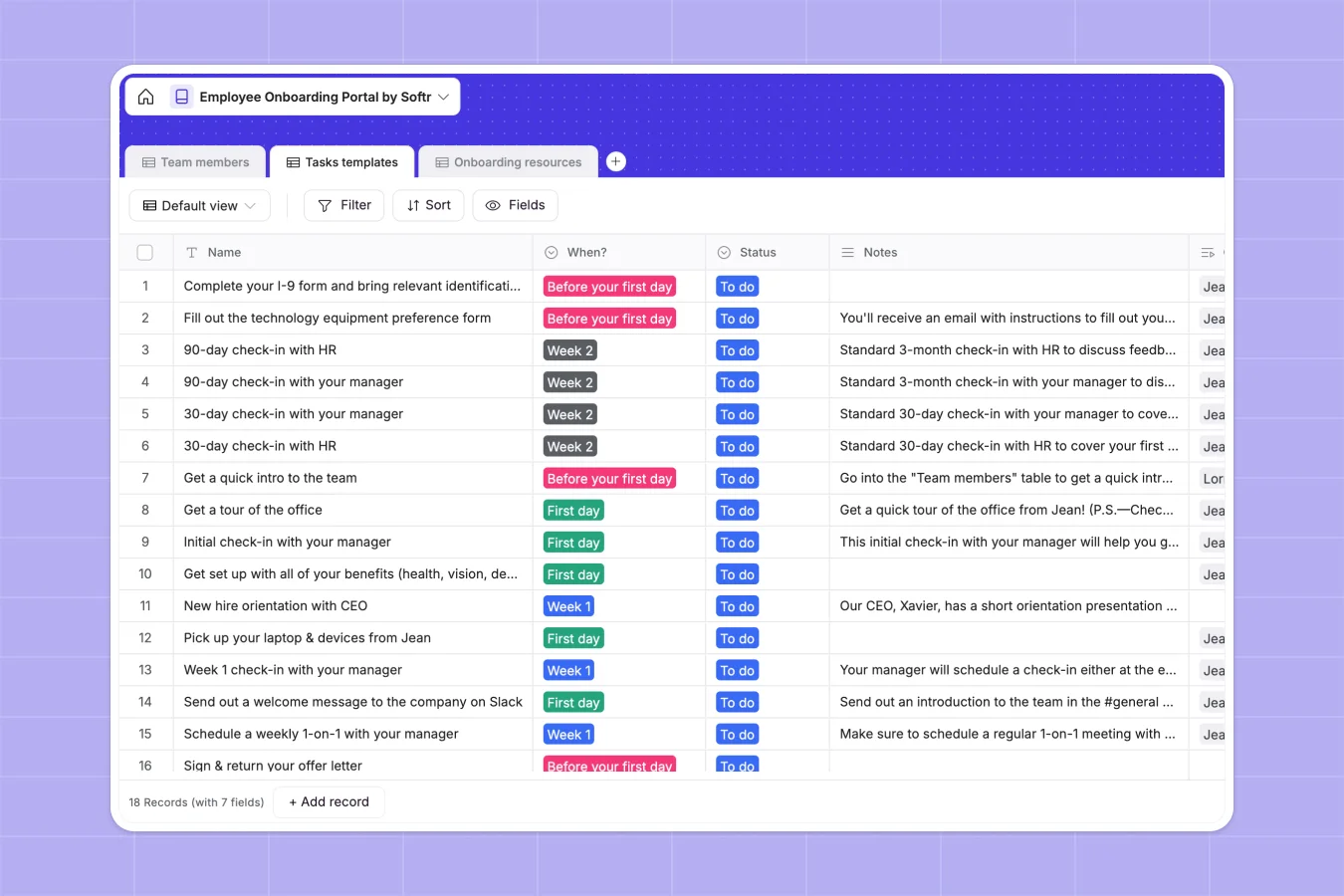
Your Employee Onboarding database at a glance
This template provides a clear, centralized hub for setting up new team members and managing their training paths from day one.
It connects your new hires to structured task checklists and relevant documentation, ensuring nothing slips through the cracks. Everything stays organized across three relational tables: Team Members, Tasks Templates, and Onboarding Resources.
What to check before building your onboarding base in Airtable
While Airtable is a powerful tool, managing employee onboarding within it often introduces unnecessary barriers as your company grows.
What changes with a database built for apps
Sharing an onboarding tracker with HR, hiring managers, and new hires starts to get expensive quickly under per-seat licensing models. This is exactly what Softr Databases solve by offering unlimited collaborators, allowing your entire team to update records together without unexpected costs.
Additionally, keeping employees locked inside raw database tables can feel overwhelming for non-technical users. A direct connection between your database and secure interface layers makes it simpler to guide newcomers through their workflows.
What you can do with this template
You can easily link new team members to pre-set tasks like signing contracts or reading manuals, checking off items as they finish.
With Database AI agents, you can automatically generate personalized onboarding task descriptions or summarize handbook documents directly within your tables.
-
Team members
Manage new hires with contact details, department roles, and progress tracking
-
Tasks templates
Organize structured onboarding checklists, timelines, and action items
-
Onboarding resources
Centralize helpful files, guides, and documentation for new joiners
Who is this Employee Onboarding database for
- HR Specialists: Manage active new hires and update global task templates simultaneously.
- Hiring Managers: Assign specific team resources and monitor real-time checklist progress.
- Operations Leads: Keep company handbooks and essential documents structured inside a secure hub.
- New Employees: View onboarding tasks organized by chronological phases (e.g., Week 1, Week 2).
How to take it further
Customize the database
Define your own departments like Engineering or Marketing and adjust the timeline selection options (e.g., "Month 1") to match your organization's specific training windows.
Import your existing data
Instead of starting from zero, import your existing employee rosters or task checklists directly via CSV files in just a few clicks.
Build a full app around it
When you are ready to remove raw tables entirely, you can easily build an app on top of this database.
By adding granular permissions, you can ensure new hires only see their assigned tasks and resources, creating a distraction-free, professional portal.
-
1
-
2
-
3
-
4
Frequently asked questions
-
What is an employee onboarding database?
-
Why use a no-code database to build an onboarding system?
-
How can AI help managing data for onboarding?
-
Can I build an app with this employee onboarding database?
-
Is this employee onboarding template free?
-
How is this template different from an Airtable template?
Start building today. It's free!
Build and launch your first app in under 30 minutes.