


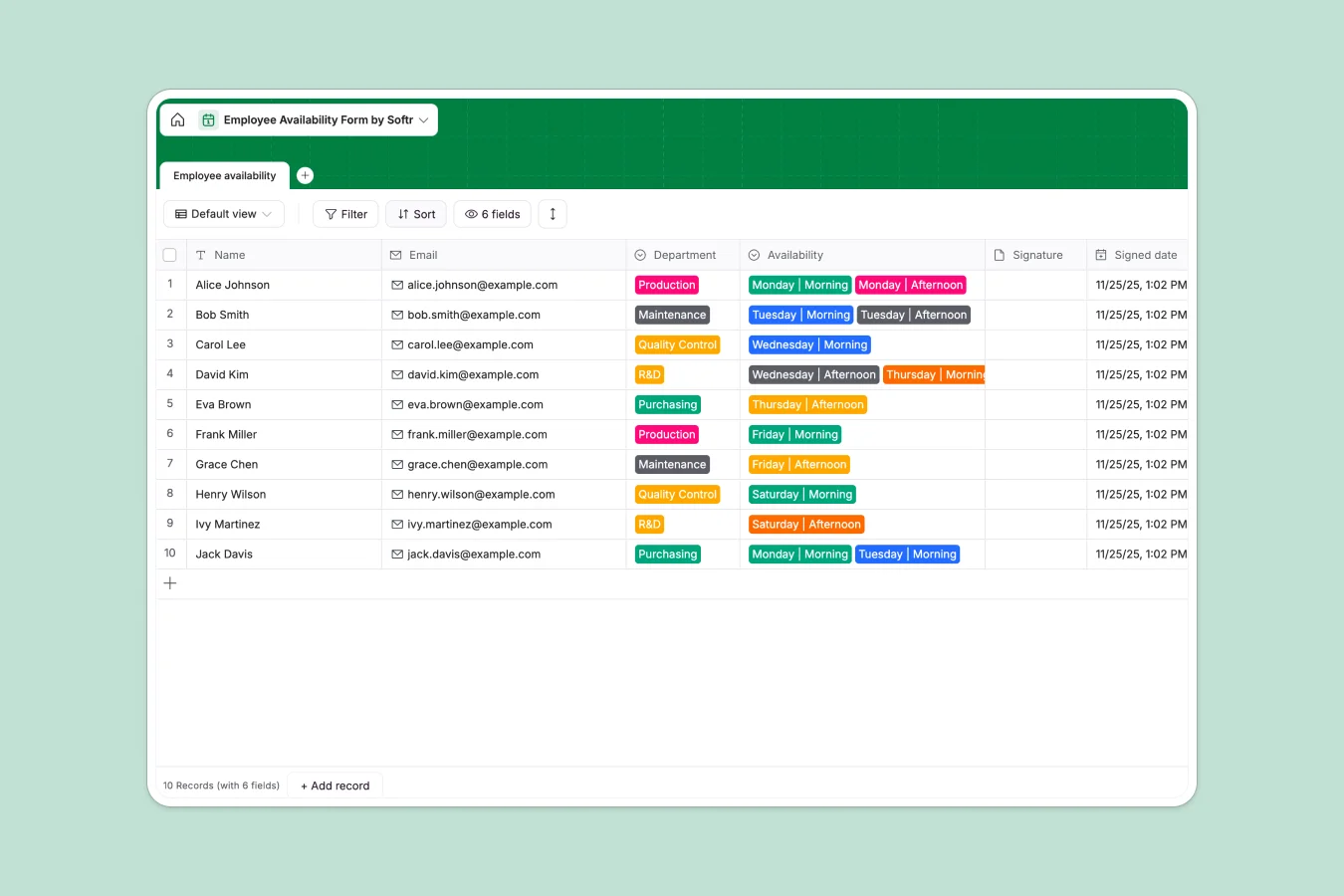
Your Employee Availability database at a glance
This pre-built template helps you collect and track when your employees are available to work across different departments. It eliminates messy emails and frantic texts by gathering signatures and shift preferences in one organized view.
Everything is structured in a single database table where you can view names, emails, departments (like Production or Quality Control), and specific available slots—such as Monday Morning or Friday Afternoon.
What to check before building your employee availability base in Airtable
While Airtable is a powerful tool for structuring employee data, the costs and limitations can quickly add up when you begin sharing your database with a growing team. Here is what you should consider before committing.
What changes with a database built for apps
Airtable's per-seat pricing means that as soon as you want employees to log in and update their own availability, your monthly bill spikes. This is exactly what Softr Databases are designed to solve.
With Softr, you get unlimited collaborators on all plans. You can store your employee availability safely and allow team leads to edit, view, and update records without paying for individual seats.
What you can do with this template
This template allows you to capture shift choices cleanly, track signed consent with the signature and signed date fields, and filter availability by department. It provides a clean, structured foundation for your scheduling workflow.
When you are ready, you can deploy Database AI agents to automatically categorize availability patterns or tag employees who haven't updated their hours, saving your scheduling managers hours of manual work.
-
Employee availability
Track staff working hour preferences, department roles and signing dates
Who is this Employee Availability database for
- Operations Managers: Track shifts across R&D, Purchasing, and Production to ensure every shift is fully staffed.
- HR Coordinators: Collect digital signatures and track submission dates for audit trails and compliance.
- Team Leads: Filter availability lists by specific days to quickly find replacements for last-minute absences.
- Staff members: Provide clear shift availability so managers build fairer schedules based on true preferences.
How to take it further
Customize the database
You can easily modify this template in seconds. Add new departments to the dropdown, adjust the available shift choices to match your specific operating hours, or include extra fields for labor rules.
Import your existing data
Instead of starting from scratch, upload your current staff list via CSV. You can also use the API to sync employee records directly from your HRIS software right into this template.
Build a full app around it
When your team is ready, you can build an app on top of this data to let employees log in and select their own shifts. Using our AI app generator, you can generate a custom portal where employees only see and edit their own schedules, while managers log in to a dashboard with full editing permissions. Starting from a structured database makes this entire process frictionless.
-
1
-
2
-
3
-
4
Frequently asked questions
-
What is an employee availability database?
-
Why use a no-code database to build an employee availability system?
-
How can AI help managing data for employee availability?
-
Can I build an app with this employee availability database?
-
Is this employee availability template free?
-
How is this employee availability template different from an Airtable template?
Start building today. It's free!
Build and launch your first app in under 30 minutes.