


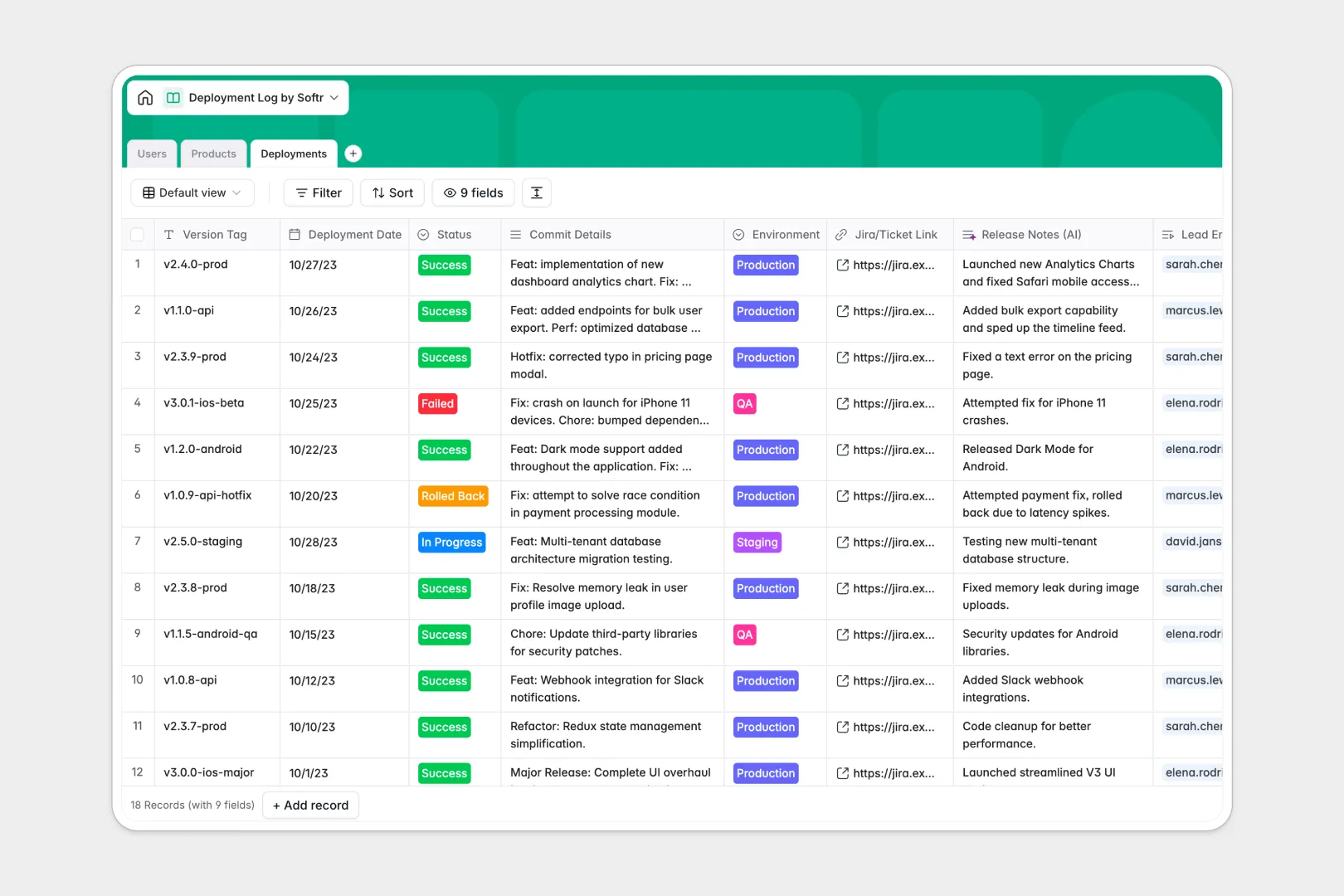
Your Deployment Log database at a glance
This template lets you track every code push to production, monitor environments, and organize active product versions in real time. It serves as a central source of truth for engineering leads, DevOps teams, and release stakeholders.
By linking products, users, and individual deployments, you keep a clean historical audit trail across all environments. There are no redundant rows—every version tag connects back to the product repository and the lead engineer.
Built-in AI fields automatically handle repetitive tasks, like generating clear release notes from Git commit logs or researching framework versions.
What to check before building your deployment log base in Airtable
When managing complex release histories, you need a system that supports your entire technical and non-technical organization.
What changes with a database built for apps
While you might think of using Airtable for a deployment log, its per-seat pricing can quickly penalize you for sharing logs with stakeholders, product managers, or support teams. If you need your wider organization to search version histories and read release notes, everyone needs to be added as a paid collaborator.
This is where Softr Databases change the dynamic. You can manage a massive volume of deployment logs, scale up to 200,000 records per database, and share access with unlimited workspace collaborators without paying for seat licenses.
Because the app layer is native, you can easily package this data into a secure portal for non-technical team members, keeping your raw Git logs protected while highlighting key releases.
What you can do with this template
This template allows you to record version tags, link deployments to Git repository URLs, and assign ownership to specific engineers. You can also view automatic math-based summaries like total releases and last-deployed dates.
Additionally, integrated Database AI agents work right inside your tables to fetch tech stack overviews from repository URLs or turn messy developers' commit details into user-friendly release notes without manual copywriting.
-
Users
Track team members, roles, contact info, and deployed release history
-
Products
Manage digital products and leverage AI to research and map tech stacks
-
Deployments
Log system deployments and use AI to automatically generate release notes
Who is this Deployment Log database for
- DevOps & Engineering Leads: Track deployment status, log failed runs, and maintain a clear audit trail of who deployed what and when.
- Product & Project Managers: Stay aligned on what features are live in staging or production without digging into terminal commands.
- Support & Success Teams: Reference active versions and release notes instantly to solve customer tickets with accurate live data.
How to take it further
Customize the database
You can easily tailor this template to your team's workflow. Add fields for build artifacts, update the status dropdown to match your specific CI/CD pipeline, or add staging links for rapid testing.
Import your existing data
Avoid manual typing by importing your Excel sheets, spreadsheets, or existing software logs via a quick CSV import. You can also connect external dev APIs to automatically push new records into your database.
Build a full app around it
When your team is ready, convert this database into a secure company hub. Using the interface builder, you can build custom portals for engineers to input logs and visual dashboards for executives.
You can set strict granular permissions to ensure only authorized DevOps engineers can edit deployment records while the rest of the company has read-only access. A structured database is the perfect springboard for building targeted internal tools.
-
1
-
2
-
3
-
4
Frequently asked questions
-
What is a deployment log database?
-
Why use a no-code database to build a deployment log system?
-
How can AI help managing data for deployment logs?
-
Can I build an app with this deployment log database?
-
Is this deployment log template free?
-
How is this template different from an Airtable template?
Start building today. It's free!
Build and launch your first app in under 30 minutes.