


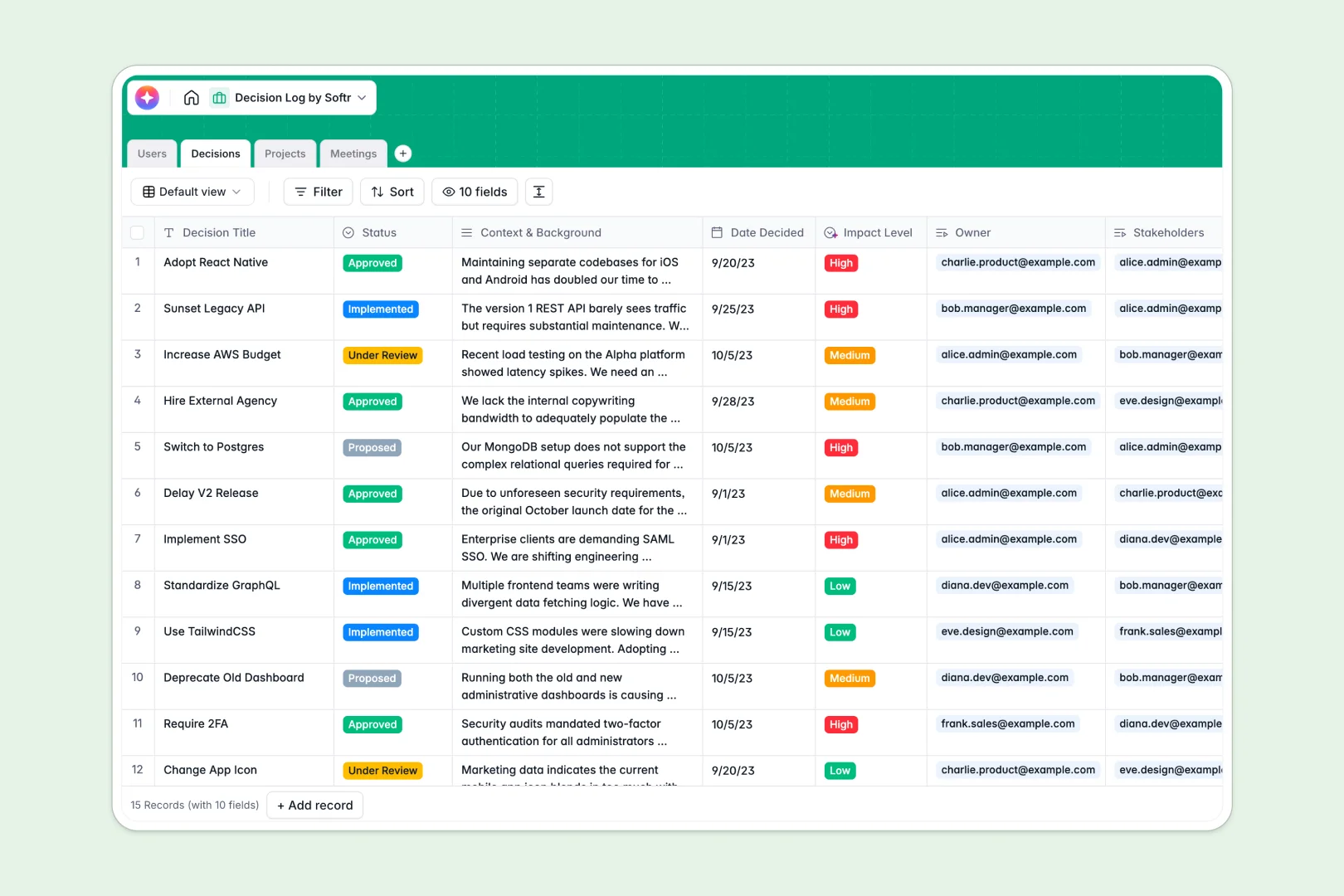
Your Decision Log database at a glance
This template provides a clear framework to record critical choices, assign owners, and track ongoing statuses. It brings sanity to alignment by keeping the exact context and reasoning of each choice in one place.
Your database groups items into interconnected tables: Decisions, Projects, Meetings, and Users. This structure allows you to link every strategic choice back to its corresponding meeting notes or parent campaign instantly.
Built-in AI agents automatically draft concise summaries of complex scenarios so team members can get up to speed without reading long threads.
What to check before building your decision log base in Airtable
While planning a relational structure for your team choices is sensible, building standard systems in Airtable often brings hidden friction.
What changes with a database built for apps
Airtable charges per collaborator, which means keeping your wider team aligned on choices gets expensive very quickly. With Softr Databases, you can build systems that involve everyone with unlimited collaborators included on all plans.
You also avoid complex multi-tool setups. Instead of stitching your tables together with external forms or interfaces, everything you need is ready to run natively on the exact same platform.
What you can do with this template
Instantly link decision records to specific projects and meetings to build a reliable organizational memory. Team members can easily look up the why behind past directions without scheduling extra shadow meetings.
Using native Database AI agents, your log can extract clear action steps directly from meeting notes or rate decision impacts automatically as status criteria change.
-
Users
Track team members, roles, and project or decision assignments
-
Decisions
Log organization decisions with AI-generated summaries and impact levels
-
Projects
Manage initiatives and link them to owners and associated decisions
-
Meetings
Record discussions, link details, and extract AI-powered action items
Who is this Decision Log database for
- Project Managers: Keep technical and design choices tied directly to project timelines and team owners.
- Executive Leaders: Quickly review active proposals, their overall business impact, and executive summaries.
- Operations Teams: Document corporate policies, meeting agendas, and subsequent action items in one place.
- Product Teams: Track feature prioritization outcomes and technical trade-offs across historical sprints.
How to take it further
Customize the database
Your database is entirely customizable. You can adjust choice lists, change the specific logic behind impact ratings, or add new tables for feedback logs in minutes using the visual editor.
Import your existing data
Move your past decision logs over without typing them manually. Use the CSV import tool to bring in old rows or connect to other workflows using standard API keys.
Build a full app around it
When you are ready to bring in external collaborators or create a custom hub, you can easily build an app on top of this structure. Use Softr's AI Co-Builder to generate an elegant interface with granular security in seconds.
By adding customized users and permissions, you can ensure stakeholders only edit items they own while managers maintain full administrative overview of the workspace.
-
1
-
2
-
3
-
4
Frequently asked questions
-
What is a decision log database?
-
Why use a no-code database to build a decision log system?
-
How can AI help managing data for your decision log?
-
Can I build an app with this decision log database?
-
Is this decision log template free?
-
How is this different from a decision log in Airtable?
Start building today. It's free!
Build and launch your first app in under 30 minutes.