


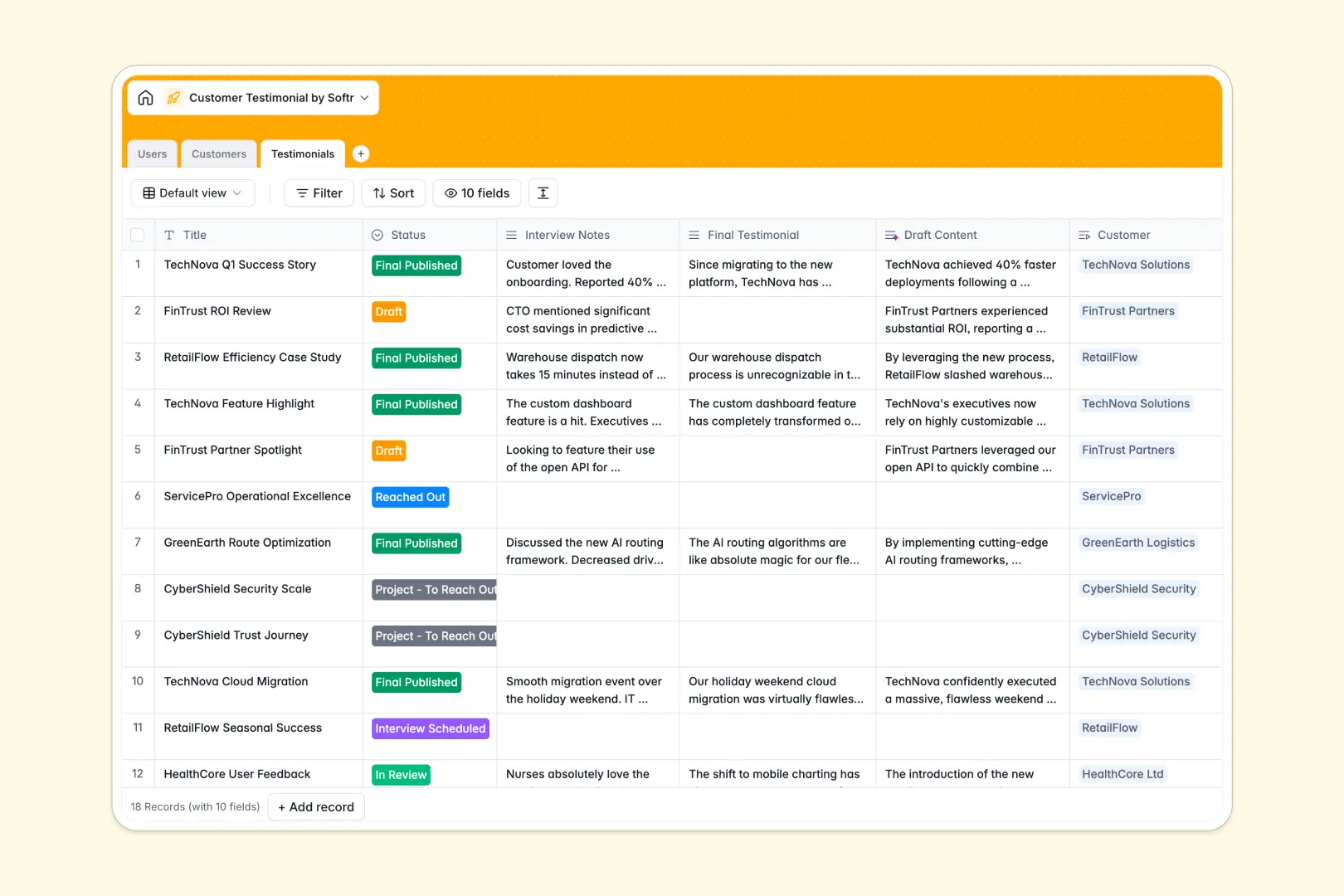
Your Customer Testimonial database at a glance
This template provides your marketing and sales teams with a ready-to-use pipeline for capturing, drafting, and publishing high-impact client success stories. By keeping your internal users, customer profiles, and the testimonial stages connected in one place, you prevent important feedback from slipping through the cracks.
It works through three connected tables: Users (your team), Customers, and Testimonials. Instead of tracking these separately, each testimonial is directly linked to the customer company providing it and the internal team member managing the outreach, keeping your data entirely organized.
With built-in AI capabilities, this database automatically researches company backgrounds from their websites and drafts polished testimonials straight from your rough interview notes.
What to check before building your customer testimonial base in Airtable
When managing a steady pipeline of customer success stories, sharing access with your marketing managers, account executives, and external writers is essential. However, choosing Airtable for your client testimonial database brings specific challenges that you should consider before committing.
Where customer success pipelines outgrow Airtable
While Airtable is a solid relational tool, its per-seat pricing model penalizes you for every team member who needs edit access. If you want your whole account management team to update testimonial statuses or let external proofreaders review drafts, your monthly software costs will spike quickly.
This is exactly what Softr Databases are structured to solve. Unlike Airtable, Softr supports unlimited database collaborators on all of its plans, so you can invite your entire company and agency partners to view and edit testimonial records without worrying about ballooning seat costs.
Furthermore, when you need to turn this testimonial tracker into a client-facing collection portal where customers can submit their own reviews directly, you would typically need to connect external builders. With Softr, you can instantly generate interfaces and client portals natively in the exact same workspace.
What you can do with this template
This template enables your team to move testimonials through a visual pipeline from "To Reach Out" to "Final Published" without losing assets or records. You can store final quotes, company logos, and interview audio files side-by-side with customer profiles.
By leveraging built-in Database AI agents, this template can auto-classify the industry and write detailed company background descriptions based solely on their website URLs. It also writes polished testimonial drafts directly from your raw, unedited interview notes, saving your writing team hours of manual drafting.
-
Users
Manage internal team members, roles, and assigned customer accounts
-
Customers
Track client companies with AI-generated descriptions and industry profiles
-
Testimonials
Manage publishing workflows utilizing AI to draft content and extract quotes
Who is this Customer Testimonial database for
- Marketing Teams: Automatically draft and polish customer stories, track the approval pipeline, and coordinate with design on matching assets.
- Sales & Enablement: Find verified, approved testimonials filtered by industry and customer type to quickly share with active prospects.
- Account Managers: Track which of your managed client accounts have already provided a testimonial or are ready to be contacted next.
- Content Agencies: Access raw interview notes and submit drafted copy directly into the database within clear validation stages.
How to take it further
Customize the database
You can customize this database format in seconds to fit your exact content workflows. Add custom fields to categorize and track the types of testimonials you gather, such as video versus text, or add specific select fields for marketing channels like website banner, social media, or slide deck.
Import your existing data
If you are already tracking success stories elsewhere, you can move your records over in one step. Simply upload a CSV with your existing clients and quotes, or use our API to sync feedback directly from your web forms and customer feedback channels into your new workspace.
Build a full app around it
When you are ready, you can elevate this template from a database into a secure internal application or a customer-facing portal. Use our AI app generator to describe the app you want to build in a single prompt and generate a portal on top of this exact schema.
With granular users and permissions, you can ensure that sales reps can only see approved testimonials, external copywriters can only edit drafts assigned to them, and clients can securely log in to review and sign off on their quotes.
-
1
-
2
-
3
-
4
Frequently asked questions
-
What is a customer testimonial database?
-
Why use a no-code database to build a customer testimonial system?
-
How can AI help managing data for customer testimonials?
-
Can I build an app with this customer testimonial database?
-
Is this customer testimonial template free?
-
How is this template different from an Airtable template?
Start building today. It's free!
Build and launch your first app in under 30 minutes.