


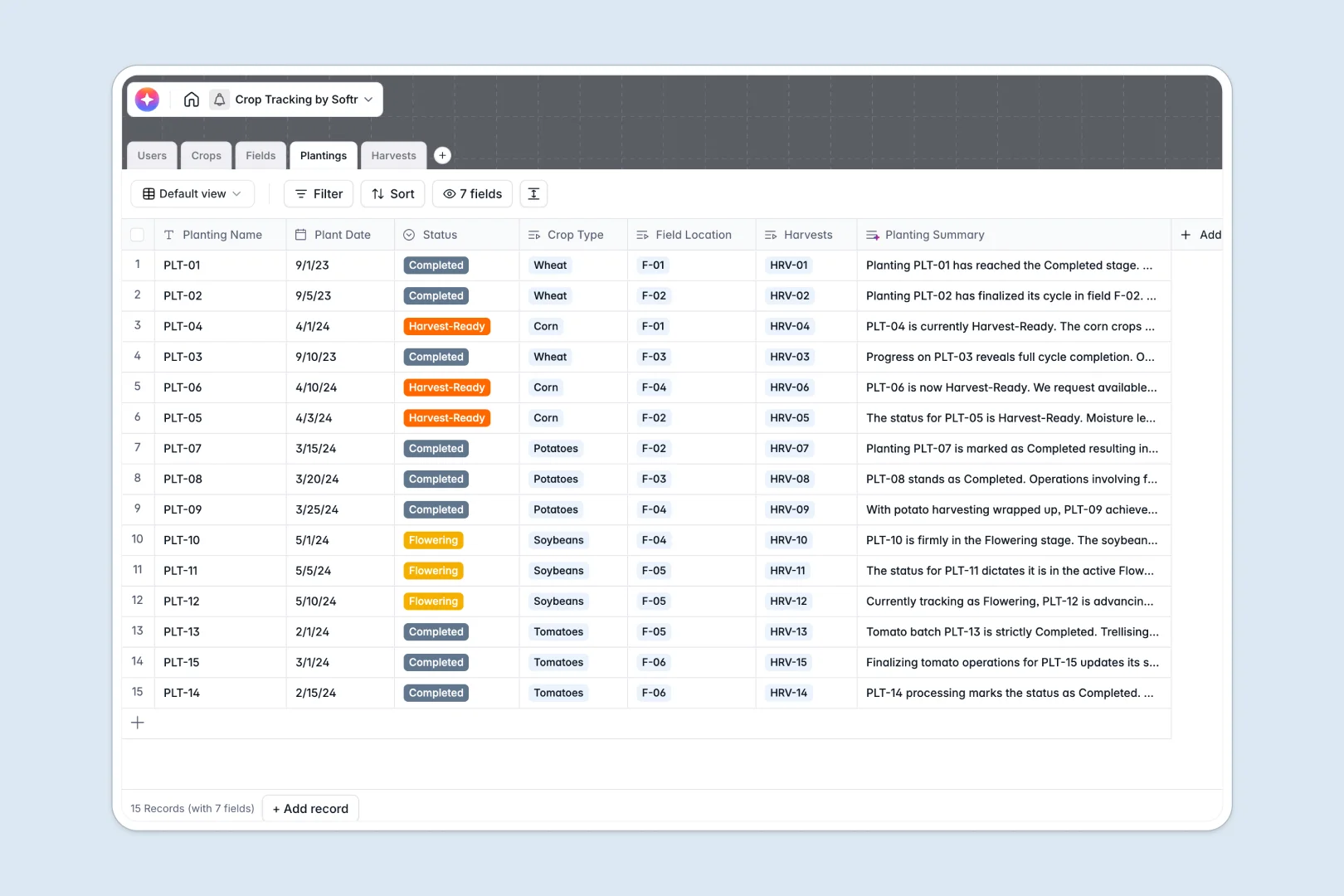
Your Crop Tracking database at a glance
This Crop Tracking database simplifies agricultural management by organizing your fields, crop varieties, plantings, and harvests in one clean system. You can monitor crop progress from seedling to harvest, coordinate farm staff, and keep detailed records of your seasonal yields without manual headache.
Everything is connected logically: crops link to specific plantings, plantings map to physical fields, and harvests are logged back to individual batches and farmers. This means you can trace any harvest directly back to the soil condition and team member that produced it.
This template also features native AI capabilities, automatically generating cultivation guides for crops and summarizing harvest quality notes as soon as they are logged.
What to check before building your crop tracking base in Airtable
When managing a farming operation, you need a shared tool that your entire field team, agronomists, and administrators can access daily. While Airtable is a powerful database, its per-seat pricing model can quickly become a bottleneck for teams with multiple operators entering field logs.
This is exactly what Softr Databases are designed to solve, offering the same strong relational structures but with a pricing model that scales happily with your operation.
What a database built for apps changes
Starting with a database built on a complete platform means you are not just getting tables: you are setting up the framework for a tailored farm management app. Instead of paying for every seasonal worker who needs to log a harvest, you can share your database with unlimited collaborators.
Additionally, you escape Airtable's record limits and API thresholds, giving your database the runway to store years of historical crop data, soil analyses, and weather logs without hitting a sudden paywall.
What you can do with this template
With this template, you can track physical fields, soil types, and crop types dynamically. By linking plantings to specific fields, you get real-time rollups of how many plantings are currently active on each parcel of land.
Furthermore, this template includes built-in Database AI agents that auto-fill crop cultivation best practices and write concise executive yield summaries, so your data remains organized and actionable.
-
Users
Track farm staff, roles, and field assignments for coordination
-
Crops
Manage crop varieties with AI-powered cultivation advice and guidelines
-
Fields
Monitor cultivable land parcels, including size and soil characteristics
-
Plantings
Track active crop batches with AI-powered progress and status overviews
-
Harvests
Log crop yields using AI to extract quality insight summaries from notes
Who is this Crop Tracking database for
- Field Managers & Operators: Easily update the status of active crops and assign specific fields to workers without cluttering records.
- Agronomists & Advisors: Quickly review soil histories, look up automated crop guides, and monitor health trends across all plantings.
- Farm Owners & Directors: Track overall yield quantities and review historical harvest data to make informed purchasing and planting decisions.
How to take it further
Customize the database
You can modify this template in seconds to fit your specific farm layout. Add new soil types, define custom vegetation stages in the plantings table, or add a column for specialized equipment usage.
Import your existing data
If you already have your crop varieties or field logs in spreadsheets or another tool, you can migrate them instantly. Use the built-in CSV import to load your historical records directly into these structured tables.
Build a full app around it
When you are ready to take your operations into the field, you can easily build an app on top of this database. Generate a field portal with Softr's AI Co-Builder to give farmers a mobile-friendly way to log harvests from their phones.
Using granular users and permissions, you can ensure agronomists see field reports while seasonal workers only see their assigned daily tasks. Spreading your data into structured tables makes it incredibly simple to turn this database into a robust, real-time farm app.
-
1
-
2
-
3
-
4
Frequently asked questions
-
What is a crop tracking database?
-
Why use a no-code database to build a crop tracking system?
-
How can AI help managing data for crop tracking?
-
Can I build an app with this crop tracking database?
-
Is this crop tracking template free?
-
How is this crop tracking template different from an Airtable template?
Start building today. It's free!
Build and launch your first app in under 30 minutes.