


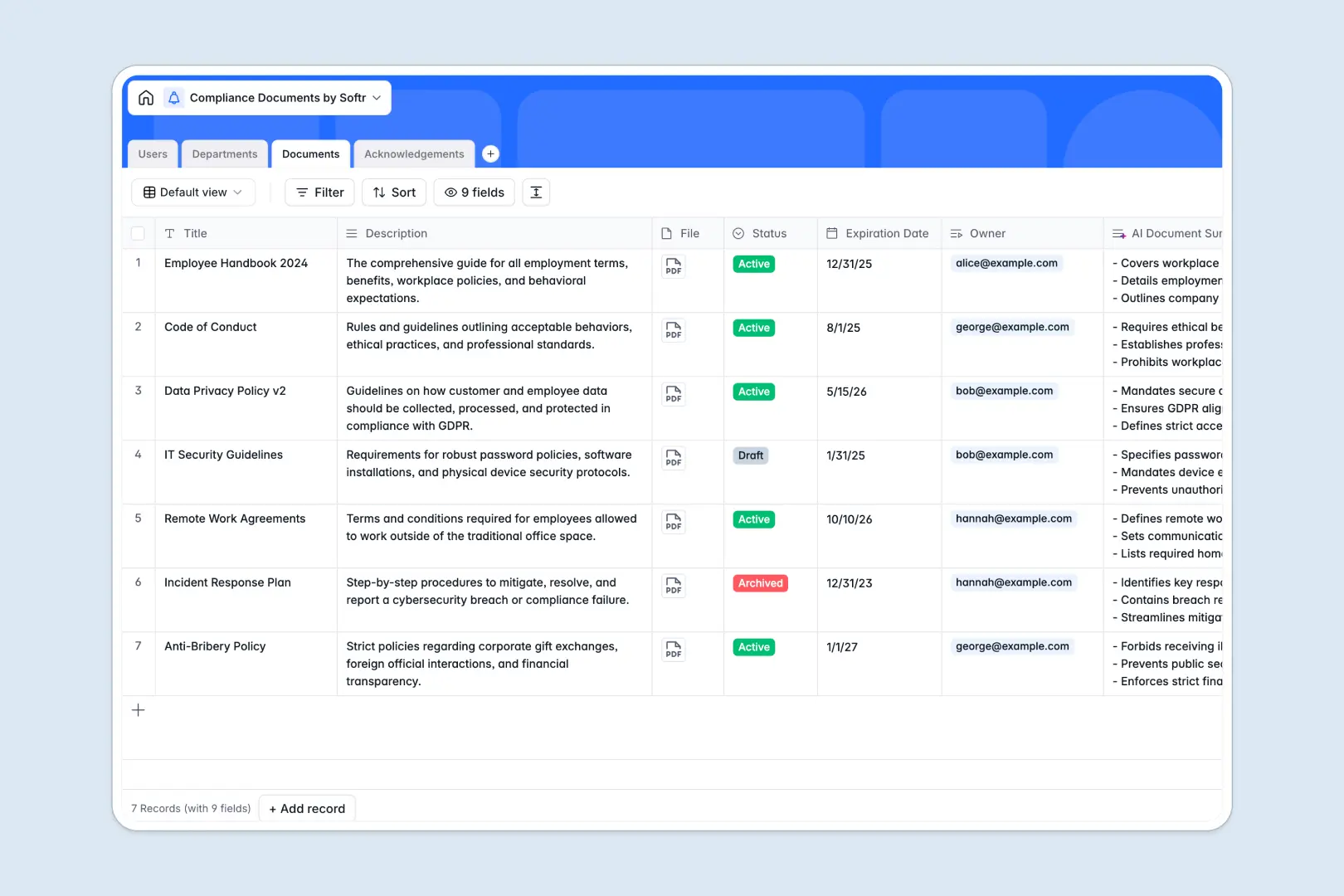
Your Compliance Documents database at a glance
This template provides a clear, central repository to store all your company's regulatory policies, manage document ownership, and track staff acknowledgements in one place.
Structured tables like Documents, Users, Departments, and Acknowledgements connect with native relationships so you always know who has signed off on what specific policy versions without manual data entry.
It features built-in AI document summaries to automatically convert complex compliance text into clean, scannable three-bullet points for your workforce.
What to check before building your compliance documents base in Airtable
Tracking company-wide policy sign-offs means involving dozens or hundreds of employees, which can make managing compliance protocols costly and complicated.
What changes with a database built for apps
With Softr Databases, your database is constructed with sharing in mind. Unlike other platforms that charge per collaborator, Softr provides unlimited collaborators so your whole team can view and edit entries securely without inflating your monthly subscription.
Instead of stitching together multiple third-party form builders or visualization tools to keep users out of your backend tables, the interface layer, granular user security, and automation workflows are handled directly in the exact same platform.
What you can do with this template
Instantly map active policy requirements to specific organizational departments, automate renewal date notifications, and let Database AI agents generate concise briefings on the fly.
You can keep historical records of employee confirmations safely linked to individual policy items, ensuring a clear and organized timeline for external audits and review.
-
Users
Manage personnel profiles, roles, departments and document assignments
-
Departments
Organize business units to target compliance policies effectively
-
Documents
Store official guidelines with statuses and automated AI-powered summaries
-
Acknowledgements
Track sign-offs, dates and compliance status of policy readings
Who is this Compliance Documents database for
- HR Managers: Coordinate policy rollouts, ensure employee safety acknowledgements, and monitor compliance progress by department.
- Operations Leaders: Maintain standard operational procedures, track training docs, and verify team awareness.
- Legal Officers: Manage corporate disclosures, track expiration dates, and secure proof of regulatory consent.
How to take it further
Customize the database
You can instantly tailor this database to fit your exact standard operating procedures. Add new custom select options for your regulatory categories, create customized fields for legal clauses, or add document review dates as your compliance rules evolve.
Import your existing data
Avoid setting up everything from scratch by dropping in your roster of contacts and policy files. Use the built-in CSV importer to move columns quickly, or utilize the developer-friendly API to continuously pull data from external HR systems.
Build a full app around it
When your operational processes expand, you can seamlessly build an app on top of this database. Use the Softr AI Co-Builder to generate an internal dashboard or external employee portal where users sign in securely via custom users and permissions to read and sign off only on the documents required for their job roles. Building on a well-structured database guarantees that your resulting app works reliably from the start.
-
1
-
2
-
3
-
4
Frequently asked questions
-
What is a compliance documents database?
-
Why use a no-code database to build a compliance documents system?
-
How can AI help managing data for compliance documents?
-
Can I build an app with compliance documents database?
-
Is this compliance documents template free?
-
How is this template different from an Airtable template?
Start building today. It's free!
Build and launch your first app in under 30 minutes.