


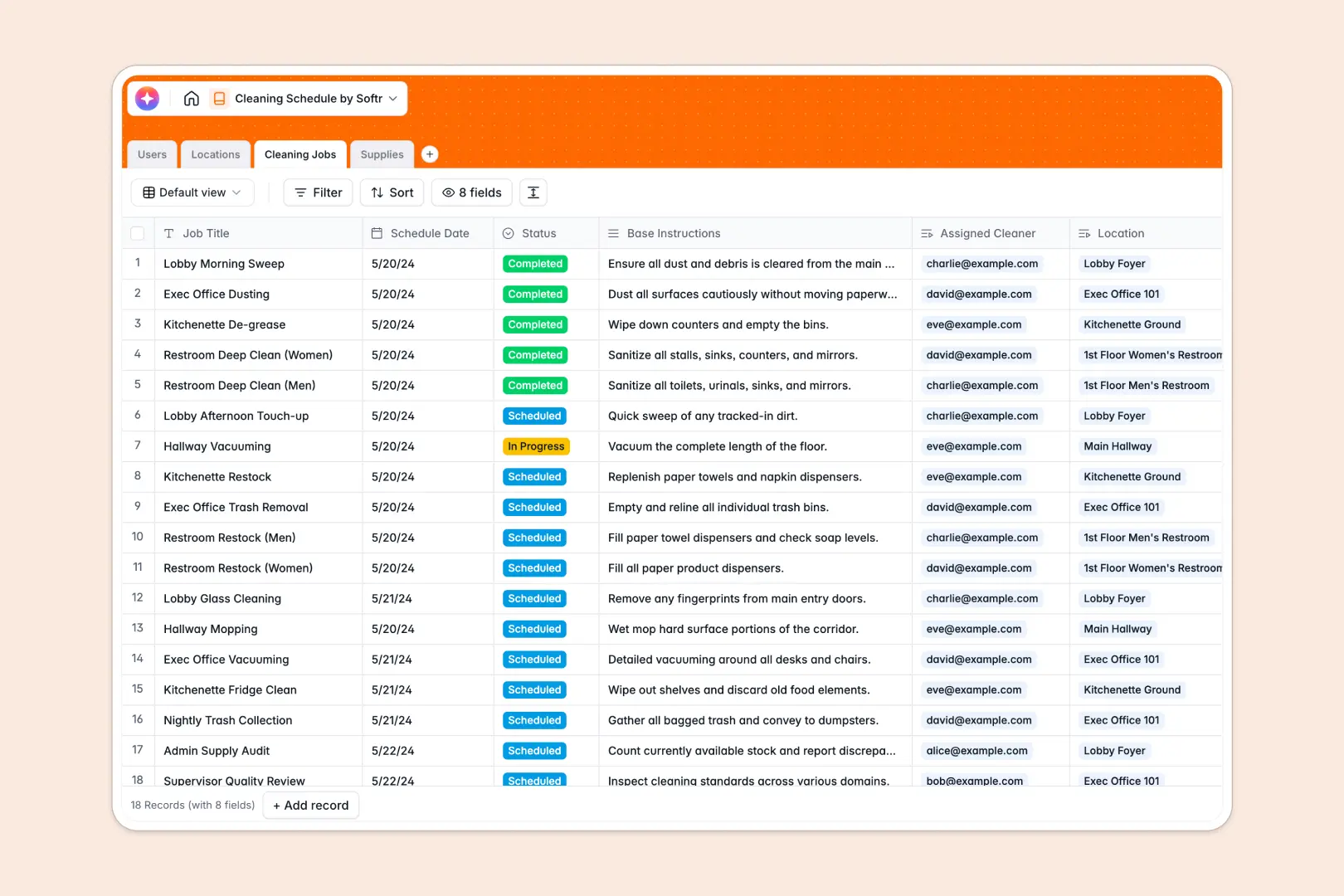
Your Cleaning Schedule database at a glance
This template gives you complete control over your facility's tidiness, safety, and hygiene. It connects your team of cleaners, physical locations, scheduled jobs, and cleaning supplies in one centralized place, ensuring nothing gets missed.
Everything operates on relational logic. When you schedule a job, you link it directly to a specific room, assign a cleaner, and note the required supplies.
The database also includes native AI-powered fields that automatically write custom cleaning checklists for your staff and draft restock request emails when inventory levels drop.
What to check before building your cleaning schedule base in Airtable
When managing complex facility operations, finding a system that adapts to your team's real-world workflow is critical. While Airtable is a powerful tool with great database structures, there are operational realities to consider before managing your schedules and personnel there.
What changes with a database built for apps
As your cleaning team grows, adding team leads, chemical inventory suppliers, and individual cleaners to your database gets expensive. Sharing an Airtable base directly can quickly lead to high per-seat fees just for staff members to check their daily tasks.
This is exactly what Softr Databases are designed for. You get the same robust relational tables, link staff to locations, and track supplies, but with unlimited collaborators included on all plans.
Instead of paying per seat, you have room for every cleaner and supervisor to access critical data without worrying about ballooning software costs.
What you can do with this template
With this database, you can link your cleaning team directly to specific locations like hallways or restrooms while tracking current stock levels of your supplies. This structure ensures that every time a status changes, your inventory updates and team assignments adjust dynamically.
Even better, you can leverage Database AI agents built into the tables to instantly generate task lists or restock orders. This keeps your supervisors focused on quality inspections rather than administrative data entry.
-
Users
Track cleaning staff, supervisors and admin contact details and roles
-
Locations
Manage rooms, physical zones, structural layouts and scheduled cleanings
-
Cleaning Jobs
Schedule cleaning tasks with assigned staff and AI-generated checklists
-
Supplies
Track cleaning chemicals and inventory with AI-powered restock drafting
Who is this Cleaning Schedule database for
- Facility Operations Managers: Keep a clear view of multiple floors, zones, and safety protocols from one visual grid.
- Cleaning Agency Owners: Coordinate dozens of cleaners and supervisors across multiple client properties without losing track of instructions.
- Hotel and Hospitality Hosts: Ensure quick turnovers in lobbies, kitchens, and rooms by scheduling jobs precisely between check-outs.
- Office Managers: Keep supply cabinets filled and track regular restroom and shared-space cleanings to stay compliant.
How to take it further
Customize the database
You can modify this database to match your exact sanitation standard operating procedures. Adjust the room zones, add column categories for specific cleaning chemicals, or create a field for post-clean photo uploads.
Import your existing data
If you already have a checklist or a directory of cleaners in a spreadsheet or file, you can upload it instantly via CSV. You can also connect to external administrative systems through the API to sync scheduled shifts automatically.
Build a full app around it
When you are ready, you can easily use an AI app generator to turn this database into a tailored worker portal. Cleaners can log in from their phones to check off items, update job statuses to 'Completed', and view instructions for their specific location.
By adding custom users and permissions, you can ensure that supervisors can edit schedules and supply levels, while cleaners only see the jobs assigned directly to them. This transition from a simple database to a functional interface keeps your operational data secure while keeping everyone on the ground aligned.
-
1
-
2
-
3
-
4
Frequently asked questions
-
What is a cleaning schedule database?
-
Why use a no-code database to build a cleaning schedule system?
-
How can AI help managing data for your cleaning schedule?
-
Can I build an app with this cleaning schedule database?
-
Is this cleaning schedule template free?
-
How is this cleaning schedule different from an Airtable template?
Start building today. It's free!
Build and launch your first app in under 30 minutes.