


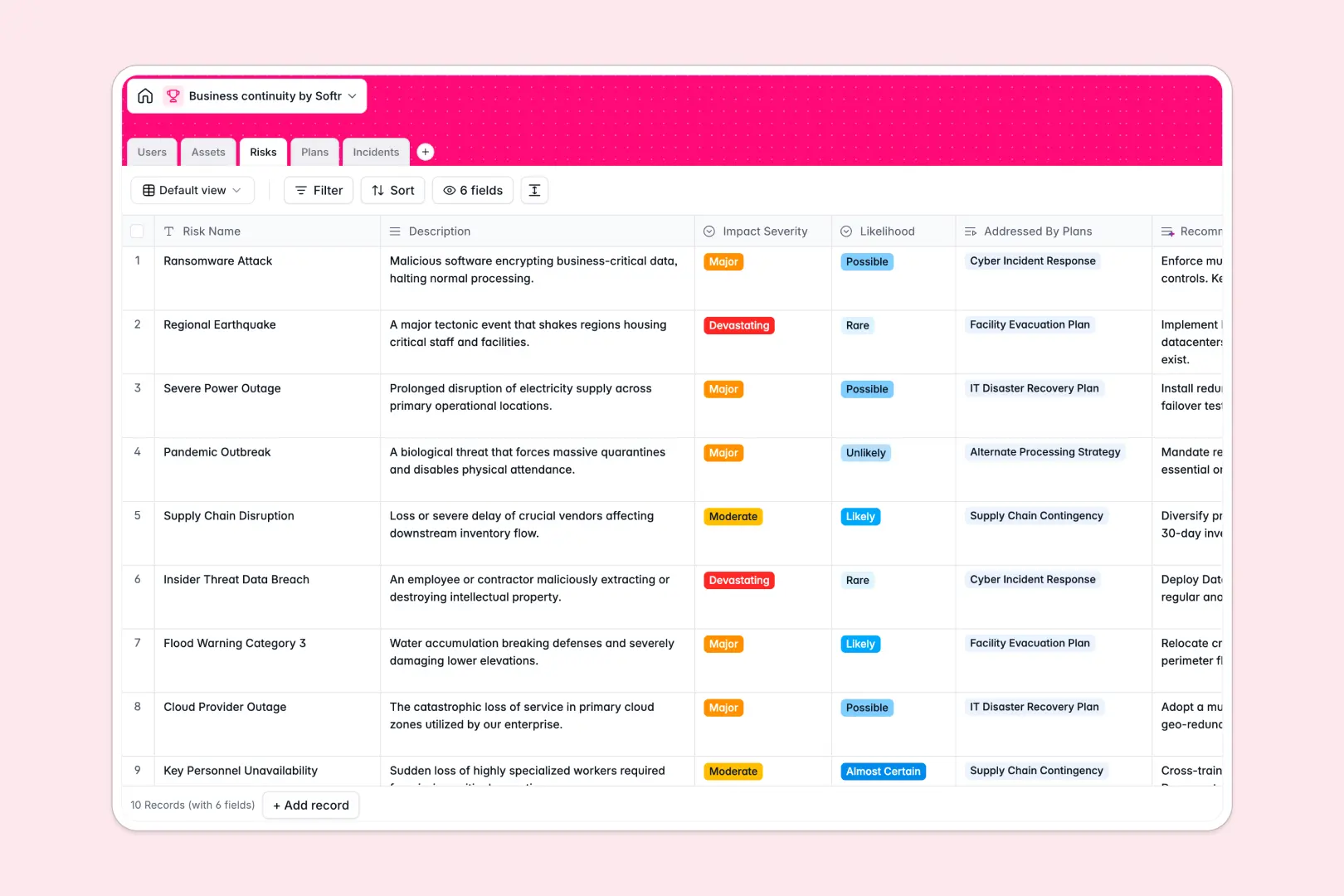
Your Business Continuity database at a glance
Maintain organizational resilience by keeping your response plans, business assets, and recovery teams organized in a single system. This template connects threats directly to mitigation strategies so your team can respond instantly when disruptions occur.
By linking critical infrastructure to active recovery protocols, you always know which operations are vulnerable and who owns the recovery steps. Protect your operations, assign planning duties, and resolve real-time events systematically.
This database features built-in AI fields to automatically suggest risk mitigation ideas, write quick executive summaries for your continuity plans, and classify live incidents instantly.
What to check before building your business continuity base in Airtable
Keeping your business continuity records organized requires cross-functional coordination. While setting up these tables is structural, committing to a platform is about how your team operates during an actual emergency.
What changes with a database built for apps
When a crisis hits, you need your entire workforce to access logs, report incidents, and read recovery procedures. Airtable's per-seat pricing introduces immediate constraints because giving your whole team edit operations becomes highly expensive.
Starting with Softr Databases changes this dynamic entirely, allowing you to invite unlimited collaborators to view, edit, and contribute without charging you per user. This ensures every employee can log an active incident when it happens.
Furthermore, this database includes native app-building capabilities and granular users and permissions. You can transform this workspace into a functional, locked-down crisis portal where managers view full details while team members only see their specific tasks.
What you can do with this template
Map vital operational assets like facilities or IT systems, assess their critical level, and link them directly to the teams responsible for protection. Connect identified risks to specific recovery scripts to speed up response efforts.
When a threat or outage is detected, log it immediately inside the Incident tracker. Built-in Database AI agents analyze the incident logs on the fly, instantly categorizing issues so you can assign the correct response playbooks without manual triage.
-
Users
Directory of personnel, managing system roles and plan ownership
-
Assets
Manage critical resources, facilities, data, and infrastructure assets
-
Risks
Identify threats to continuity, generating AI-powered mitigations
-
Plans
Design recovery strategies with AI-generated executive summaries
-
Incidents
Log disruptive events using AI to categorize threat types automatically
Who is this Business Continuity database for
- Operations Leaders: Keep systems online by connecting operational assets with action-oriented recovery protocols.
- Risk & Compliance Officers: Catalog threats, assess impact levels, and track review dates in one system.
- IT Systems Managers: Monitor infrastructure dependencies and coordinate backup workflows during server outages.
- General Managers: Maintain a bird's-eye view of emergency plans, active disruptions, and mitigation steps.
How to take it further
Customize the database
Modify this database to fit your exact business environment. Rename asset categories, add custom risk metrics, or update status workflows easily inside Softr's visual editor without writing code.
Import your existing data
Bring your existing risk spreadsheets and facility registries into this workspace. Upload your contacts and inventory through the built-in CSV importer or sync external records via API to get started instantly.
Build a full app around it
When you are ready, use our AI app generator to turn this database into a robust operational portal. Build an interface where employees log incidents through front-end forms, managers view checklists on mobile devices, and operations directors view risk matrices in secure dashboards.
By using a well-structured database as the backend foundation, you ensure that any workspace, portal, or internal app you generate works accurately and securely from day one.
-
1
-
2
-
3
-
4
Frequently asked questions
-
What is a business continuity database?
-
Why use a no-code database to build a business continuity system?
-
How can AI help managing data for business continuity?
-
Can I build an app with this business continuity database?
-
Is this Business Continuity template free?
-
How is this template different from an Airtable template?
Start building today. It's free!
Build and launch your first app in under 30 minutes.