


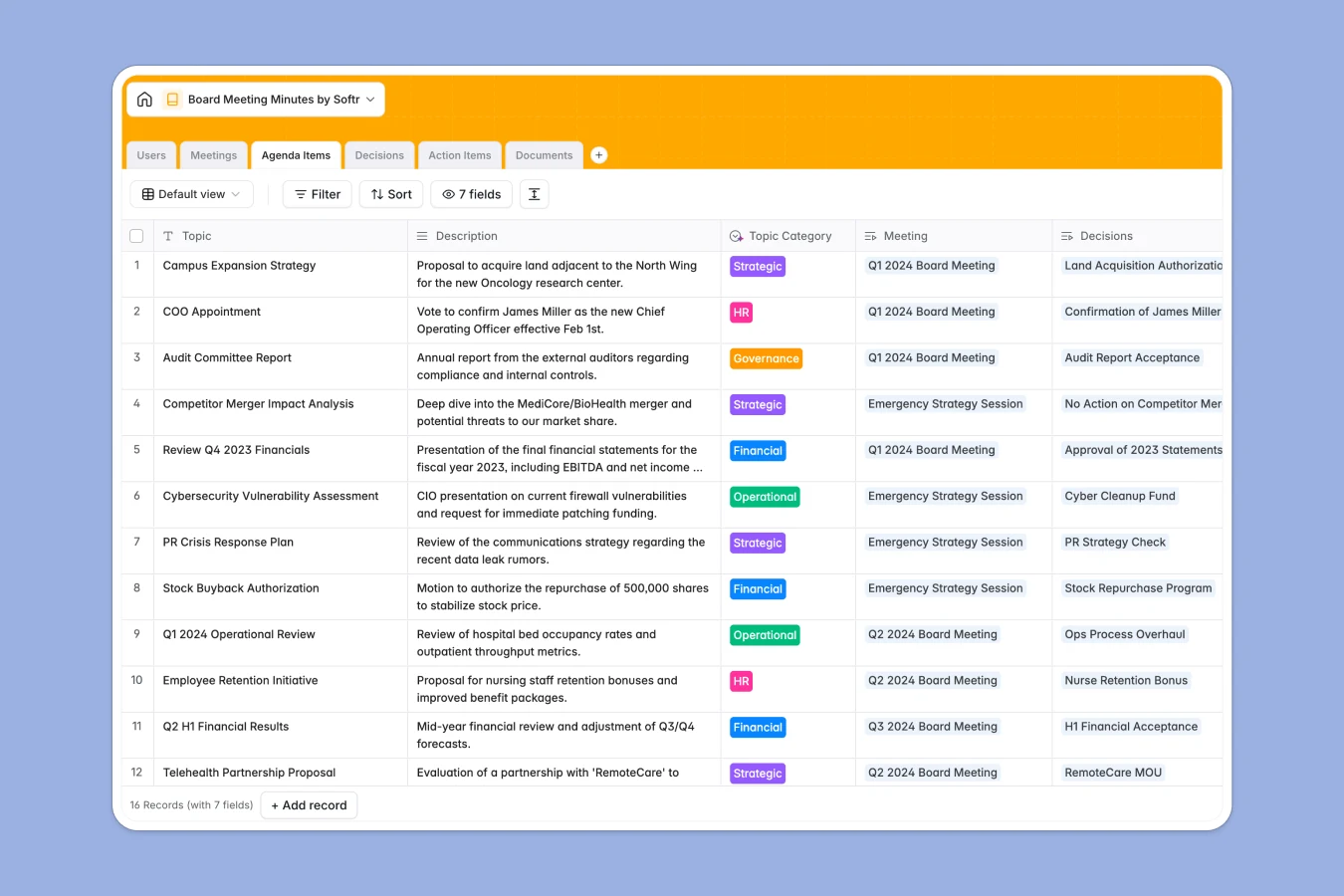
Your Board Meeting Minutes database at a glance
This template gives your board a single, professional source of truth for every meeting. It tracks everything from scheduling details and detailed raw notes to concrete decisions, agenda items, and shared corporate documents.
At its core, this structured database connects the right people to the right events. Board members are linked directly to the meetings they attended, the decisions they voted on, and the action items they need to complete.
Equipped with built-in AI, this template automatically formats raw meeting notes into official board minute drafts and writes formal legal phrasing for passed resolutions.
What to check before building your board meeting minutes base in Airtable
When managing sensitive board governance data, you need absolute security, accessibility for external board members, and clear pricing structure as your leadership team grows.
What changes with a database built for apps
While Airtable handles data relations well, its per-seat pricing quickly punishes you for sharing the database with external board members, trustees, or observers who need regular access.
With Softr Databases, you get the same powerful relational engine—complete with linked records and lookups—but with unlimited collaborators on all plans so you can share your database without worrying about rising costs.
Additionally, you don't have to stitch together external form builders or portal tools. The database natively serves as the backend for secure portals, letting you control exactly who can view, edit, or sign off on corporate minutes.
What you can do with this template
- Track formal resolutions: Log voting outcomes (Approved, Rejected, Deferred) and link them directly to their parent agenda topics so your corporate record is bulletproof.
- Automate minute preparation: Use built-in Database AI agents to capture raw meeting drafts and instantly format them into a professional executive summary ready for signature.
- Manage action items: Assign follow-up responsibilities directly to board members with clear due dates, task names, and status tracking.
-
Users
Directory of board members and staff with AI-sourced professional bios
-
Meetings
Schedule meeting sessions and draft AI-powered minutes and summaries
-
Agenda Items
Manage topics for discussion categorized with AI classification assistance
-
Decisions
Track official resolutions using AI to write formal corporate minutes
-
Action Items
Follow up on board tasks with AI-generated concise titles and assignees
-
Documents
Centralize board packs, financial reports, and meeting presentations
Who is this Board Meeting Minutes database for
- Corporate Secretaries: Streamline the drafting and filing of corporate minutes, resolutions, and board packets for audit readiness.
- Board Chairs & Directors: Access strategic documents, past decisions, and upcoming agenda topics easily from anywhere.
- Non-Profit Boards: Coordinate executive directors, trustees, and administrative teams reliably while keeping overhead costs zero.
- Venture-Backed Startups: Maintain high-quality documentation for investor board meetings and track post-meeting actionable items clearly.
How to take it further
Customize the database
You can fully adapt this database in seconds. For example, add custom select options to your topic categories, insert fields for digital signatures, or add custom tags to keep your documents organized by fiscal year.
Import your existing data
Bring in historical meeting records easily. Use the built-in CSV importer to upload previous meeting notes and board member list, or connect external APIs to sync meeting dates from your corporate calendar.
Build a full app around it
When your board wants a cleaner way to log in without looking at rows and columns, you can easily build an app on top of this exact database. Using the AI co-builder, you can generate a custom client portal with a single prompt.
With granular users and permissions, you can ensure that board chairs see restricted financial files, while general staff can only view meeting agendas and assigned tasks. This database serves as the ideal secure backend for a professional, branded portal.
-
1
-
2
-
3
-
4
Frequently asked questions
-
What is a board meeting minutes database?
-
Why use a no-code database to build a board minutes system?
-
How can AI help managing data for board meeting minutes?
-
Can I build an app with this board minutes database?
-
Is this board meeting minutes database free?
-
How is this board meeting template different from an Airtable template?
Start building today. It's free!
Build and launch your first app in under 30 minutes.