


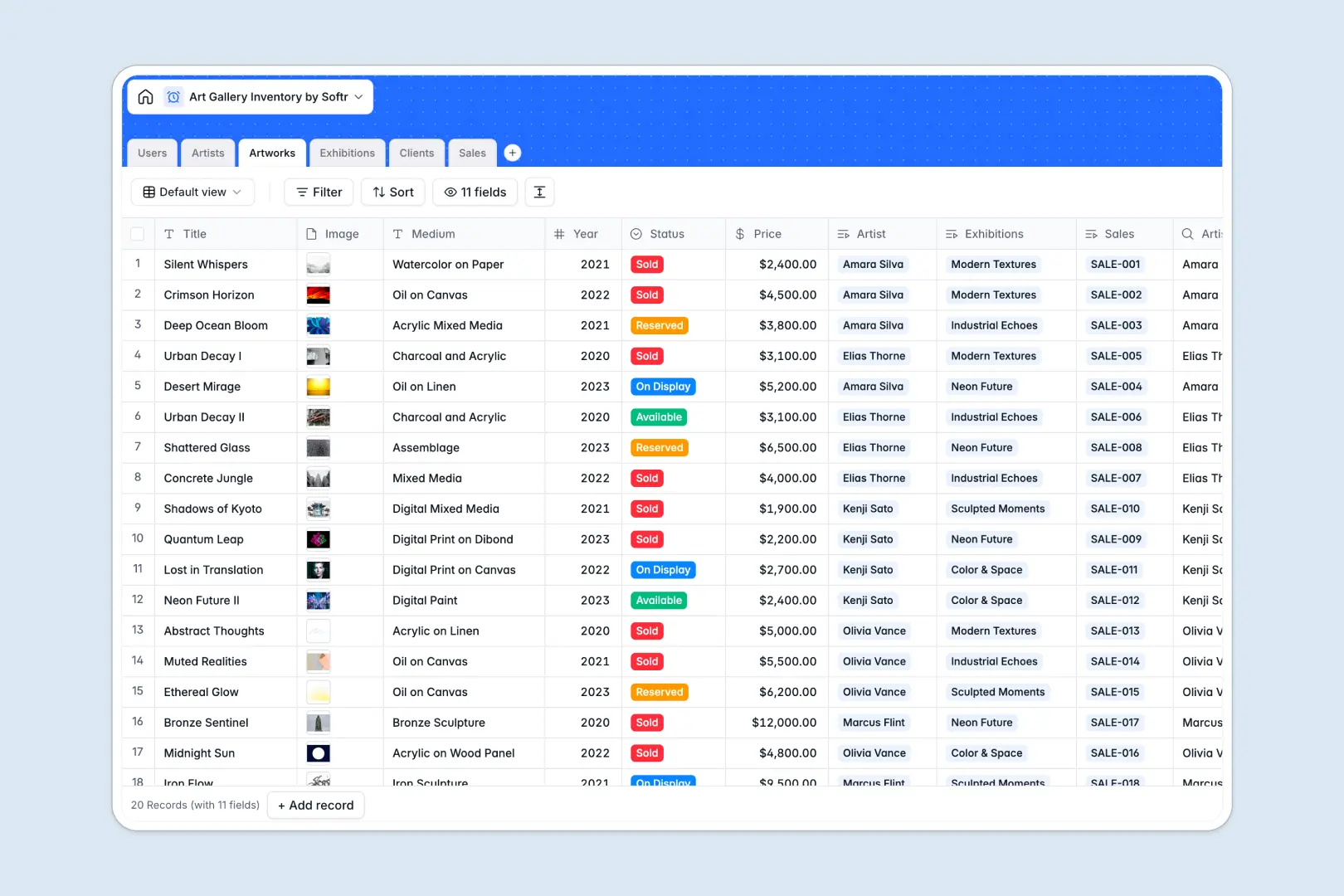
Your Art Gallery Inventory database at a glance
This template keeps artworks, artists, client records, and exhibitions organized in one central, fluid database. Gallery teams can track status changes from 'Available' to 'Sold' instantenously.
Everything is connected: individual artworks link directly to their registering artists, active exhibitions, and finalized sales invoices. Your team stays updated, preventing duplicate listings or missed sales.
With built-in AI fields, this database automatically writes artist biographies and drafting exhibition pitches directly inside your tables. Work is done for you before your team even starts.
What to check before building your art gallery inventory base in Airtable
While Airtable is a solid relational tool, standard choices might present some limitations when running a fast-growing art gallery business day-to-day.
What changes with a database built for apps
First, sharing a gallery inventory database with freelance curators, external sales representatives, or partner artists gets expensive quickly due to Airtable's strict per-seat pricing.
With Softr Databases, you get unlimited collaborators on every plans, ensuring everyone can collaborate without a scaling bill.
Furthermore, having your inventory in a database is only half the battle. To turn your ledger into a client viewing portal, you usually have to stitch external builders together.
Gain direct speed with AI and native workflows
With this template, your core artwork and client records reside on a platform that lets you generate an app with AI in seconds, right on top of your working data.
Our native Database AI agents run inside specified fields to automatically draft artistic blurbs based on the medium and year, saving curators hours of writing work.
Everything is ready to roll out from day one, allowing you to easily handle artwork acquisitions and client invoices in one seamless spot.
-
Users
Manage gallery staff roles, assignments, and curated exhibitions
-
Artists
Track artist profiles with portfolios and AI-generated professional biographies
-
Artworks
Catalog art pieces with prices, status, and AI-powered descriptions
-
Exhibitions
Schedule shows and generate promotional pitches using AI based on titles
-
Clients
Maintain collector records, contact details, and their total investment history
-
Sales
Log transactions, associate artworks with buyers, and store invoice copies
Who is this Art Gallery Inventory database for
- Gallery Directors & Owners: Oversee global sales pipelines and inventory values across all represented artists.
- Art Curators: Organise layout lists for upcoming exhibitions and auto-generate promotional pitch texts instantly.
- Sales Representatives: Monitor artwork availability status, track client budgets, and issue transaction records.
- Artists' Liaisons: Maintain comprehensive creator profiles with auto-updating list totals for represented portfolios.
How to take it further
Customize the database
Adjust fields effortlessly within your native workspace. You can edit artwork medium choices, append fields for shipping dimensions, or introduce customizable statuses like 'On Loan' tailored to your gallery's schedule.
Import your existing data
Avoid manual typing by uploading your inventory lists as CSV files in bulk, or synchronize your historical collection databases with direct API imports to have your portfolio active in a single afternoon.
Build a full app around it
When you are ready, use our AI app generator to turn this inventory database into a secure visual portal. You can create a secure login for collectors to view private portfolios, or build an interface where gallery employees log sales on the floor.
By leveraging Softr's robust users and permissions, you can ensure sales staff see client financials, curators view presentation layouts, and external collectors only view public catalogs.
-
1
-
2
-
3
-
4
Frequently asked questions
-
What is an art gallery inventory database?
-
Why use a no-code database to build an art gallery system?
-
How can AI help managing data for art galleries?
-
Can I build an app with this gallery inventory database?
-
Is this Art Gallery Inventory database template free?
-
How is this gallery template different from an Airtable template?
Start building today. It's free!
Build and launch your first app in under 30 minutes.