Google Tables discontinued: Why and how to migrate to Softr

.webp)
With Google Tables having retired on June 27, 2025, forward-thinking teams are looking beyond mere replacements to find their next competitive advantage.
A platform shutdown is more than a logistical hurdle; it's an opportunity to modernize your core processes. Instead of simply migrating, teams are evolving their workflows into sophisticated, custom-built applications.
We specialize in turning migration into a digital transformation. Softr isn't just a place to host your data; it's an AI-powered ecosystem designed to make your transition seamless while significantly upgrading your operational capabilities.
If you're evaluating the next chapter for your business operations, here is why Softr is the definitive choice for those outgrowing Google Tables.
Why teams are moving from Google Tables to Softr
If you loved how Google Tables let you structure data with rich column types and link tables together, but still found yourself running into the limitations of its interface and permissions, here are some of the main reasons Tables customers are choosing Softr.
Softr is an AI-native platform that empowers teams to build real business software like client portals, vendor portals, company intranets, and CRMs. Simply describe what you need, and Softr creates the database, app, and business logic built-in and ready to share with real users.
Use Softr Databases as a powerful, ready-to-go alternative where you can house your data with easy import functionality, or connect to 21+ external data sources.
With native Softr Workflows, you can trigger actions directly from your app's interface (or connect to Zapier, Make, and n8n via native integrations). Softr comes with everything you'd expect: loops, conditions, branches, schedulers, and all the triggers and actions you need, like webhooks, emails, and custom code.
1. A familiar home for your business data, with an upgrade
Since Google Tables itself was your database, migrating your data is the first step. You can easily import everything directly into our built-in Softr Databases (recommended) — or describe your data structure to the Database AI Co-Builder and it will generate the tables and fields for you. Alternatively, you can export from Tables to Google Sheets and connect it to Softr. You'll find a familiar environment with rich field types, but with far more power.
While Tables allowed you to create relationships between its own tables, Softr significantly expands your capabilities by connecting to 21+ external sources like Google Sheets, Airtable, HubSpot, Notion, SQL databases, or any REST API. Your business data no longer has to live in just one place.
2. Get ahead with AI that empowers builders and end users
Google Tables was useful for structured data, but it offered little in the way of AI-powered functionality. Softr builds AI directly into the platform to help teams work faster—from generating apps to automating setup and workflows.
Your users can get instant answers from your live data with Ask AI, a built-in chat assistant that takes one click to turn on. There's no complex setup, it's secure by default and automatically respects your user permissions, so you don't have to worry about users getting access to data they shouldn't.
For builders, you can create AI agents (or AI-enabled fields) in our native Softr Databases that cut hours of manual data entry and cleaning into seconds. For instance, auto-filling missing record details, extracting info from files, creating content, or auto-tagging records by category.
What sets Softr apart is the level of control. You can set specific filters and conditions for when they run, so you're not wasting credits on tasks that don't need automation.
3. Granular and flexible permissions system
Google Tables offered a solid sharing model based on workspaces and tables, with roles like Viewer, Commenter, and Editor. This was great for team collaboration, but it lacked the granular, record-level permissions needed for building client portals or vendor management tools where each user should only see their own data.
Softr is built for these exact use cases. You can create custom user groups and set conditional filters to control exactly what records users can see and edit. This allows you to build secure applications where each logged-in user gets a personalized view of the data that pertains only to them. For enterprise-grade security, you can also set app-level permissions that apply a rule across your entire application.
4. Custom workflows and automations
The "Bots" in Google Tables were great for automating simple tasks within a table, and you could even extend them with Apps Script for custom logic. However, this often required developer knowledge for complex scenarios.
With Softr Workflows, you can go far beyond basic actions.
You can build automations manually with loops, conditions, branches, schedulers, and all the triggers and actions you need — or describe the automation you need to the Workflow AI Co-Builder and it will build the logic for you. You can also easily connect to 3rd-party tools like Zapier, Make, and n8n).
With our built-in action buttons, you can add advanced business logic. Send an invite email the moment a user joins, automatically mention teammates in a comment, or call an API to process external invoices, all right inside your app.
5. Professional and tailor-made business apps
Google Tables gave you multiple "layouts" like Grid, Kanban, and Maps to visualize the data within a view. This was a powerful way to look at your information, but you were still working within the fixed interface of Tables.
Softr goes a step further by letting you build a completely custom front-end for your data visually — or ask the AI Co-Builder to add blocks and pages for you by describing what you need.
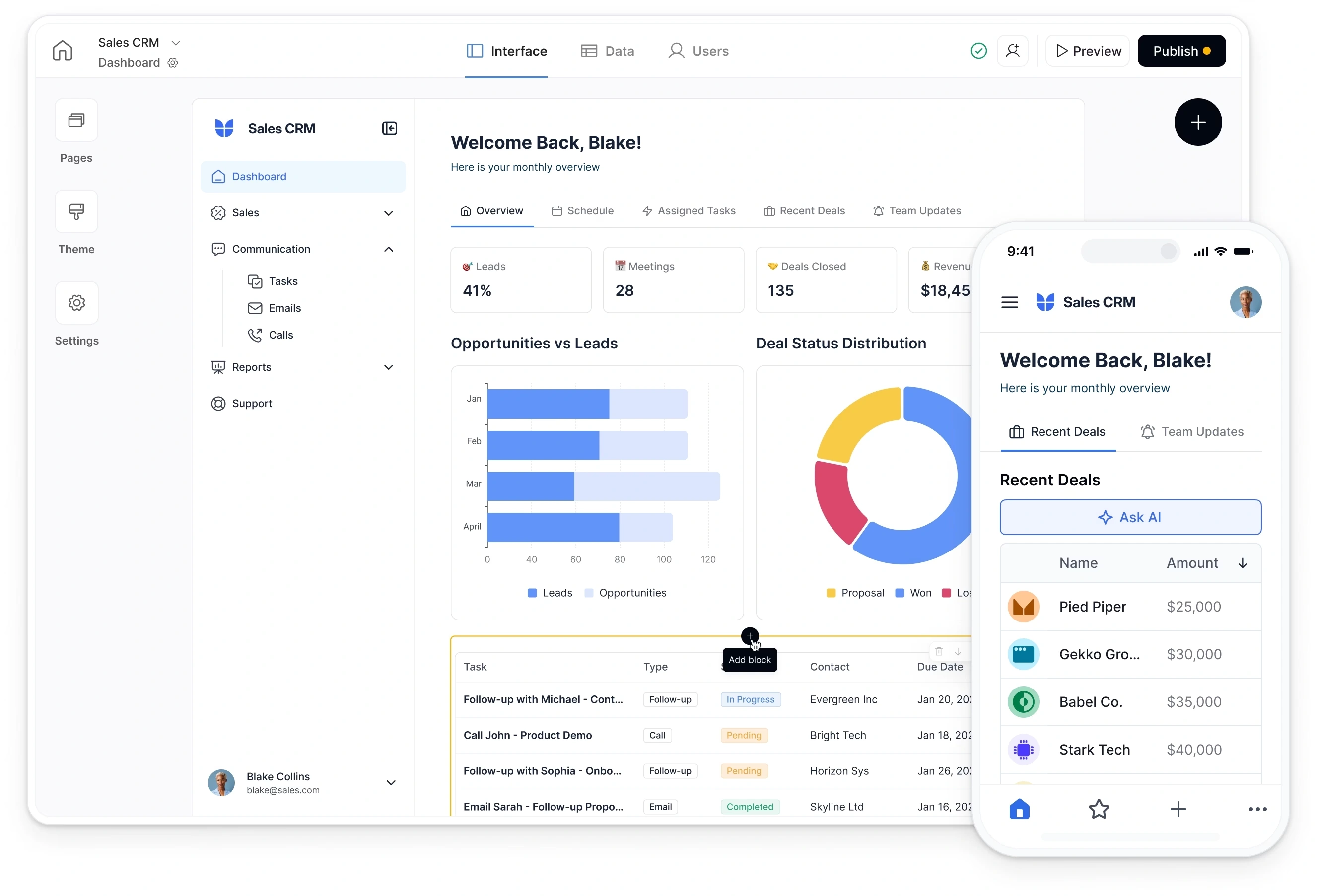
- 100+ building blocks: Lists, Kanban, Charts, Forms, and more to build any interface.
- Vibe Coding block: Ask AI to generate limitless, custom React UI components for any unique needs.
- 80+ templates: Launch Client Portals, CRMs, Dashboards, and more in minutes.
- Granular permissions: Control exactly what each user can see and do, from hiding a button to restricting access to specific data.
We thought we'd need developers, a product manager, and UX designers before launching a new project management system. With Softr, we built it ourselves in weeks.
Natalie Neumann, COO, Designity
| Feature | Google Tables | Softr |
| Data Sources | Self-contained database with table relationships. Import/export via Google Sheets & CSV. No external data sources. | Built-in Softr Database with easy import and 21+ native data sources integrations (Airtable, SQL, HubSpot, etc.) |
| AI Features | None. No built-in AI capabilities for builders or end-users. | AI for end-users ("Ask AI"), AI agents in databases, Softr AI actions in workflows (no need for API keys) or connect directly to your favorite AI providers. |
| Workflows | Basic 'Bots' for in-table actions; extendable with Apps Script. | Built-in Workflows with loops, branches, schedulers, webhooks, and AI actions. |
| Permissions & security | Role-based sharing (Viewer, Editor) for entire workspaces and tables. No record-level security. | Dynamic User Groups, record-level filters & application-level data restrictions. |
| App Building | Multiple 'layouts' (Grid, Kanban, Map) to view data within a fixed interface without external end-users. | Drag-and-drop builder with 100+ blocks to create custom business app interfaces, including user permissions. |
How to migrate from Google Tables to Softr
Transitioning from Google Tables to Softr doesn't have to be a headache. You can rebuild and even improve your Google Tables app in just a few simple steps.
Most teams complete their migration in as little as 1–2 weeks, depending on the project's size, thanks to Softr's intuitive builder.
Here’s how to get started:
- Connect your data: Import everything directly into Softr Databases (recommended), or export your data from Google Tables into Google Sheets and connect it to Softr.
- Build your interface: Describe what you need and the AI Co-Builder builds a complete app for you — or start from a template or blank canvas if you prefer manual building.
- Set up users and permissions: Easily mirror your existing user roles with Softr’s flexible user groups and granular permission settings.
- Publish your app: Add your domain and branding, then launch your upgraded operational business software.