Sortly is a lightweight inventory management tool that’s great for scanning and organizing items with folders, photos, and barcodes. But price increases have made it harder to justify, especially for small teams, and if you try to downgrade you risk losing items, custom fields, or data you’ve built up over the years. We compare five Sortly alternatives across different categories and use cases.
Best alternatives to Sortly software at a glance
| Tool | Best for | Key features | Pricing |
|---|---|---|---|
| Softr | Building a custom inventory app with AI and no-code | No-code app builder, barcode scanning, built-in relational database, role-based permissions, native workflow automation, AI agents, AI assistant, 21+ data sources, PWA mobile app | Free plan available; paid plans start at $19/month |
| inFlow Inventory | Wholesale and eCommerce sellers needing end-to-end order fulfillment | Purchase-to-sale workflow, B2B Showroom, barcode scanning, multi-location tracking, bulk pricing tools, mobile app | From $129/month |
| Zoho Inventory | eCommerce sellers managing orders across multiple marketplaces | Multichannel selling (Amazon, eBay, Etsy, Shopify), shipping integrations, serial and batch tracking, workflow automation, customer and vendor portals | Free plan available; paid plans start at $29/month |
| BoxHero | Simple, barcode-first stock tracking for small teams | Barcode scanning and custom label printing, purchase and sales orders, multi-location tracking, team-based inventory counting, Inventory Excel import/export | Free plan available; paid plans start at $18/month |
| Odoo Inventory | Businesses that want a full ERP system | Advanced warehouse operations, shipping with built-in carrier integrations, open source | Free available; paid plans start at $7.25/user/month |
What to look for in a Sortly alternative
The right inventory tool depends on the size of your team, the complexity of your operations, and how much flexibility you need. Here are some key features to consider:
- Real-time stock tracking: Pick a tool that updates your inventory data the moment something is received, sold, moved, or adjusted.
- Barcode or QR code scanning: Look for tools that let you scan items to speed up receiving, picking, counting, and transfers.
- Low stock alerts and reorder management: A good tool notifies you when items drop below a certain threshold and generates purchase orders automatically.
- Multi-location support: If you store inventory across multiple warehouses, stores, or job sites, prioritize tools that let you track stock by location and transfer items between sites.
- Order and supplier management: Look for tools that also handle purchase orders, sales orders, supplier records, and invoicing in one place.
- Integrations with your existing tools: Your inventory system should connect to the tools you already use natively or via API and webhooks.
- User permissions: Look for tools that let you set roles and permissions so warehouse staff, sales managers, and external partners only see the invetory information that’s relevant to them.
- Reporting and analytics: Look for tools that help you understand sales trends, identify low-selling products, and track costs with live dashboards.
- Scalability: Some platforms cap items, users, locations, or orders by plan, so check whether the limits match where your business is heading.
1. Softr — best for building a custom inventory app with AI and no-code
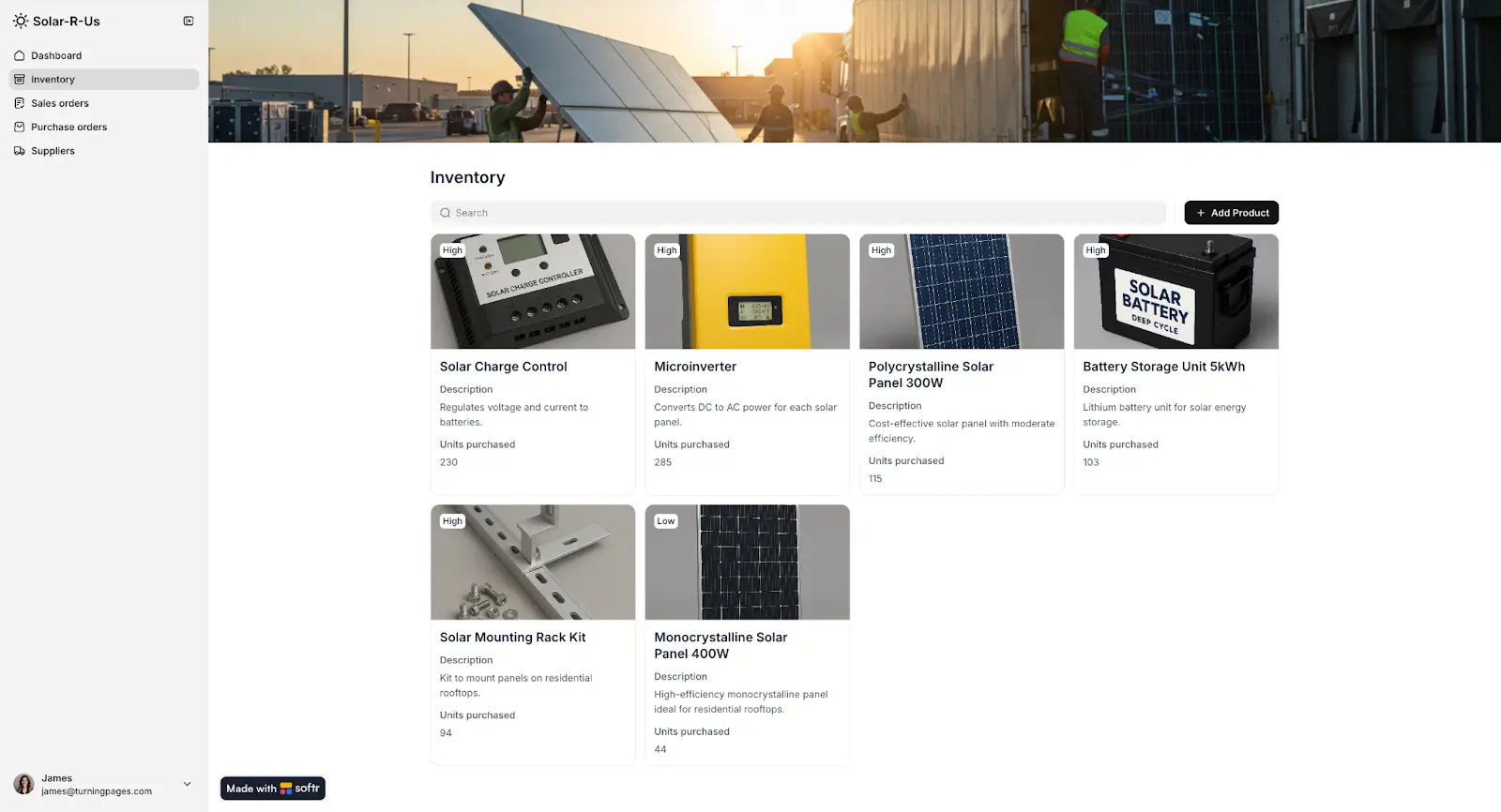
Softr is a no-code, AI-powered platform that lets you build a production-ready inventory management app that matches your real business workflows. You can manage stock data with a native relational database, streamline tasks with built-in automated workflows, and build custom portals for suppliers, vendors, and other external users.
Unlike Sortly’s fixed feature set, Softr lets you use AI (or start from a template) to build a tailored inventory system yourself in hours without hiring developers or stitching together different tools.
Use the visual editor to build and customize pages for stock tracking, order management, supplier directories, product catalogs, dashboards, and anything else your workflow needs. Set up user groups with role-based permissions to control exactly what each team member, partner, or customer can see and do. Then publish your app and share the URL.
Softr also includes native workflow automation. You can set up automations to do things like send alerts to relevant team members when stock drops below a threshold, notify logistics when new shipments are received, or flag products with upcoming expiration dates.
Plus, you can add an AI assistant directly into your app that reads from your live inventory data and answers questions like "What products are running low?" or "How many units were sold this week?"
Softr pros and cons
Pros
- Build only what you need. You’re not paying for features you’ll never use, and you can add capabilities like role-based permissions, supplier portals, or integrations as your needs grow.
- Integrated AI. Softr AI can answer questions about your live inventory data, with no API keys or external setup needed.
- Lower costs as you scale. You can invite team members, partners, or clients to use your app without paying per seat fees.
- Works wherever your team works. Your inventory app runs on desktop and mobile, and you can turn it into a downloadable mobile app with multiplatform PWAs.
- Automate multi-step processes, not just alerts. Build custom approval workflows, reorder triggers, and status updates that move stock through your specific stages — without being constrained by what someone else decided those workflows should look like.
- Production-ready from day one. Your inventory app comes with hosting, user management, and security built in, so there's no infrastructure to set up and no developers needed to make it safe for real users.
Cons
- No native eCommerce marketplace integrations to Shopify, Amazon, or eBay (but you can connect to them via REST API integration)
Key features
- Drag-and-drop app builder: Create pages for inventory dashboards, product catalogs, order tracking, supplier management, and more using pre-built blocks. Customize layouts, views, and filters for different teams or roles, without coding.
- Built-in relational database: Structure and manage inventory data, including items, stock levels, suppliers, orders, and locations. Changes sync instantly with your app.
- Integrations and data connections: Connect Softr to the tools you already use, including 21+ native data sources. Connect to other systems through REST API and webhooks.
- Role-based access and permissions: Create separate user groups for warehouse staff, sales managers, admins, or external partners. Control who can view, edit, or manage specific records and pages down to the button level.
- Native workflow automation: Automate tasks directly inside Softr. Add steps like updating records, sending notifications, or calling external APIs to sync inventory data with tools in your stack.
- AI agents and assistant: Set up AI agents that work inside your database to handle repetitive tasks like cleaning up messy data, tagging records, filling in missing details, or writing summaries. Add an AI assistant to your app that can read your live inventory data and answer questions on the spot.
- Barcode scanning: Scan item barcodes to record stock coming in and going out. Quantities and transactions update automatically and reflect in your database.
- Progressive Web App (PWA): Turn your inventory app into a downloadable mobile app in one click. Your team can access and update inventory from any device without building a separate mobile version.
- Enterprise-grade security: Your inventory data is protected with SOC 2 and GDPR compliance built in, with access controls at every level. You can log in securely with Google, email, or SSO.
Pricing
Softr offers flexible pricing with a generous free plan.
- Free: Unlimited apps, with access to Softr Workflows and Softr Databases, 5 app users, 5,000 database records, 5 AI credits.
- Basic ($19/month): Unlimited apps with 42+ integrations, Team: 5 + Client: 5 app users, 50,000 database records, 10 AI credits, and a custom domain.
- Pro ($99/month): Unlimited apps with 45+ integrations and custom code, Team: 10 + Client: 50 app users, 500,000 database records, 50 AI credits, advanced permissions, calling external APIs, and e-signature.
- Business ($329/month): Unlimited apps with 52+ integrations, Team: 30 + Client: 100 app users, 1,000,000 database records, 100 AI credits, and two-factor authentication.
- Enterprise: Custom pricing, SSO, dedicated success manager, and tailored onboarding
Who Softr is best for
Softr is best for e-commerce businesses, retailers, field service teams, wholesalers and distributors, and manufacturers that want to build an inventory system designed around how they actually work. You get full control over how the system looks, works, and who can access what.
2. inFlow Inventory — best for wholesale and eCommerce sellers that want end-to-end order fulfillment
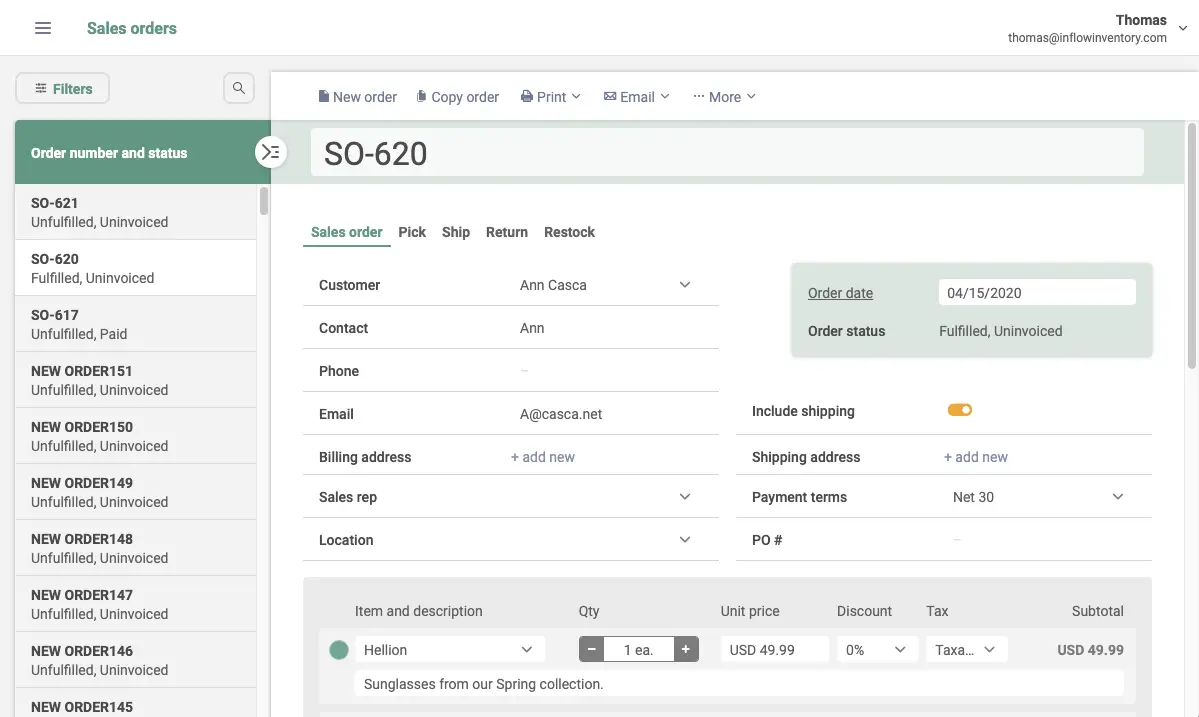
inFlow Inventory is a cloud-based tool that helps you manage your entire inventory process in one system. This includes purchasing from vendors, managing stock, processing sales orders, invoicing customers, and shipping products. You can create purchase orders, receive shipments, fulfill customer orders, and set up a B2B catalog for wholesale buyers without needing a separate eCommerce tool.
inFlow Inventory pros and cons
Pros
- Connects with over 100 integrations, including major eCommerce platforms like Shopify, Amazon, WooCommerce, and Squarespace.
- Lets you create public or private showrooms where customers can view products, see custom deals, and place orders on their own.
- Supports pricing and restocking at scale. You can update prices in bulk, set reorder points by product and location, and let inFlow remind you or create purchase orders when it’s time to restock.
- Tracks abandoned carts in B2B Showrooms and can automatically send reminder emails to customers who didn’t complete checkout.
Cons
- More expensive than Sortly, and adding users or integrations increases the cost
- Lowest tier pricing plan is limited to one location and one integration
- A mandatory onboarding fee is required on the Small Business plan and above
Key features
- Complete purchase-to-sale workflow: Create purchase orders, receive stock, process sales orders, generate invoices, manage returns, and handle back orders in one platform.
- Barcode scanning and label designer: Generate barcodes and scan them using your phone. Design custom labels using inFlow's built-in drag-and-drop label designer with templates or build your own from scratch.
- B2B Showroom: A built-in wholesale portal with real-time inventory sync and customer-specific pricing, plus abandoned cart reminders on select plans.
- Multi-location stock management: Track inventory across multiple locations with sublocations, stock transfers, and user-level access controls.
- Order fulfillment and shipping: Compare shipping rates, print labels, manage partial shipments, and track order and payment status.
Pricing
- Entrepreneur: Starts at $129/month. Includes 2 team members, 1,200 sales orders per year, 1 integration, and 1 location
- Small Business: Starts at $349/month. Includes 5 team members, 12,000 orders per year, 3 integrations, unlimited locations, user access rights, and B2B Showroom
- Mid-Size: Starts at $699/month. Includes 20 team members, unlimited orders, 5 integrations, advanced permissions, Showroom Pro, and API access
- Enterprise: Custom pricing
Who inFlow Inventory is best for
inFlow Inventory is best for businesses that sell physical products across one or more channels: wholesale, eCommerce, or field service. It’s also useful for wholesale distributors that want a built-in B2B ordering portal, and for eCommerce sellers that need inventory synced across platforms like Shopify and Amazon.
3. Zoho Inventory — best for eCommerce sellers managing orders across multiple marketplaces
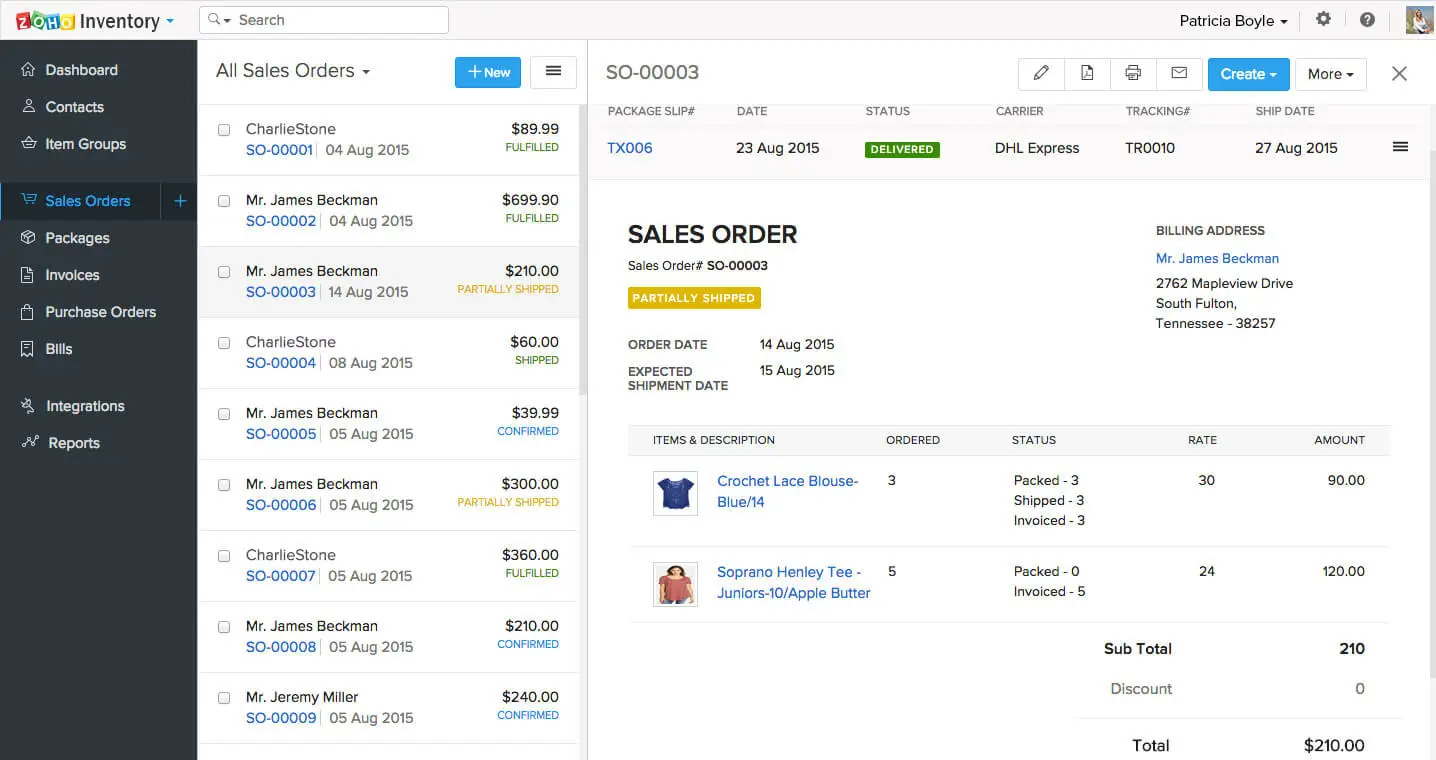
Zoho Inventory helps businesses that sell online manage products and orders across multiple channels. It keeps inventory, orders, invoicing, and shipping automatically synced with your sales and accounting tools. Depending on the plan you choose, you can automate everyday inventory and order tasks using custom workflows. Zoho Inventory can also trigger actions across connected tools, so your processes run in the background without manual follow-ups.
Zoho Inventory pros and cons
Pros
- Integrates natively with the broader Zoho ecosystem, which is useful if you already use Zoho Books, Zoho CRM, or other Zoho apps.
- Offers more on its free plan than most tools on this list. You get core features like 1000 API calls/day, multi-currency invoicing, backorders, sales returns, credit notes, shipping label generation, report scheduling, and integrations with eCommerce platforms, shipping carriers, and accounting tools, all at no cost.
Cons
- Workflow automation and custom functions are only available on the Professional plan or higher
- Shopify store integrations are capped by plan, so if you run more stores than your plan allows, you'll need to upgrade
Key features
- Multichannel selling and stock sync: Connect your Amazon, eBay, Etsy, and Shopify stores and manage all orders from one dashboard. When a sale is made on any channel, stock levels update automatically across every connected store.
- Full order management workflow: Create and track purchase orders, receive shipments from vendors, process sales orders, generate invoices, manage backorders, handle sales returns and credit notes, and set up dropshipments within the same system.
- Workflow automation and webhooks: Automate everyday tasks using custom workflows. Trigger actions in third-party apps using webhooks.
- Shipping integrations and label generation: Integrate with UPS, USPS, FedEx, and 40+ carriers worldwide through EasyPost and AfterShip.
- Customer and vendor portals: Customers can access a self-service portal to view orders, pay invoices, track shipments, and update contact details. Vendors get a separate portal to manage purchase orders, upload invoices, and view payment history.
Pricing
- Free: Includes 1 user, 2 locations, 50 invoices/month and 1000 API calls/day
- Standard: $29/month. Includes 2 users and 2 locations
- Professional: $79/month. Includes 2 users and 4 locations
- Premium: $129/month. Includes 2 users and 6 locations
- Enterprise: $249/month. Includes 7 users and 10 locations
Who Zoho Inventory is best for
Zoho Inventory is best for eCommerce sellers and online retailers that sell across multiple marketplaces and need one system to sync stock, process orders, and manage shipping. If you already use other Zoho apps, it’s a great fit since everything connects natively and data flows seamlessly between tools.
4. BoxHero — best for simple, barcode-first inventory tracking
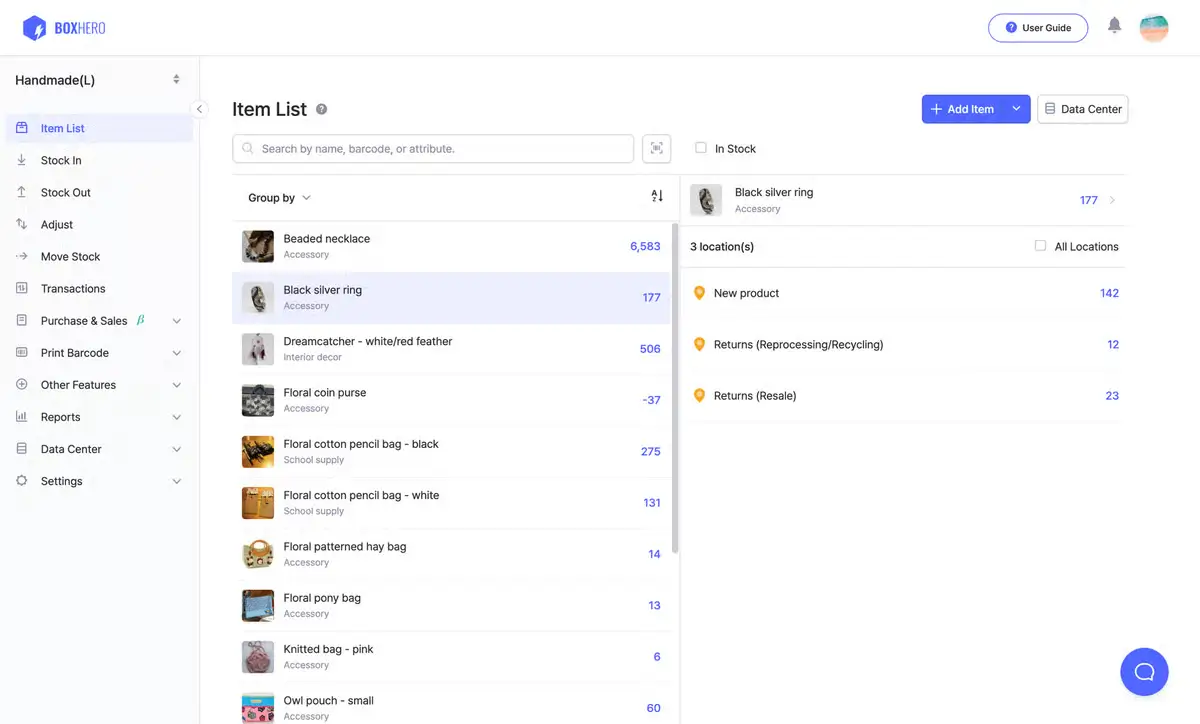
BoxHero is a cloud-based inventory management app designed for small businesses that need a clean, simple way to track stock across one or more locations. It runs on web, iOS, and Android, and its main appeal is how quickly you can get started. You add items, assign or generate barcodes, record stock in and stock out, and the system updates in real time across all devices.
BoxHero pros and cons
Pros
- Very easy to learn and use with no real training or onboarding required.
- Share real-time, read-only inventory views with clients or partners using secure links. You control exactly what information they can see.
- Affordable pricing that makes it easy to scale as you expand your team, investories, or locations.
Cons
- No direct connection to accounting tools like QuickBooks or Xero
- No native eCommerce integrations. BoxHero doesn't connect directly to Shopify, Amazon, eBay, or other online sales channels
- Low-stock alerts work at the item level, not by location — if one location runs out of stock but another still has inventory, you may not receive an alert
Key features
- Barcode scanning and label printing: Scan barcodes or QR codes using your phone camera to record stock in and out, move items between locations, and run inventory counts. Design custom barcode labels, then print them on any printer.
- Purchase and sales order management: Create purchase orders for suppliers and sales orders for customers directly in BoxHero. Track order status, apply taxes and discounts, manage billing records, and generate invoices.
- Multi-location tracking and transfers: Manage inventory across multiple warehouses, stores, or sections in one account. Transfer stock between locations, set low-stock alerts, and view reports for each location.
- Team-based inventory counting: Run stock counts by assigning tasks to team members. Updates sync in real time, and admins review and approve the counts before finalizing.
- Reporting and custom analytics: Use built-in reports to track metrics like turnover and stockouts, or create your own calculations using Excel formulas.
Pricing
- Personal Plan: Free. Includes 1 member, 100 items, and 1 location
- Business Plan: $18 per month ($216 per year with 10% annual discount). Includes 3 members, 1,000 items, and 3 locations. Additional members are $5/month
Who BoxHero is best for
BoxHero is best for small teams that want a simple inventory app without the cost or complexity of a full operations platform. This includes retail shops, small warehouses, food and beverage businesses, nonprofits, and teams that mainly need to track what comes in and what goes out across a few locations.
5. Odoo Inventory — best for businesses that want a full ERP system
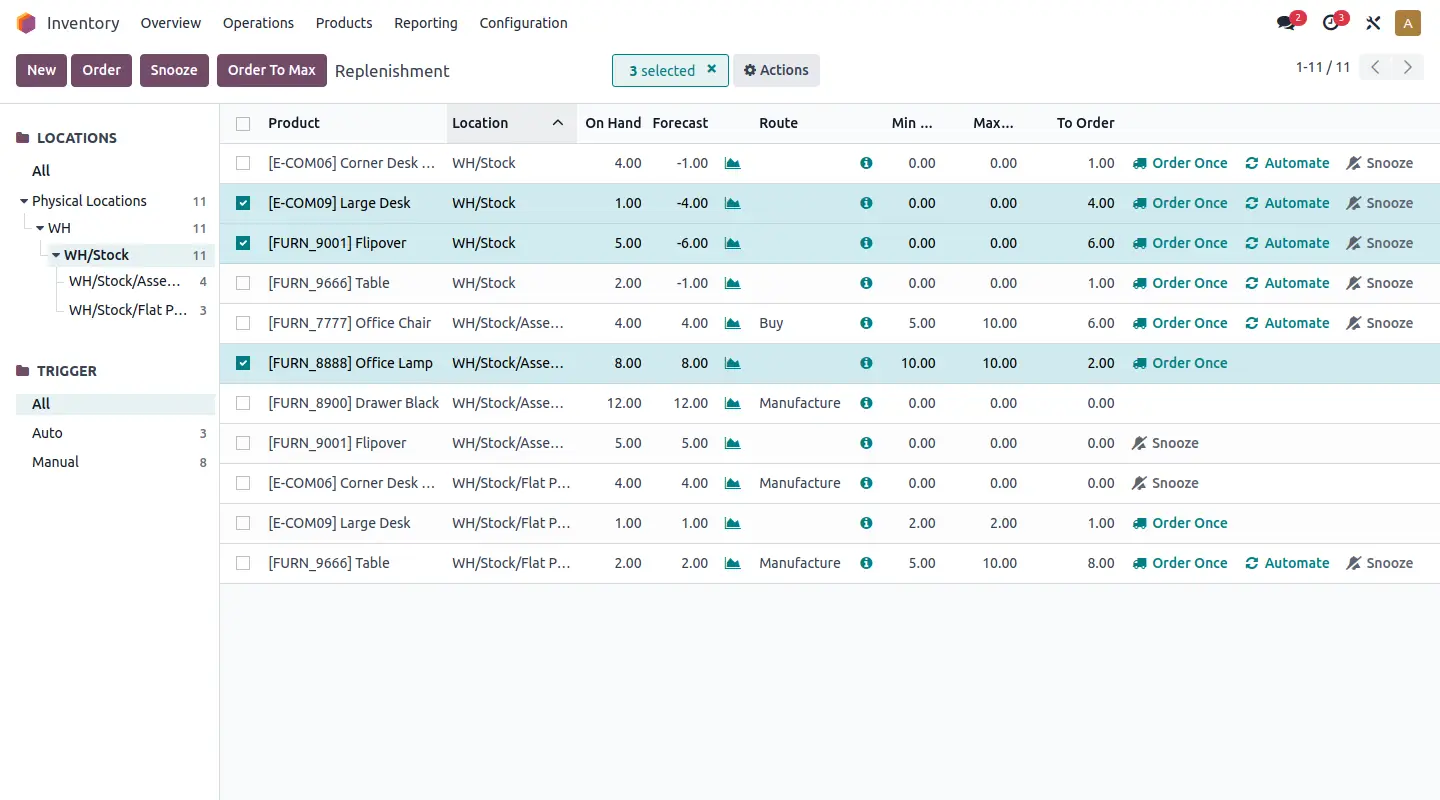
Odoo Inventory focuses on receiving shipments, storing products using smart putaway rules, picking and packing orders, managing shipping carriers, and tracking every stock movement in detail. When you connect Inventory with Odoo’s Sales, Purchase, Accounting, and Manufacturing apps, you get a full ERP system without buying traditional enterprise software.
Odoo pros and cons
Pros
- Free plan that lets you use Odoo Inventory app (and related Odoo apps like Invoicing) with unlimited users.
- Affordable for larger teams, with paid plans that start at a low per-user price.
- Self-service portal lets customers track orders, payments, and deliveries, and start returns using printable barcodes and custom return instructions.
- Because Odoo is open source, you can self-host and tailor the app to your workflows.
Cons
- Very steep learning curve. Odoo is a full ERP system, and even the Inventory app alone has many settings and options that can feel overwhelming.
- Pricing can be hard to predict. While the per-user price looks low at first, extra app costs, implementation fees, and hosting charges can add up.
- The free Community Edition includes fewer features, no official support, no automatic updates, and requires you to handle hosting and maintenance.
Key features
- Double-entry inventory with full traceability: Track products from supplier to customer using lot and serial numbers, with a full history of stock moves, counts, adjustments, and user actions.
- Advanced warehouse operations: Create detailed storage locations down to shelves and aisles. Set rules that automatically send products to the right storage area and choose how items are picked and removed.
- Barcode scanning: Use any standard barcode scanner or mobile device for receipts, pickings, inventory adjustments, and transfers.
- Automated replenishment and forecasting: Set minimum and maximum stock levels to trigger purchase orders, warehouse transfers, or manufacturing orders automatically.
- Shipping and returns management: Generate shipping labels from built-in carrier integrations including FedEx, DHL, UPS, USPS, and Bpost. Manage returns with clear workflows for inspection, repair, restocking, or disposal. Customers can track return status through a self-service portal.
Pricing
- One App Free – $0 per month. Use one app (Inventory in this case) with unlimited users. Includes hosting, maintenance, and support for that app.
- Standard – $7.25 per user per month (first-year annual discount) or $8.95 per user per month (regular annual rate). Hosted on Odoo Online.
- Custom – $10.90 per user per month (first-year annual discount) or $13.60 per user per month (regular annual rate). Can be hosted on Odoo Online, Odoo.sh, or self-hosted on your own servers.
Who Odoo is best for
Odoo is best for companies in manufacturing, retail, distribution, and wholesale that need inventory closely connected to sales, purchasing, accounting, and production. It’s also a good fit for teams that are willing to invest time in setup and maintenance or work with an implementation partner to configure the system properly.
Which Sortly Alternative is best for your team?
Choose BoxHero if you need a simple, affordable way to track stock with barcode scanning. If you sell across multiple online channels and need stock, orders, and shipping to stay in sync, Zoho Inventory may be a solid option.
If your business runs on purchasing, order fulfillment, and wholesale, inFlow is worth a look. Consider using Odoo if you need a full ERP system that connects inventory to accounting, manufacturing, and sales—and if you’re willing to invest the time in setup.
But if none of the off-the-shelf tools quite fit the way your team works, Softr will likely be a better fit. You get a built-in relational database, native workflow automation, barcode scanning, AI agents, role-based permissions, and deep flexibility. And your team can access your inventory app from any device.
Try Softr for free and start building your inventory system today.
Frequently asked questions
What alternatives are there to Sortly?
What is the best software for inventory management?
What are the best free inventory management tools?