
Zapier is arguably the most popular workflow automation tool on the market, connecting apps and moving data in the background without a line of code. But when you’re running a small or mid-sized business, you’ll quickly discover how limiting it can be. Costs rise quickly as workflows increase, and managing automations across several apps can add more work rather than simplify it. Here are the best Zapier alternatives in 2026, free and paid.
Best Zapier alternatives at a glance
| Tool | Best for | Standout features | Pricing |
|---|---|---|---|
| Softr Workflows | SMBs and internal teams needing workflows and full-stack apps without third-party integration | • Native automations (your automations, data, and UI live together in one place) • Build apps, portals, and workflows in one platform • Multi-step processes with conditions, filters, branches, loops, and more • AI actions to execute tasks within workflows | Free (5 app users, 500 workflow actions) Paid plans from $19/month |
| Make | Small teams looking for visual workflow automation | • Visual workflow builder • AI agents and tools • Conditional logic • API support | Free for up to 1,000 credits Paid plans from $9/month |
| n8n | Developers and technical-ops teams needing self-hosted, advanced workflows | • Self-hosting option • Advanced logic and scripting • Rich app integration library • Detailed execution logs | Free open-source community edition Paid plans from $20/month |
| Lindy | Teams needing AI-agent style automation | • AI-driven automation • Pre-built templates • Conversational interface • Large integration library | Free up to 400 credits/month Paid plans from 39.99/month |
| Workato | Mid-sized to large companies needing enterprise-level integrations, governance, and scalability | • Prebuilt AI agents • Low-code workflow studio • Universal connectivity • Extensive library of workflow recipes • Enterprise SLAs and support | Custom |
Limitations of Zapier
Zapier makes automation accessible for everyone, regardless of technical expertise. But it's not always the right fit for every team. You might want to look at alternatives if:
| Limitation | Why it matters |
|---|---|
| Costs start climbing as workflows increase | Teams start automating more as business grows: more leads, more clients, more internal processes. Because Zapier bills you for every action (every “task”) your automation runs, as workflows scale up, the monthly cost can rise sharply, making automation expensive for growing teams. The platform also limits advanced integrations to higher-tier plans, putting automation out of reach for smaller businesses. |
| You're automating outside your core business systems | Zapier moves data between separate tools — Tool A →Tool B →Tool C. You still have to pay for multiple subscriptions, switch dashboards, and manage permissions across platforms to keep your processes running. |
| Complex workflows are becoming hard to maintain | Some users report difficulty managing complex workflows as they start layering conditional logic, branching paths, or multiple dependencies. Debugging can also become time-consuming, as you have to check various Zaps across systems to find where something broke. |
| You need better support | When workflows fail, you need clear answers fast. Delayed support responses, especially for non-enterprise users, can disrupt work and slow your team down. |
What to look for in a Zapier alternative
When choosing a Zapier alternative, cost should not be your only concern. You need to find Zapier competitors that align with your team's workflow, technical comfort, and long-term automation goals. Here are some key factors to keep in mind when making a decision.
1. Integration depth: Teams love Zapier because it connects with thousands of apps. The alternative you choose might have fewer integrations, but make sure it integrates with your existing tech stack and other important apps or even allows custom integrations via webhooks and APIs if needed.
2. Native automation inside your system: Third-party integrations are good but still require dependency on external APIs. Choose platforms that let you automate directly within your app or database, reducing tool hopping and license stacking.
3. Good support: Most users cite issues with Zapier's support, and automation isn't always the easiest thing to handle. Make sure you're choosing a platform with a responsive support team, an active community, and clear documentation you can turn to when workflows fail.
4. User friendliness and technical expertise: Some workflow automation platforms are designed for non-technical operators, while others, especially those with open-source or self-host options, are better suited for developers and advanced users. Look for options that match your team's skill level and make it easy for you to see how your workflows run.
5. Predictable pricing as you scale: Zapier's task-based pricing and tight task limits make it too expensive for growing businesses. Check for alternatives with more affordable pricing, such as flat-rate plans, volume-based pricing, or even lifetime deals.
1. Softr Workflows — best no-code Zapier alternative for workflows and full-stack apps

Softr is a full-stack no-code platform that helps teams move beyond disconnected tools by combining the three core components needed to build apps:
- A database to store and organize your company’s data.
- An interface builder to design and customize how users interact with it.
- A workflow engine to automate actions and connect everything together.
Softr Workflows beautifully combine with Softr apps to allow complex automation to be triggered directly from the app’s UI (e.g. clicking a button). It comes with native features for the interfaces, allowing it to show a loading screen to the app user while the workflow is being executed and allowing it to easily redirect the user to a certain page or reload blocks’ data once it’s done.
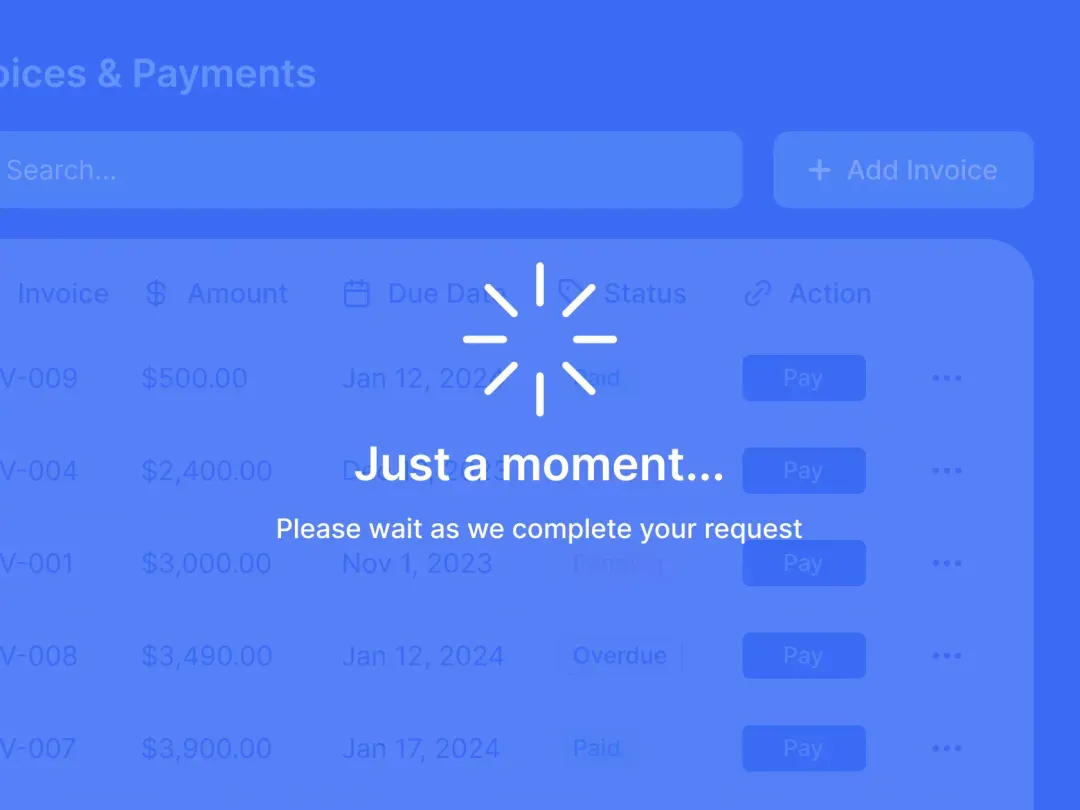
With Softr Workflows, you can design multi-step automations that handle everything from simple tasks to end-to-end processes without relying on third-party tools like Zapier. You can add logic with conditions, branches, loops, and wait time, and even show users a waiting screen while a workflow loads or processes data.
You can design simple or advanced multi-step flows using conditions, branches, loops, wait steps, API calls, and built-in AI actions. And because everything lives inside Softr, you avoid the usual maintenance issues that come with external automation tools.
Pros and cons of using Softr Workflows
Pros:
- Reduces tool sprawl and license costs by combining UI, workflows, and databases in one no-code tool
- Fewer external dependencies = fewer workflow failures and less maintenance.
- Easier troubleshooting in one environment if something goes wrong
- Friendly for non-technical teams, with room for advanced logic (API, custom code, AI).
- Includes templates and AI co-builder for creating workflows in minutes
- Includes templates and the AI Co-Builder, plus Softr MCP support to build and edit workflows directly from your AI assistant
Cons:
- Newer automation tool, so has smaller native integration library compared to Zapier (though you can use Webhooks, as well as Rest API to connect to any data source).
Softr Workflows key features
- Visual workflow builder: Easy-to-use canvas with drag and drop interface for building multi-step automations with triggers, conditions, actions, loops, and wait steps.
- Native automations: Run automations directly inside your Softr app without needing external connectors like Make or Zapier. With Softr Workflows, you can trigger automations directly from action buttons in your apps and run them in the background with optional wait screens or next steps.
- Built-in AI actions: Beyond basic automation, add AI-powered steps like summarizing content, analyzing data, enriching records, and generating content using Softr's built-in Database AI Agents.
- Database integrations: Automatically sync data with Softr Databases(e.g. you can import your Airtable base with all the logic applied) or connect to 21+ native data sources with real-time, two-way sync.
- API & webhook support: Lets you connect your Softr app to external tools or services—sending or fetching data, or triggering workflows when external events occur, while keeping your main app and database inside Softr.
Softr Workflows pricing
Softr Workflows is included in all Softr plans. Softr offers flexible pricing with a generous free plan.
- Free: Unlimited apps, with access to Softr Workflows and Softr Databases, 5 app users, 2 user groups, 5,000 Softr Database records with 500 Softr Workflow actions/month
- Basic ($19/month): Unlimited apps with 42+ integrations, Team: 5 + Client: 5 app users, 2 user groups, 50,000 database records, and 2,500 workflow actions
- Pro ($99/month): Unlimited apps with 45+ integrations and custom code, Team: 10 + Client: 50 app users, custom user groups (up to 3), 500,000 database records, and 10k workflow actions
- Business ($329/month): Unlimited apps with 52+ integrations, Team: 30 + Client: 100 app users, custom user groups (up to 10), 1M database records, and 25k workflow actions
- Enterprise (custom pricing, contact sales) for enterprise customers.
Why it's better than Zapier's pricing
Both Softr and Zapier charge based on the number of “actions” or “tasks” your automations run. With Softr, each plan gives you a fixed monthly quota of workflow-action executions (for example, 500 on the free plan, 2,500 on Basic, 10,000 on Pro, and 25,000 on Business). In many cases, especially for small to mid-sized teams or internal tools. This makes budgeting easier and spending more predictable.
With Zapier, you also get a monthly task allowance (e.g., 750 tasks/month on entry-level paid plans); but as automation volume, complexity, or frequency rises, you may need to buy extra tasks or upgrade plans, which can push costs up quickly.
For teams building internal apps, portals, or operational workflows tied to their data, Softr’s model offers a clear cap per plan and reduces the risk of unexpected overages, making it a more predictable choice as usage scales.
Verdict: Softr Workflows vs Zapier
If self-contained, low-maintenance automations are your priority, Softr is the best Zapier alternative. By bringing all your business apps, database, and workflow logic together in one place, Softr removes the friction of managing dozens of integrations and connections. You don't have to worry about data sync issues or workflows breaking each time an external app updates its API: a common pain point with Zapier-style setups. Instead, you'll get a system that's easier to maintain and far more reliable long-term, especially for small and medium-sized teams without technical staff constantly monitoring automations.
2. Make — best for small teams looking for visual workflow automation

Make, formerly known as Integromat, is a popular no-code automation tool that's very similar to Zapier. It lets you build simple and complex business processes to automate everything from CRM updates and file uploads to data transformations and notifications.
Make's biggest strength is its visual workflow builder that maps out every step of your process on a canvas. You can see how data flows between apps, add filters, routers, and conditions, and see where steps fail without digging through your entire automation history. The platform connects with over 3,000 apps and supports API calls so you can integrate any custom system.
Pros and Cons of Make
Pros:
- Intuitive visual builder makes complex workflows easier to manage
- Transparent execution steps simplify debugging
- Affordable for power users compared to Zapier
Cons:
- Has a slightly steep learning curve for non-technical users
- Limited support on lower-tier plans
- Usage-based pricing can spike costs unexpectedly
Key features of Make
- Visual workflow builder: Intuitive drag and drop interface for building sophisticated workflows. In-depth visibility makes it easy to spot inefficiencies or optimize workflows as you build.
- AI agents and tools: Make provides reusable AI agents that can adapt in real time and execute tasks across workflows.
- Conditional logic: Automate complex decision-making processes using conditions, schedule delays, routers, and more.
- API support: Direct connections with 3,000+ apps and a flexible API for integrating more tools.
Make pricing
- Free for up to 1,000 credits/ month
- Core: from $9/month (annual billing)
- Pro: from $16/month (annual billing)
- Teams: from $29/month (annual billing)
- Enterprise: custom pricing
Who Make is best for
Solo operators, small agencies, and teams that want visibility into complex workflows. Its visual workflow builder gives you step-by-step insight into how each step in your automation runs. Make is also one of the best free alternatives to Zapier for budget-conscious teams looking for advanced automation power without the upfront cost.
Verdict: Make vs Zapier
Make will give you the flexibility to map complex workflows, monitor every execution, and fine-tune logic visually. While it requires more technical experience, it's a good option if you value control and visibility over your automations.
3. n8n — best for technical ops teams that want self-hosted and advanced workflows
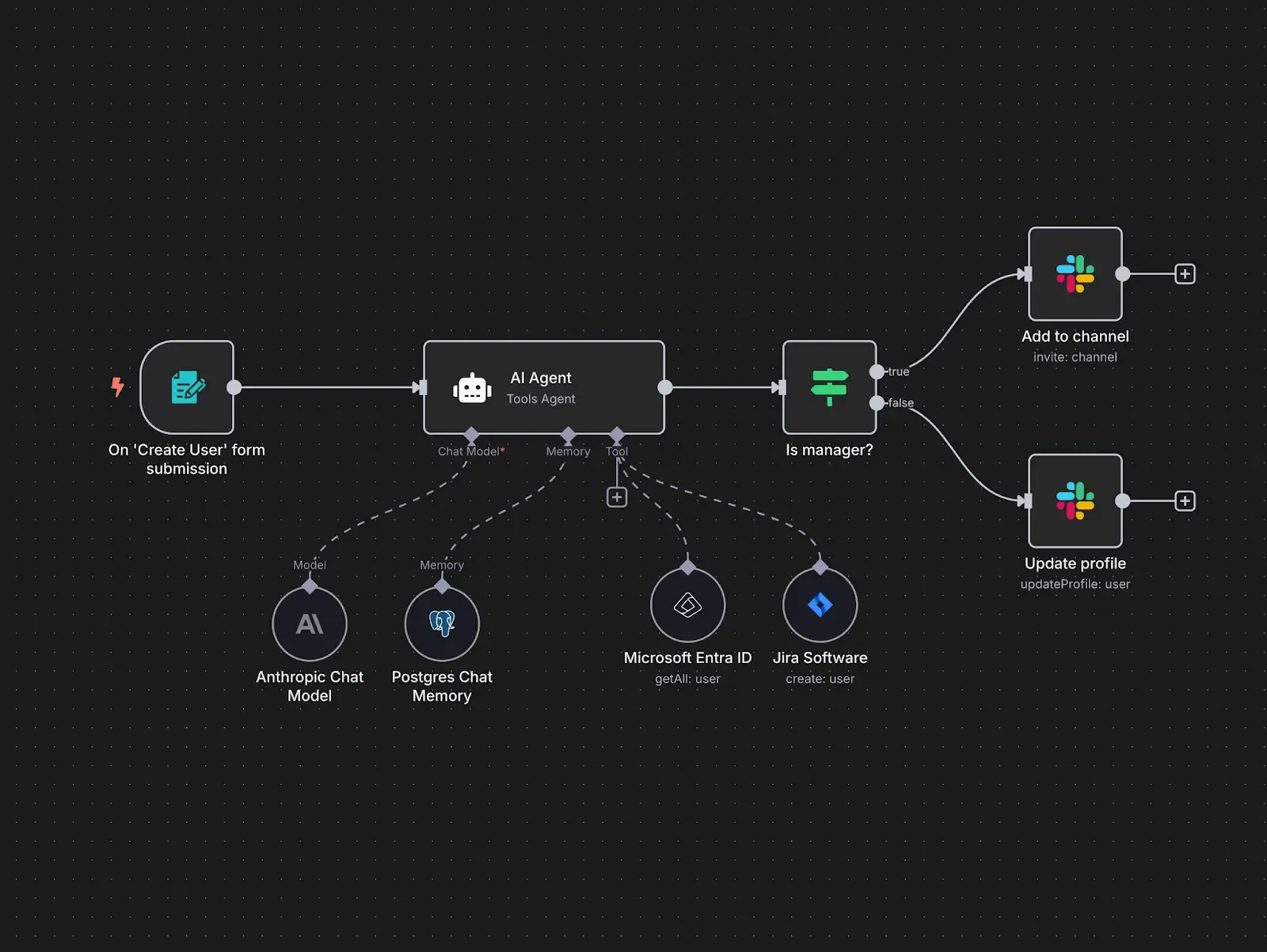
n8n is a mature automation platform that gives teams full control over how and where their automations run. It uses a node-based builder where each node represents an action, function, or app, and you can connect them to design both simple and highly complex workflows. Unlike other automation tools that only support cloud-based deployment, n8n gives you the option to self-host your workflows so you can decide where your data lives, how it is processed, and how the system scales.
What sets n8n apart is its deep workflow customization, control, and versatility. You're not locked into proprietary connectors. You can integrate with internal systems that aren't possible with Zapier and automate practically anything with an endpoint. This makes it a top choice for technical ops teams and developers looking for flexibility beyond the limits of SaaS automation tools.
Pros and cons of n8n
Pros:
- Full control over your data and infrastructure
- Highly customizable and extensible
- Self-host option eliminates dependency on external SaaS uptime
- Git based version control, which allows you to roll back changes or switch environments
- Custom code capability within workflows for advanced data manipulation and logic
Cons:
- Very steep learning curve
- Requires technical setup and server maintenance if self-hosted
- Can be resource-intensive if you're running large workflows
Key features of n8n
- Self-hosting option: Run n8n on your own infrastructure for full data ownership and security
- Advanced logic and scripting: It supports conditional flows, loops, JavaScript code blocks, and Python for fine-grained control
- Rich app integration library: Over 1000 pre-built nodes plus customizable HTTP request nodes, GraphQL, and webhooks for connecting with virtually any RESTful API to build workflows that fit your unique needs
- Detailed execution logs: Lets you inspect each run, test steps, and debug errors directly in the workflow editor
N8n pricing
- Free open-source community edition
- Starter: $20/month (billed annually) hosted by n8n
- Pro: $50/month (billed annually) hosted by n8n
- Business: $667/month (billed annually) self-hosted
- Enterprise: custom pricing, self-hosted or hosted by n8n
Who n8n is best for
Technical operations teams, developers, and privacy-conscious organizations looking to automate complex workflows while staying in complete control of their data and infrastructure. It's ideal for businesses in regulated industries with advanced governance, security, and scalability requirements.
Verdict: n8n vs Zapier
If control and customization are your priorities, n8n outclasses Zapier. Where Zapier locks you into cloud-only automations and fixed connectors, n8n gives you the freedom to host, extend, and tailor workflows to your exact system. It's more technical to set up, but you'll get total flexibility and no surprise costs from scaling usage.
4. Lindy — best for teams that want AI-agent style automations
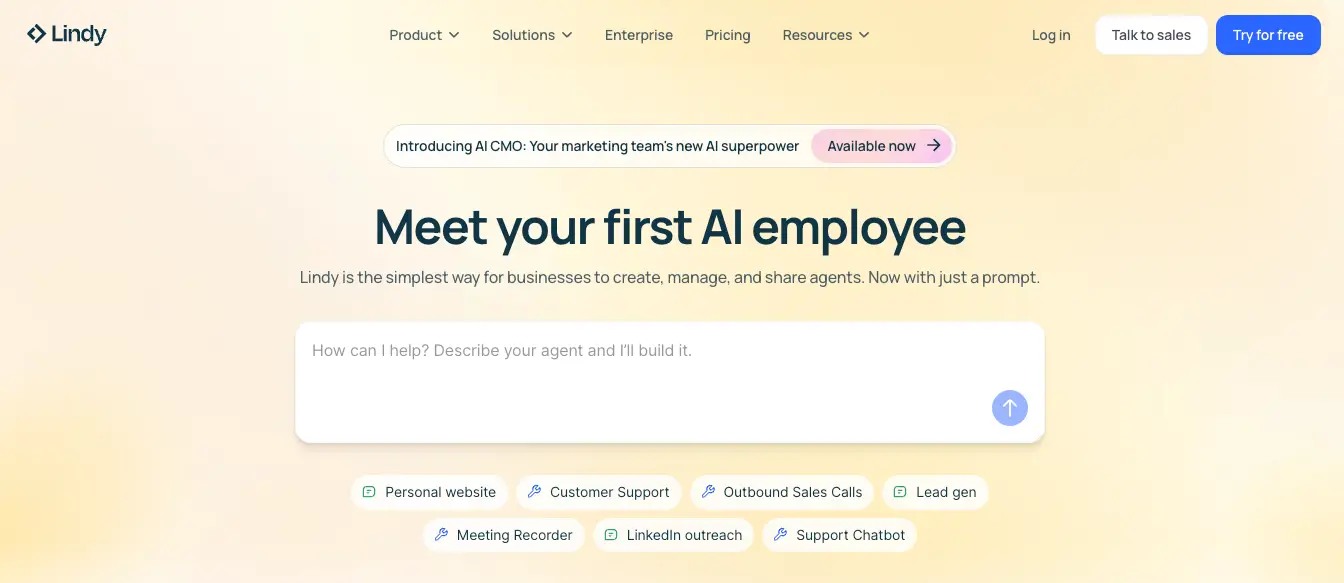
Lindy is a much simpler automation software compared to Zapier, Make, or n8n. Powered by AI agents, Lindy lets you build custom workflows with AI agents that reason, make decisions, and take actions on your behalf. It is perfect for handling routine tasks such as replying to emails, scheduling meetings, updating your CRM, or qualifying leads.
With Lindy, you can connect business-critical tools like Gmail, Slack, Notion, and Hubspot, describe what you want done in plain English, and the AI will understand the intent, determine the necessary steps, and execute them automatically. The AI can combine multiple agents to manage multi-step actions and processes across sales, customer support, operations, and more.
Pros and cons of Lindy
Pros:
- Easy to set up and use for non-technical teams
- Handles unstructured data like emails, notes, and messages effortlessly
- Built-in logic for executing tasks based on intent rather than fixed instructions
- Reduces time spent on manual work
Cons:
- Because AI powers everything, some workflows might need human verification.
- Not suited for complex or advanced automation
- Requires total access to a lot of your business tools to function properly
- Uses a credit-based system that runs quickly
Key features of Lindy
- AI-driven automation: Natural language workflows powered by large language models that understand context and intent.
- Conversational interface: Build automations by chatting with your AI agent instead of configuring triggers and steps.
- Pre-built templates: 100+ workflows across marketing, ops, sales, recruiting, and customer service.
- Large integration library: Connects with over 7,000 business apps.
Lindy pricing
- Free with 400 credits/month
- Basic: starts from $39.99/month (billed annually)
- Business: starts from $159.99/month (billed annually)
- Enterprise: custom pricing
Who Lindy is best for
Startups and customer-facing teams that want to delegate routine communication, admin, or coordination work to intelligent AI agents instead of building workflows by hand.
Verdict: Lindy vs Zapier
Choose Lindy if you want automation that figures things out for you. Instead of building step-by-step workflows, you'll simply describe what you need done, and Lindy will handle the logic. This way, you'll spend less time designing automation and more time delegating real work.
5. Workato — best for mid-to-large companies needing enterprise-level automation
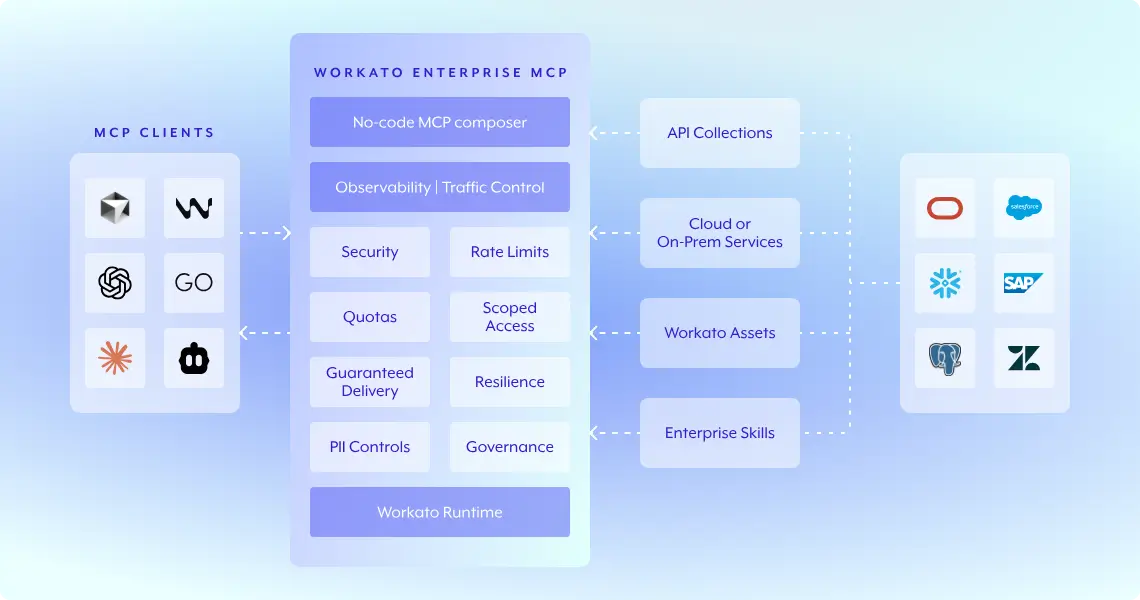
Workato is an enterprise-level automation platform for organizations that need to connect complex systems securely and at scale. With it, you can build deep, bi-directional integrations across your business-critical systems, from CRMs and ERPs to finance, HR, and data warehouses.
Workato's workflows (called recipes) can handle advanced logic, real-time triggers, and data transformations between on-premises and cloud applications. You'll get access to enterprise-grade features like granular access controls, audit logs, versioning, and encrypted pipelines to ensure all workflows comply with your company's security and compliance policies.
Pros and cons of Workato
Pros:
- Supports both cloud and on-premises integrations
- Granular governance and compliance tools suitable for large organizations
- Advanced automation and integration capabilities built for scale
- Includes an MCP server to connect with AI platforms
Cons:
- Expensive for small teams and startups
- Advanced platform and so requires technical knowledge to implement complex workflows
- Less intuitive platform compared to Softr, Zapier, and Lindy
Key features of Workato
- Prebuilt AI agents: Called Workato Genies, handle high-impact work within business functions like marketing, sales, support, IT & security.
- Low-code workflow studio: Equipped with enterprise-grade capabilities for designing, testing, and deploying workflows with AI agents.
- Universal connectivity: Connect every system from modern SaaS to legacy and on-prem infrastructures.
- Enterprise SLAs and support: 24/7 global support, contractual SLAs, and dedicated success teams
- Extensive library of workflow recipes: Over 225,000 workflow recipes that address popular business use cases like customer success, employee onboarding, and more.
Workato pricing
- Custom, speak to sales for a personalized quote.
Who Workato is best for
Mid to large-sized enterprises with experienced IT and operations teams looking to manage workflows across ERP, CRM, and HR systems. You'll get reliability and control with strict governance, compliance, and systems integration.
Verdict: Workato vs Zapier
If your automations are very complex, Workato could be a better alternative to Zapier. It combines the ease of low-code automations with the power and governance features enterprises need to scale securely.
Choose the right Zapier alternative for your team
Zapier and other automation tools have made it easier than ever to connect apps and move data across platforms. But at some point, connecting different systems stops making work easier. It just adds more tools to manage.
If you're looking for something that makes automation simpler and more self-contained, Softr Workflows is worth considering. You can use Softr to build your business-critical apps, connect your database, and then automate your processes inside the same platform — no third-party connectors, or extra logins required.
Try Softr for free and see how easy it is to build automated workflows.
Frequently asked questions
What is the best free alternative to Zapier?
What Zapier alternative allows me to automate workflows inside my app?
What's the main difference between Zapier and its alternatives?
Which Zapier alternative is best for enterprise use?
What's the best Zapier alternative if I want AI-driven automation?