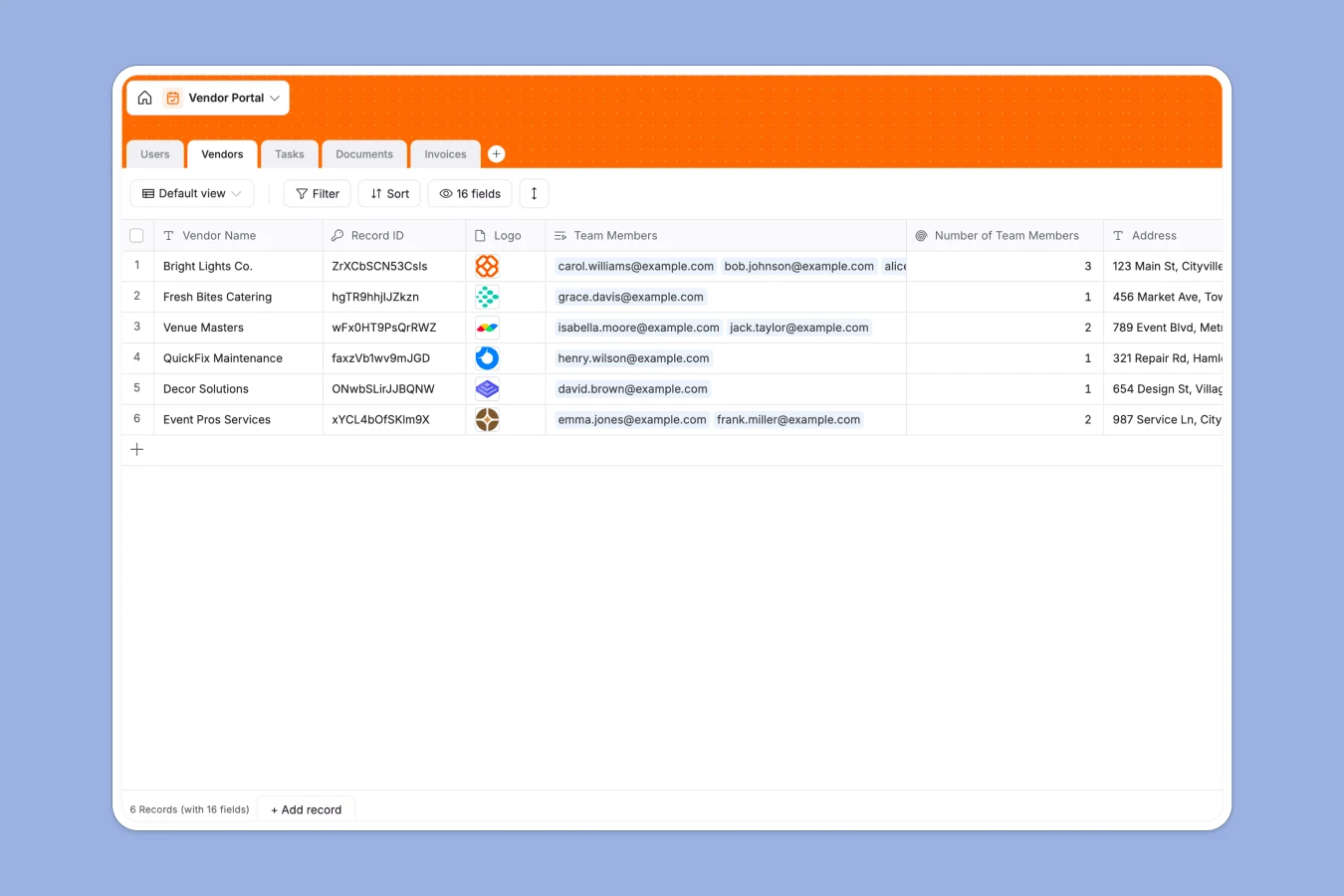
This vendor portal database centralizes all vendor relationships, documents, invoices, and tasks in one structured system. Track vendor status from application through approval, manage team access by company, and maintain visibility over outstanding work and payments.
The database connects five core tables: Vendors store company profiles with approval workflows and categories; Users manage access with role-based permissions linking to specific vendor companies; Tasks assign and track work with due dates; Documents organize compliance and legal files by type; and Invoices handle submission-to-payment cycles with status tracking. Rollup fields automatically count team members, open tasks, and outstanding invoices per vendor.
AI agents automate data entry—categorizing vendors by description, generating task titles from descriptions, classifying document types from uploaded files, and extracting invoice amounts automatically. This eliminates manual data entry and keeps records consistent as new information arrives.
Spreadsheets fragment vendor management across multiple files—one for contacts, another for documents, separate trackers for invoices and tasks. As vendor relationships grow, finding information becomes slow and error-prone.
Softr Databases enforce proper structure with typed columns (dates, currency, select fields, attachments) and native relationships between tables. Instead of fragile VLOOKUPs that break when data moves, related records connect vendors to their team members, documents, tasks, and invoices automatically. Rollup fields pull live counts—team size, open tasks, outstanding invoices—without formulas. The one table = one object principle keeps vendor data clean and app-ready, with API access for automated syncing and a foundation built for building full-stack applications with proper permissions.
This template includes approval workflows tracking vendors from "Under review" to "Approved" or "Rejected," role-based access controlling what admins versus vendor users can see and edit, and automatic categorization using Database AI agents that classify vendors, documents, and extract invoice amounts without manual data entry. Rollups provide instant visibility into workload and payment status across all vendor relationships, making oversight effortless as your vendor network scales.
Manage vendor and admin profiles with roles, contact info and task links
Track partner companies and use AI to automatically categorize business types
Coordinate work using AI-generated titles to summarize project descriptions
Store vendor files and apply AI for automatic document type classification
Process payments and use AI to extract exact billing amounts from files
This database helps teams manage external vendor relationships efficiently:
Customize the database to match your vendor management process. Modify the Category select field to reflect your industry—swap "Equipment" and "Catering" for "Software," "Consulting," or "Manufacturing" as needed. Adjust Vendor Status options to match your approval stages, or add custom fields like contract end dates, performance ratings, or primary contact information.
Import your existing data via CSV to move current vendor lists, contact details, and invoice history into the structured database. Use the API to sync automatically with accounting systems, contract management tools, or ERP platforms, ensuring vendor information stays current without manual updates.
Build an app on top to create secure vendor portals where external partners log in to submit invoices, upload documents, and update task status—while your internal team uses admin views to approve vendors and monitor all relationships. Softr's interface builder connects directly to this database, letting you create custom pages for different user groups. Configure permissions so vendors only see their own company data while admins access everything, and internal teams view aggregated reports across all vendors. A well-structured database like this makes building those interfaces straightforward—relationships between vendors, users, tasks, and invoices are already defined, so your app displays the right information to the right people automatically.
Full-stack apps in Softr combine Database + Interface + Workflows, all connected in one platform, turning this template into a complete vendor management system that adapts as your processes evolve.
A vendor portal database centralizes all information about external vendors—company profiles, contact details, documents, invoices, tasks, and approval workflows—in one structured system. It tracks vendor relationships from application through ongoing collaboration, maintaining visibility over compliance, payments, and deliverables without scattering data across emails and spreadsheets.
No-code databases let you deploy vendor management systems in hours instead of months, without technical skills or developer dependency. The structure is production-ready immediately—start tracking vendors today, customize fields as needs change, and maintain the system yourself. This autonomy means procurement and operations teams control their tools directly, adapting workflows without waiting for IT resources.
AI Database co-builder follows natural language prompts to structure your vendor tables, write filters for approval workflows, and create formulas calculating payment timelines. Database AI agents work as configurable columns—automatically categorizing vendors by industry from descriptions, classifying document types from uploaded files (Legal, Financial, Compliance), extracting invoice amounts from PDFs, and generating task titles from work descriptions. Set execution conditions so agents only run when new vendors are added or documents uploaded, preventing unnecessary processing and keeping data consistent without manual entry.
Yes, Softr's interface builder connects directly to this database, letting you create secure portals where vendors log in to submit invoices, upload compliance documents, and update task status—while internal teams use admin dashboards to approve new vendors, track outstanding payments, and monitor all relationships. Configure permissions so vendors only access their own company data, procurement teams review and approve applications, and finance views invoice status across all vendors. The relational structure makes this straightforward—users link to vendor companies, invoices connect to vendors, and permissions control who sees what automatically.
Yes, this template is free to get started. Databases are included in Softr's free plan, and you can invite unlimited collaborators at any tier. Higher-tier plans offer increased database capacity for growing vendor networks, but you can begin organizing vendor relationships and building your portal immediately at no cost.
Spreadsheets force you to create separate files for vendors, contacts, documents, and invoices, then rely on fragile VLOOKUPs to connect them—which break easily as data grows. This database uses native relationships: vendors link to team members, tasks, documents, and invoices automatically, with rollups counting open tasks and outstanding payments in real time. Enforced column types prevent mixing dates with text in the same field, and the structured format makes building secure vendor portals with proper access control straightforward—something spreadsheets can't support.