


Overview
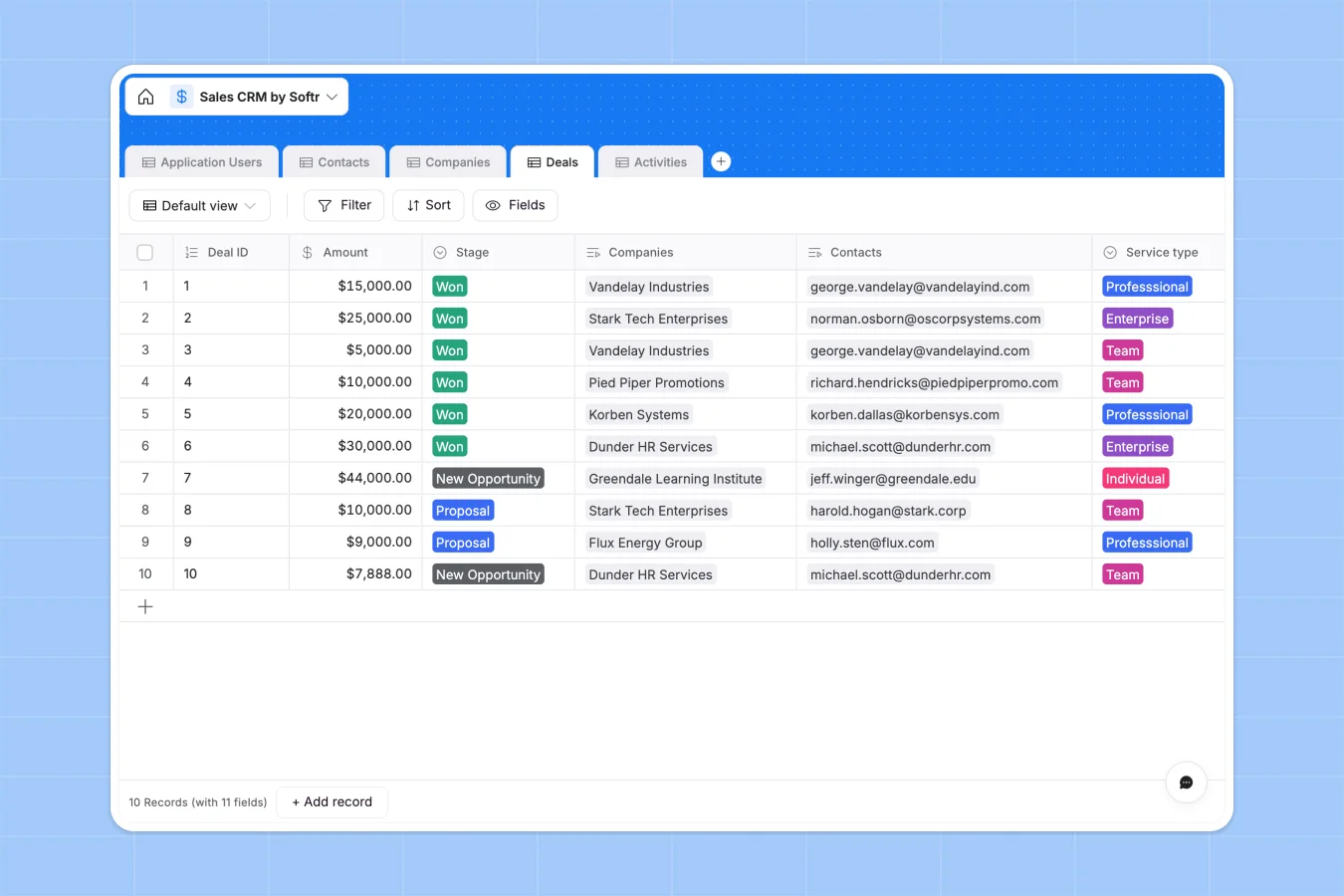
This Sales CRM database tracks every aspect of your sales pipeline in one structured system. It connects companies, contacts, deals, activities, and account managers through native relationships—so you see the full picture of each opportunity without hunting across multiple tabs or files.
The database includes five interconnected tables: Companies store client details and industry information; Contacts link to their companies with job titles and communication details; Deals track opportunity amounts, stages, and close dates; Activities log every interaction with automatic timestamps; and Application Users manage account manager assignments and workload visibility. Lookups and rollups pull related information automatically—like showing all contacts at a company or counting total deals per account manager—without manual updates or fragile formulas.
Why choose a sales CRM database over spreadsheets
Spreadsheets create chaos as your pipeline grows: you end up with separate tabs for leads, opportunities, and closed deals—often duplicating the same company or contact across multiple sheets. Filters are cumbersome, views don't save properly, and columns accumulate mixed data types (dates alongside notes, numbers next to text). Navigation becomes difficult, and VLOOKUP formulas break whenever you reorganize.
The power of Softr Databases
Softr Databases solve these problems through enforced structure and native relationships. Each table represents one object type (one for companies, one for contacts, one for deals) with strictly typed columns—currency fields only accept numbers, datetime fields only accept dates, select fields limit choices to predefined values. Related records connect tables without formulas: link a contact to their company once, and lookups automatically pull company details wherever you need them. Rollups count related records (like total deals per account manager) and update instantly. This structure follows the principle of one table = one object, making your data app-ready and eliminating the fragile VLOOKUPs that plague spreadsheet-based CRMs.
Core features and functionality
This template uses linked records to connect contacts to companies, deals to both contacts and companies, and activities to the people involved—creating a complete relationship map of your sales efforts. Rollup fields automatically count deals per account manager and activities logged per contact, giving visibility into workload distribution and engagement levels. Autonumber fields generate unique IDs for deals and activities, while creation date fields timestamp every new record automatically. These capabilities turn your CRM into a reliable system that scales with your team, not a collection of disconnected spreadsheets requiring constant manual maintenance.
-
Application Users
Manage internal staff members with roles and assigned account relationships
-
Contacts
Store individual lead and client details with interaction history tracking
-
Companies
Organize business entities by industry and linked account management owners
-
Deals
Track sales opportunities through pipeline stages with currency and contracts
-
Activities
Log all communication events and meetings with timestamped staff comments
Who is this Sales CRM for
This database helps sales teams and business operators manage their pipeline without complex tools:
- Sales teams: Track every opportunity from first contact through close with complete visibility into deal status and history.
- Account managers: See all companies, contacts, and deals assigned to you in one view with automatic workload counts.
- Small businesses: Run your entire sales operation without paying for enterprise CRM software or learning complicated systems.
- Operations teams: Maintain clean, structured customer data that actually reflects how your sales process works.
- Growing companies: Scale from tracking a few deals to managing hundreds without rebuilding your entire system.
How to take it further
Customize the database. Modify the Stage select field to match your actual sales stages (Qualification, Demo, Negotiation, Closed-Won, Closed-Lost). Adjust Industry choices to reflect the sectors you serve. Add custom fields like Lead Source, Expected Revenue, or Next Follow-up Date. Since this is a native Softr Database, every change updates instantly across all related records.
Import your existing data. Upload your current contacts, companies, and deals via CSV to populate the database immediately. Use the API to sync data from other tools automatically—like pulling new leads from your website form or updating deal stages from your email sequences. This gets you from spreadsheet chaos to structured pipeline in minutes.
Build an app on top. Create a full-stack sales portal where account managers log into personalized dashboards showing only their assigned companies and deals. Use Softr's interface builder to design views for different roles: sales reps see their pipeline and activity logs, managers view team performance and deal distribution. Set permissions so each user accesses only relevant data—reps can't see each other's deals, but managers get complete visibility. The interface connects directly to this database, so updates happen in real time. A well-structured database like this makes building the interface straightforward because relationships and data types are already defined—you're configuring views, not fixing broken formulas.
-
1
-
2
-
3
-
4
Frequently asked questions
-
What is a sales CRM database?
-
Why use a no-code database to build a sales CRM?
-
How is a sales CRM database different from spreadsheets?
-
Can I build an app with this sales CRM database?
-
Can I customize this Sales CRM database?
-
How do I import existing sales data into this template?
Start building today. It's free!
Build and launch your first app in under 30 minutes.