


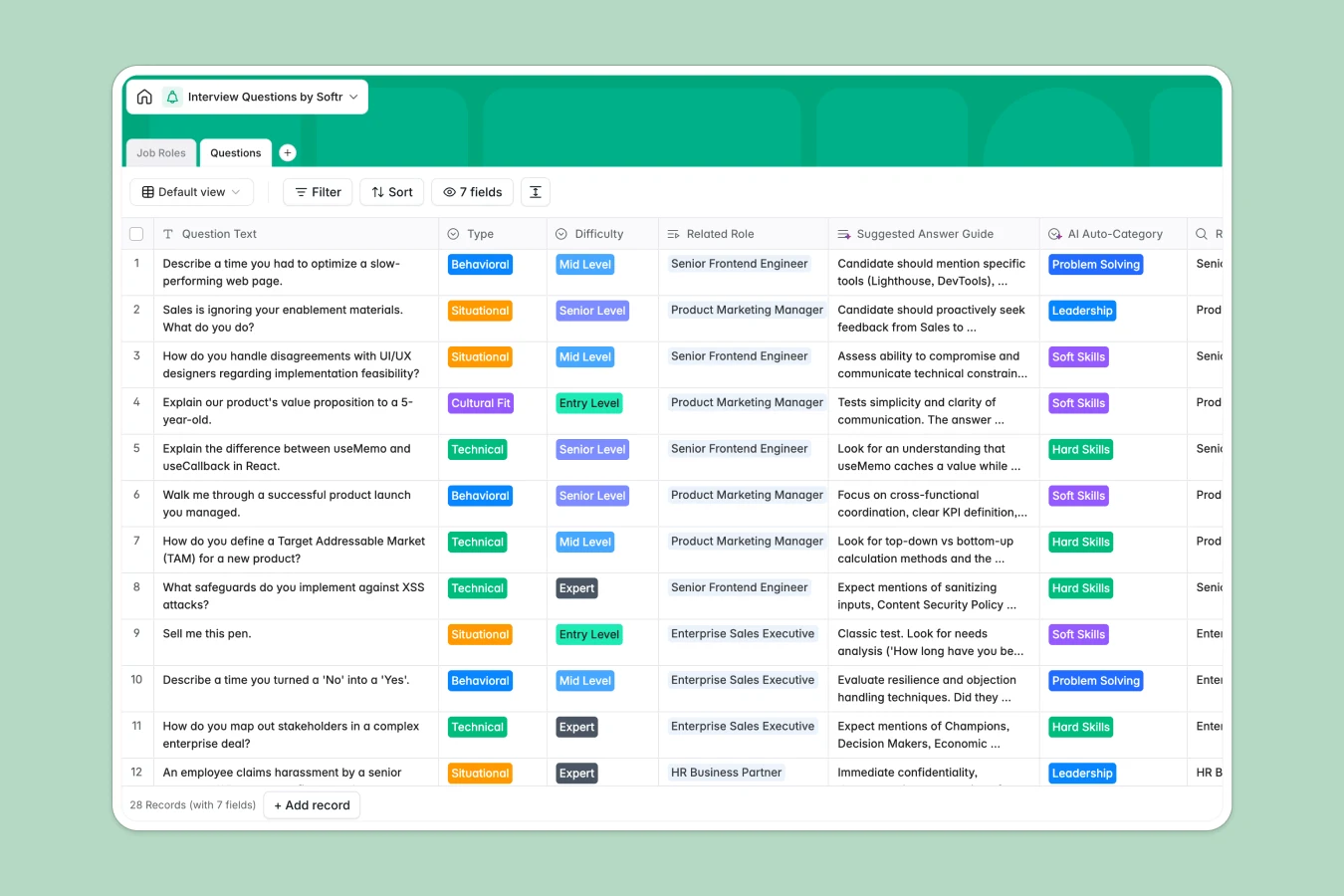
Your Interview Questions Database at a glance
This template helps you organize and standardize your hiring process in one central hub. It replaces scattered documents with a structured library of behavioral, technical, and cultural questions.
It works by connecting a Job Roles table directly to your Questions repository. When you build a new role, you simply link existing questions instead of copy-pasting them across different files.
The template also features an AI Auto-Category field that instantly tags new questions by skill type. This keeps your repository perfectly organized without manual sorting.
Why interview questions get messy in spreadsheets
Tracking thousands of interview questions in a spreadsheet usually leads to endless horizontal scrolling and duplicate data. When a hiring manager needs to find entry-level engineering questions, they are forced to dig through messy, unfiltered rows.
What a structured database changes
A relational system fixes this by treating jobs and questions as connected objects, not flat rows. Every column enforces a specific format, meaning categories and difficulty levels stay perfectly standardized.
You can link a single behavioral question to multiple job roles simultaneously without duplicating data. This is exactly what Softr Databases are designed for, keeping your hiring data clean as your team scales.
What you can do with this template
You can build out rich job descriptions and automatically track how many questions are assigned to each role. Suggested answer guides fit neatly into long-text fields, giving interviewers complete context without cramming data.
You can also leverage Database AI agents to automatically categorize new questions as soft, hard, or leadership skills. It is fully set up and ready to accept your existing hiring data immediately.
-
Job Roles
Define distinct career positions and organize related interview content
-
Questions
Store interview queries with AI-powered tagging for skill categorization
Who is this Interview Questions database for
Whether you are standardizing hiring company-wide or organizing your own team's process, this template adds instant structure.
- HR Leaders: Standardize interview processes across departments to ensure fair and consistent candidate evaluations.
- Hiring Managers: Quickly assemble custom interview guides by picking from a pre-vetted repository of questions.
- Recruiters: Maintain a clean, searchable library of technical and cultural questions tailored by difficulty level.
How to take it further
Start by customizing the database to match your exact hiring framework. You can easily tweak the department categories or difficulty levels to reflect your internal labeling.
Next, import your existing questions from scattered files directly via CSV. This instantly transforms your messy historical data into a clean, searchable repository.
When you are ready, you can transform this database into a complete hiring portal using Softr's interface builder. This lets you securely share specific interview guides with external recruiters or distinct departments.
By utilizing robust users and permissions, you ensure that hiring managers only see the roles and questions relevant to specific open positions. Starting with a structured database makes building these connected apps effortless.
-
1
-
2
-
3
-
4
Frequently asked questions
-
What is an interview questions database?
-
Why use a no-code database to build an interview process tool?
-
How can AI help managing data for interview questions?
-
Can I build an app with an interview questions database?
-
Is this Interview Questions database free?
-
How is an interview questions database different from spreadsheets?
Start building today. It's free!
Build and launch your first app in under 30 minutes.