


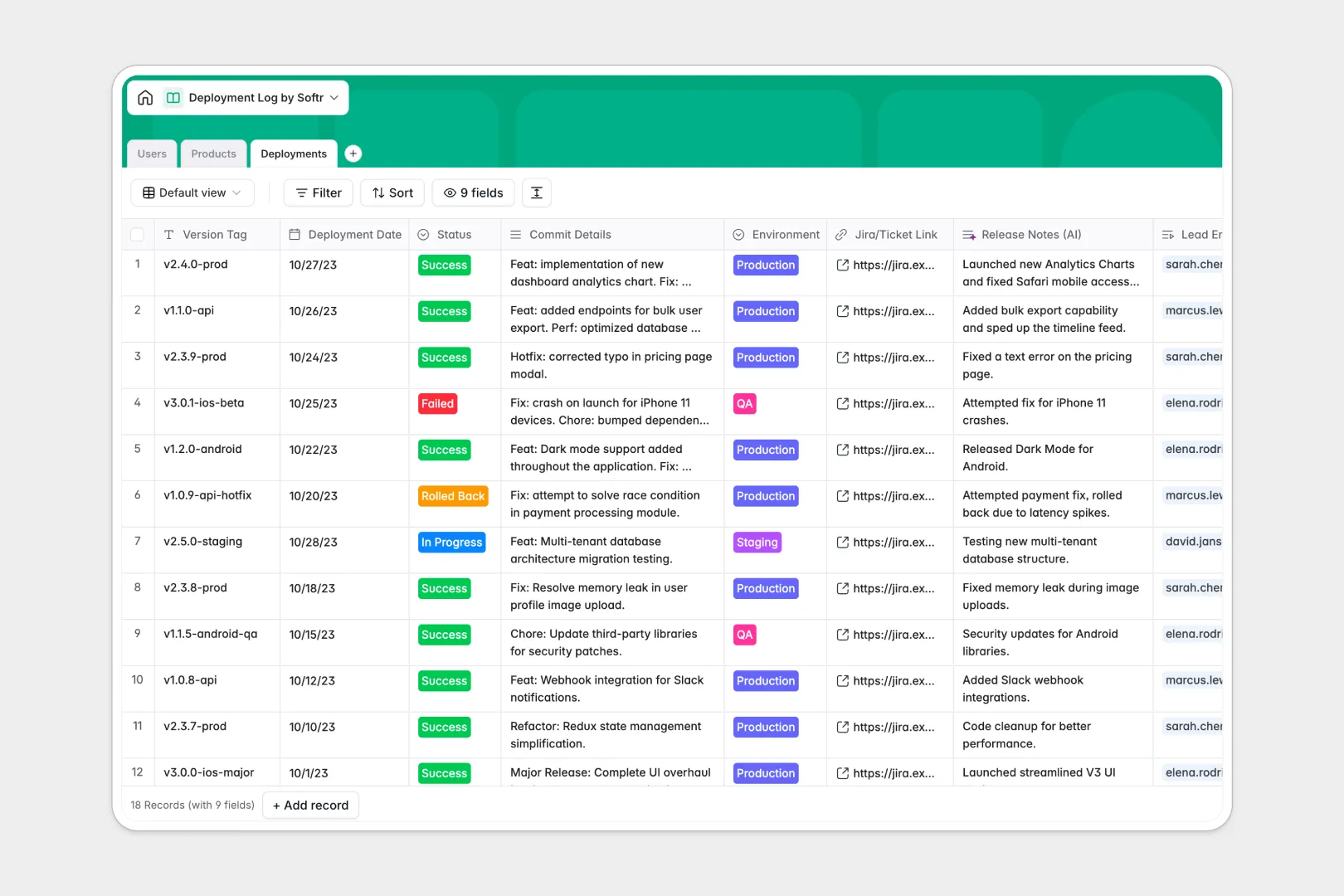
Your Deployment Log database at a glance
This template centralizes every continuous integration and rollout event in one place. It gives engineering teams complete visibility over what code was shipped, when, and by whom.
It works by seamlessly connecting your core data together. The Deployments table tracks every version tag and status, linking directly to the responsible Users and the specific Products being updated.
Built-in AI automatically researches tech stacks directly from repository URLs. It also translates technical commit histories into clear, stakeholder-ready release notes the moment a deployment is logged.
Why tracking deployments in spreadsheets breaks down
When teams rely on spreadsheets to manage release histories, version control quickly gets messy. Mixed status entries, manual copy-pasting, and disconnected links make auditing past rollouts nearly impossible.
What a structured database changes
In a structured system, columns enforce strict data formats so environments and dates stay consistent. You can connect a specific code deployment to an engineer without relying on fragile formulas.
This foundation of perfect, reliable data is exactly what Softr Databases are built to provide. Every record stays organized, making it easy to track rollback events and deployment success rates natively.
What you can do with this template
You can securely track release statuses across Production, Staging, and QA environments all at once. By linking external Jira tickets directly to the deployment log, debugging past product versions becomes effortless.
This setup also utilizes Database AI agents to automate tedious documentation work. As soon as you paste commit details, the system instantly formats them into user-friendly release notes for non-technical stakeholders.
-
Users
Manage team members responsible for deployments with roles and access info
-
Products
Catalog digital assets while using AI to detect and summarize tech stacks
-
Deployments
Track version releases using AI to generate release notes from commit logs
Who is this Deployment Log database for
This template provides immediate clarity for technical and product teams managing continuous delivery.
- DevOps Engineers: Standardize deployment records and effortlessly audit rollback histories across all environments.
- Product Managers: Track the exact release dates of new features without interrupting developers for status updates.
- Engineering Leads: Monitor overall team velocity and track the success rates of recent production pushes.
- CTOs: Maintain a high-level view of product evolution, tech stack changes, and continuous system stability.
How to take it further
It is exceptionally easy to tailor this template to your precise engineering workflows. You can quickly customize the deployment status dropdown to perfectly match your specific CI/CD pipeline stages.
Bring your existing release history into the system immediately via a simple CSV import. You can also use the API to automatically push new deployment logs straight from external tools like GitHub Actions or GitLab.
When your team is ready, you can seamlessly use a drag-and-drop interface builder to turn this database into an internal developer portal. This gives PMs a safe way to view release notes without touching the underlying raw data.
Using powerful users and permissions, you control exactly who can configure or approve a production rollout. Starting with a perfectly structured database makes building this secure, full-stack app incredibly fast.
-
1
-
2
-
3
-
4
Frequently asked questions
-
What is a deployment log database?
-
Why use a no-code database to build a deployment tracking tool?
-
How can AI help managing data for deployments?
-
Can I build an app with this deployment database?
-
Is this Deployment Log template free?
-
How is a deployment log database different from a spreadsheet?
Start building today. It's free!
Build and launch your first app in under 30 minutes.