


Overview
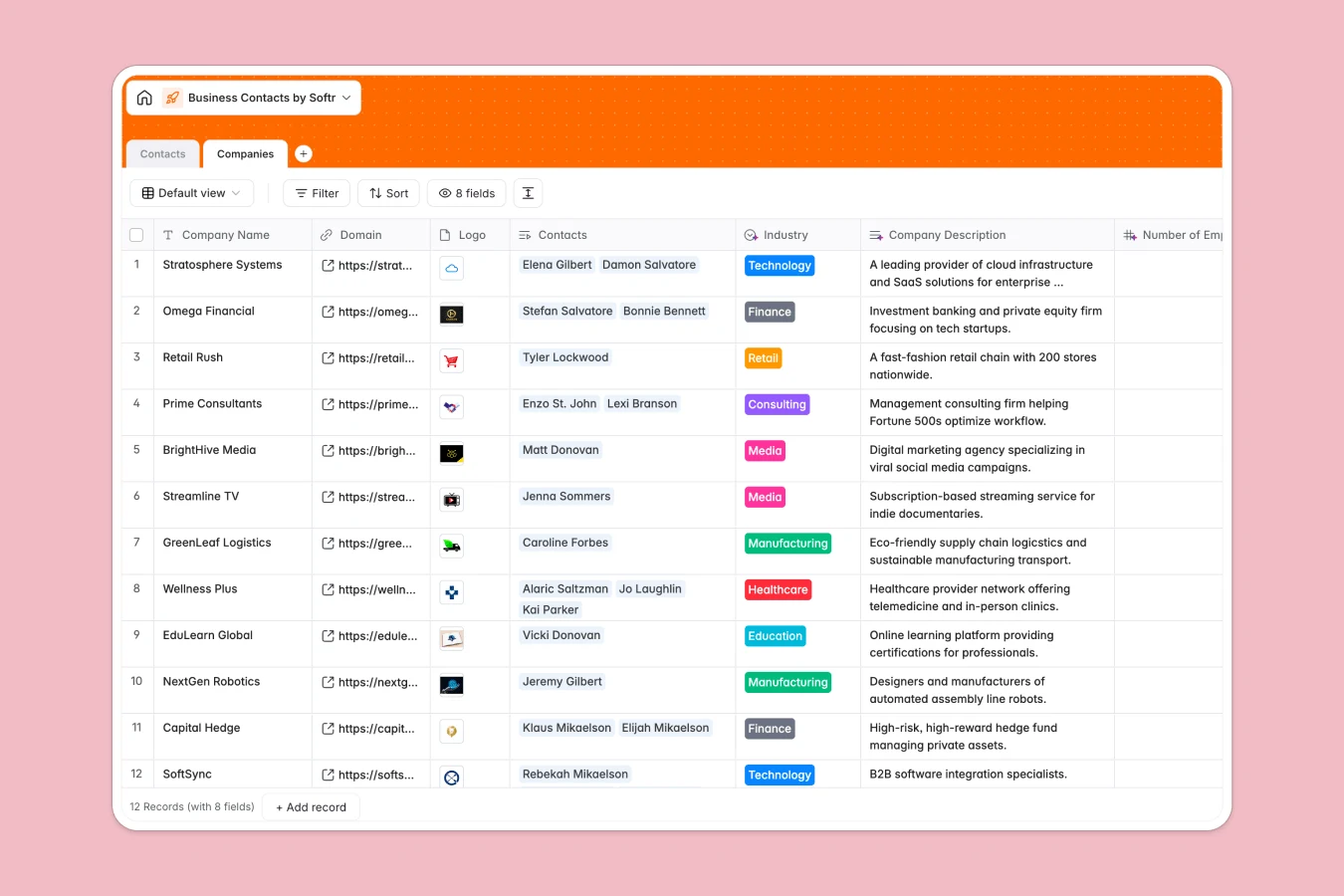
This business contacts database maintains a clear structure between your contacts and their companies through native table relationships. Instead of cramming everything into one flat spreadsheet with redundant company data repeated across rows, you get two connected tables: Contacts and Companies. Each contact links directly to its company, letting you view all contacts per company instantly and pull automatic insights like contact counts.
The Contacts table tracks full names, emails, job titles, phone numbers, LinkedIn profiles, relationship types (Prospect, Client, Partner, Vendor, Previous Client), meeting context, and notes. The Companies table stores company names, domains, logos, industry categories, and automatically pulls firmographic data through AI web search—company descriptions, employee counts, and headquarters countries—keeping your records current without manual research.
AI-powered fields suggest conversation icebreakers at the contact level and auto-categorize industries at the company level, turning static contact lists into actionable relationship intelligence.
Why choose a business contacts database over spreadsheets
Spreadsheets force you into awkward tradeoffs: either one bloated table with company details repeated for every contact, or multiple disconnected tables with fragile VLOOKUP formulas that break when data shifts. Neither scales well as your network grows.
The power of Softr Databases
Softr Databases enforce proper relational structure through native linked records between tables. Each contact connects directly to one company—no duplicate data, no fragile formulas. You can instantly count contacts per company through rollup fields, filter by industry through lookup connections, and maintain data integrity with enforced column types (emails stay emails, phone numbers stay formatted). This one table = one object principle keeps your database clean and app-ready, with API access when you need programmatic control.
Core features and functionality
Linked records between Contacts and Companies create true relationships: view all contacts at a company instantly, or see a contact's company details without duplication. Lookup fields pull company industry directly into contact records for easy filtering. Database AI agents run web searches to enrich company data automatically—descriptions, employee counts, headquarters—and suggest personalized icebreakers based on contact context, turning manual research into automated intelligence.
-
Companies
Manage business entities with AI-driven industry categorization and web search
-
Contacts
Store individual person records featuring AI-generated icebreaker suggestions
Who is this business contacts database for
This template helps anyone managing professional relationships maintain accurate, connected data:
- Sales teams: Track prospects and clients with full company context for better outreach.
- Consultants and freelancers: Organize client contacts with relationship history and meeting notes.
- Business development: Maintain partner and vendor contacts with clear company affiliations.
- Networking professionals: Keep conference connections organized with where-we-met context and follow-up details.
- Startup founders: Build your network database with enriched company intelligence for strategic partnerships.
How to take it further
Customize the database
As a native Softr Database, you can modify any field directly. Adjust the Contact Type select values to match your workflow (add "Investor" or "Advisor"), rename "Where we met" to "Source" or "Referral," or add custom fields like "Last Contact Date" or "Deal Stage." The Industry categories can expand beyond the eight defaults to match your sector focus.
Import your existing data
Bring in your current contact lists through CSV upload for bulk imports, or connect via API for automated syncing from your CRM or email tools. The relational structure means you can import contacts first, then companies, and establish the connections afterward—or import both simultaneously with proper ID mapping.
Build an app on top
Once your contact data is structured, build a full-stack app using Softr's interface builder to give your sales team or colleagues easy access. Create filtered views by contact type or industry, forms for adding new contacts on the go, and detail pages showing full company context. With users and permissions, each team member sees only their assigned contacts while managers view the complete network. The database's relational foundation makes building these interfaces straightforward—no complex queries needed.
-
1
-
2
-
3
-
4
Frequently asked questions
-
What is a business contacts database?
-
Why use a no-code database to build a business contacts system?
-
How can AI help managing data for business contacts?
-
Can I build an app with this business contacts database?
-
Is this business contacts database free?
-
How is a business contacts database different from spreadsheets?
Start building today. It's free!
Build and launch your first app in under 30 minutes.