


Overview
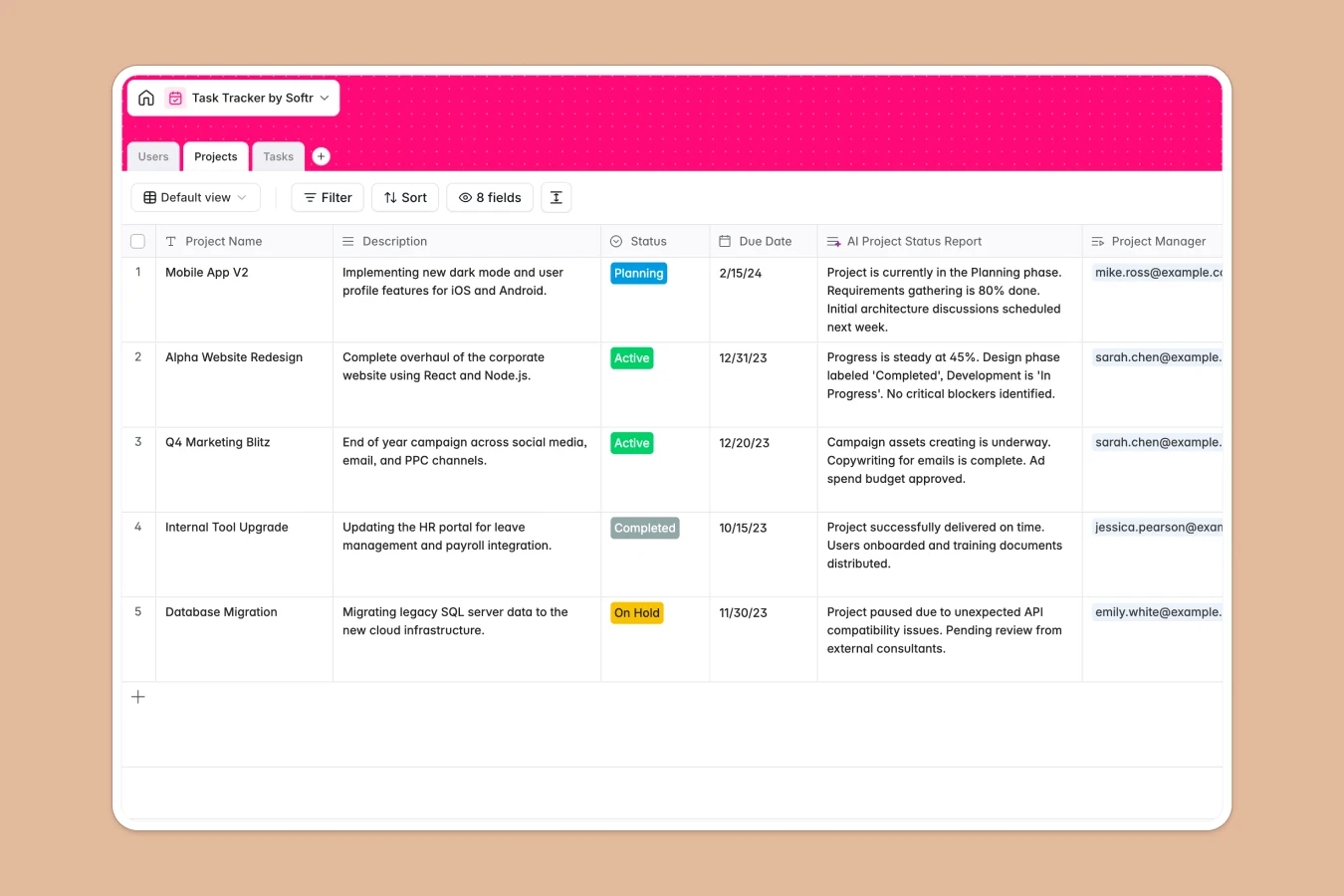
This task tracker database organizes all your work in three connected tables: Projects for high-level initiatives, Tasks for individual work items, and Users for team members. Each task connects to a project and assignee, making ownership and progress instantly visible without hunting through multiple sheets.
The Projects table tracks status (Planning, Active, On Hold, Completed), due dates, and project managers, with a lookup showing all related tasks at a glance. Tasks include status tracking (Todo, In Progress, Review, Done), progress notes, and due dates. Users link to their managed projects and assigned tasks, creating a complete view of responsibilities across the team.
AI features enhance this structure: the "AI Project Status Report" field automatically generates progress summaries for each project, while "AI Generated Name" creates concise task titles from descriptions—saving time and standardizing naming conventions across your workflow.
Why choose a task tracker database over Google Sheets
Google Sheets creates maintenance headaches: teams often duplicate sheets for different views because filtering and hiding columns becomes cumbersome, columns mix dates with comments and text, and VLOOKUPs break when someone moves a row. As work scales, navigation becomes painful.
The power of Softr Databases
Softr Databases enforce proper structure with typed columns—dates stay dates, select fields offer controlled choices, and formula fields calculate reliably. Instead of fragile VLOOKUPs, native relationships connect tasks to projects and users through linked records, lookups, and rollups. Following the principle of one table per object type, this database keeps projects, tasks, and users separate but connected—making your data app-ready and reliable.
Core features and functionality
Linked records connect tasks to projects and assignees automatically, so updating a task status instantly reflects in project overviews. Database AI agents generate project summaries and task names as records change, eliminating manual reporting. The structured approach means filtering by assignee, project, or status works consistently without breaking formulas or losing data—something Google Sheets struggles to maintain as teams grow.
-
Projects
Manage initiatives with statuses, dates, and AI-generated status reports
-
Users
Centralize team members with roles, emails, and linked project assignments
-
Tasks
Track work items using AI-generated names and status tracking workflows
Who is this task tracker database for
This template helps teams maintain clear task ownership and project visibility:
- Project managers: Track multiple projects with automatic status summaries and consolidated task views.
- Team leads: Assign work clearly, monitor progress across assignees, and identify bottlenecks fast.
- Operations teams: Maintain one source of truth for all work items without spreadsheet chaos.
- Small businesses: Coordinate cross-functional work with proper task relationships and due date tracking.
- Department heads: Oversee initiatives across teams with structured project and user connections.
How to take it further
Customize the database
Modify the Status select field in Tasks to match your workflow stages (e.g., "Backlog," "Blocked," "Ready for QA"). Add a Priority column with values like "Urgent," "High," "Medium," "Low," or create a Tags field for categorizing tasks by theme. Since this is a native Softr Database, editing fields, adding columns, and adjusting taxonomies is straightforward.
Import your existing data
Use CSV import to bulk upload existing tasks from spreadsheets—just map your columns to the database fields. For ongoing synchronization, connect via API to automatically pull tasks from other tools or push updates externally.
Build an app on top
Once your database is populated, build an interface for your team to manage work. Create different views: team members see their assigned tasks with filters by status and due date, project managers access full project dashboards with progress summaries, and admins control user assignments. Set permissions so each role sees relevant data—assignees can update task progress, but only managers edit project details.
Full-stack apps in Softr connect your database, interface, and workflows in one platform. Starting with this structured task tracker database makes building that interface easier—proper relationships between tasks, projects, and users mean your app works reliably from day one.
-
1
-
2
-
3
-
4
Frequently asked questions
-
What is a task tracker database?
-
Why use a no-code database to build a task tracking system?
-
How can AI help managing data for task tracking?
-
Can I build an app with a task tracker database?
-
Is this task tracker database free?
-
How is a task tracker database different from Google Sheets?
Start building today. It's free!
Build and launch your first app in under 30 minutes.